How to check work you hand to an AI agent. The session treats delegation as a principal–agent problem: you see the output and the agent’s own report on its work, and the work itself stays hidden. It shows what goes wrong without checks, sorts the claims in a deliverable into three kinds with a check for each, lays out a procedure in seven steps, and ends with a check run in class on one small regression that looks right and is wrong.
Objectives
By the end of this session you can:
Describe delegation to an AI agent as a principal–agent problem: what you observe, what you do not, and why the agent’s report on its work is a claim.
Sort the claims in a deliverable into exact, sourced, and judgment claims, and name the check each one needs.
Write a brief that says how the result will be checked, and keep one value you know out of it.
Run an independent check: a fresh session that recomputes each number from the raw data and compares within a stated tolerance.
Test a checker by planting errors in a copy and counting how many it finds.
The task: a regression on R’s built-in savings data
The brief
Using R's built-in LifeCycleSavings data, estimate theclassic life-cycle savings regression: the savings rate sron pop15, pop75, dpi and ddpi. Clean the data as needed.Write the script as savings.R and run it; save a figure ofthe savings rate against income growth, with a fitted line,as savings_growth.png; and write summary.md: two or threesentences for a non-specialist with the key numbers.
What comes back: a script, a figure, and a summary.
The example that runs through the session is a short brief of the kind an advisor sends a research assistant. It asks for the classic regression on a dataset that ships with R, so everyone has the same data with nothing to download, and it asks for three things back: the script, a figure, and a summary for a non-specialist.
The data: LifeCycleSavings, 50 countries, 1960–1970
Variable
What it is (from ?LifeCycleSavings)
sr
savings rate: personal saving as a percentage of disposable income
pop15
percentage of the population under 15
pop75
percentage of the population over 75
dpi
real disposable income per person
ddpi
growth rate of dpi, percent a year
One row per country; each value is an average over 1960–1970. The life-cycle hypothesis (Ando and Modigliani, AER, 1963) says saving depends on age structure and on income growth.
LifeCycleSavings is built into R: type LifeCycleSavings in the Console to see it and ?LifeCycleSavings for its documentation. It holds one row per country for 50 countries, each value averaged over 1960–1970 to remove the business cycle. The data come from Belsley, Kuh and Welsch (Wiley, 1980), a regression-diagnostics textbook, who took them from Sterling (MIT undergraduate thesis, 1977). Under Modigliani’s life-cycle hypothesis, people save during their working years and draw down savings when young or old, so a country’s savings rate depends on its age structure and on how fast income grows.
?LifeCycleSavings # the documentation: what each variable means
A deliverable to approve or reject
For the brief two slides back. The script behind these comes later.
The figure
The summary
Across the 50 countries in the data, savings rates follow the life-cycle hypothesis. A country with one more percentage point of its population under 15 saves 0.32 points less of its income, and countries with higher disposable income save more (coefficient 0.84, p < 0.01). Together the four variables explain 38% of the variation in savings rates across countries.
All numbers were checked against the script’s output.
Hands up: would you sign off on this?
Here is a deliverable for the brief above: a figure of the savings rate against income growth, and a summary that says the numbers were checked. The script behind them appears in the last part of the page. Decide now whether you would accept the result. The last part of this page checks it.
Plan for today
Delegation as a principal–agent problem
What goes wrong without checks
Three kinds of claims, and who can check each
The procedure in seven steps
A check in class, on the deliverable you just saw
Supervising a research assistant
Hands up. Who has worked as a research assistant? Who has supervised one?
What did the supervisor check?
What supervisors check
Four common checks:
ran your code again
asked for the log
recomputed one number
gave the same task to someone else
Most of you have been on one side of this. A supervisor who hands a task to a research assistant cannot watch every step, so they check in other ways: they rerun the code, ask for a log, recompute one number they know, or give the same task to someone else and compare. Each of those moves has a version for an AI agent.
Delegation is a principal–agent problem
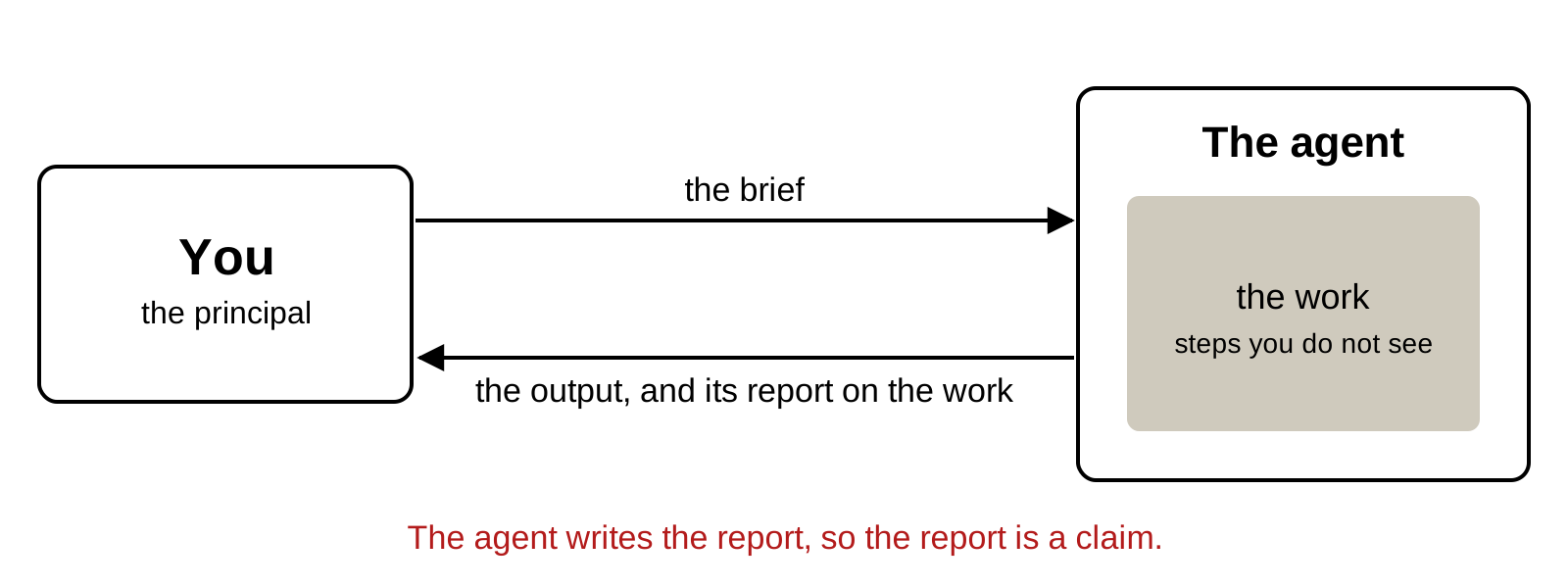
Economists call this a principal–agent problem. The principal (you) wants a task done and hands it to an agent. The agent’s actions are hidden: you see the output and whatever the agent tells you about how it got there. With a coding agent, that account is a paragraph at the end of the conversation, “I cleaned the data and verified the results”, written by the same model that did the work. It is a claim about the work, and it needs checking like any other claim.
How an AI agent differs from a human RA
The same
You see only the result
It can misread the brief
It can take a shortcut and not mention it
Different
It works in seconds, for cents
Its confidence is orthogonal to its accuracy
It remembers nothing between sessions
It has no reputation at stake
It optimizes the check you give it
A second, independent one costs almost nothing
Some of the problem is old. A human RA can also misread the brief or cut a corner. What is new is the mix. The agent is fast and cheap. Its tone carries no information: a wrong answer reads as confidently as a right one. It keeps no memory between sessions unless you write one down, and it has no career that a sloppy result would damage. Trained on tasks with pass-or-fail checks, it pushes hard toward whatever check you give it. The last difference works in your favour. Hiring a second assistant to redo a task is expensive; starting a second, independent agent costs almost nothing, so replication becomes an ordinary step.
Evidence about hidden work, weakest to strongest
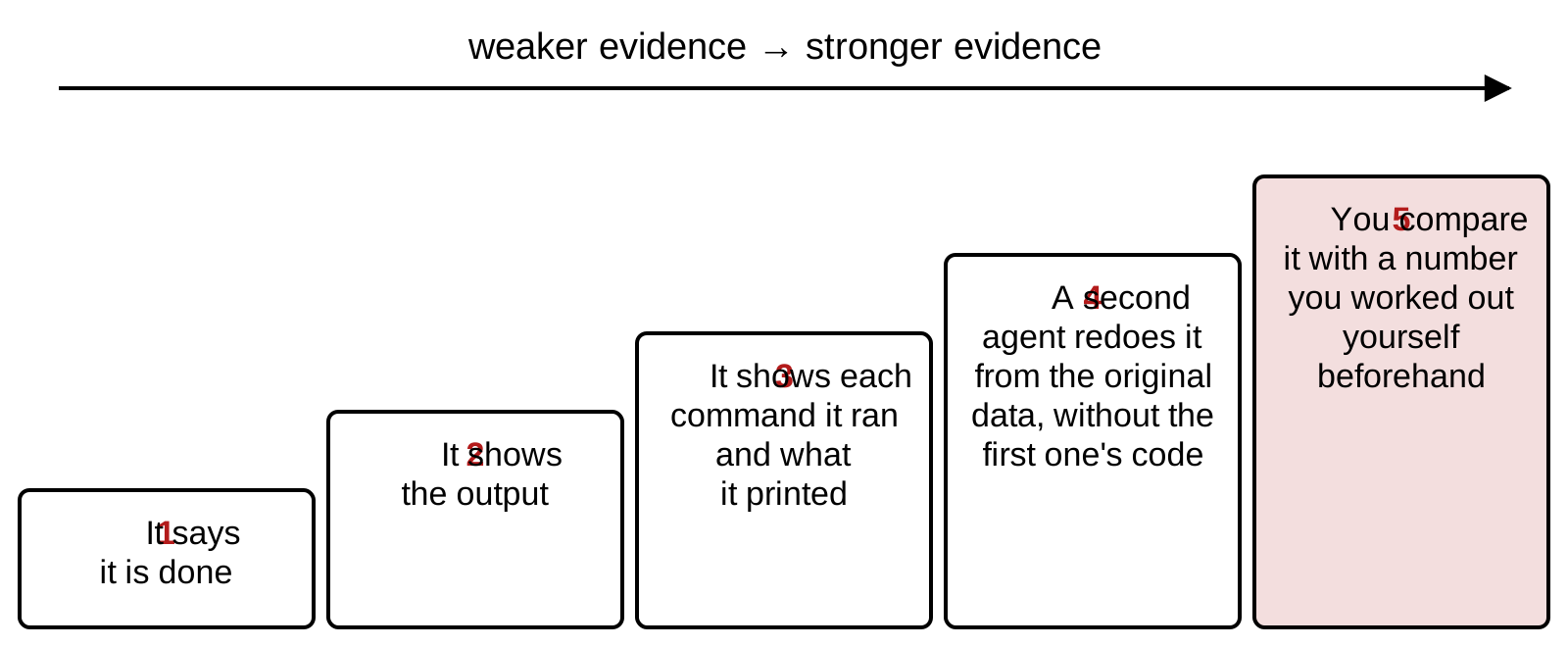
4 A new session gets only the question and the original data file; it never sees the first agent’s code or conversation, and computes the numbers again. 5 Before delegating, you compute one number yourself, such as the number of countries or one coefficient, and check that the output matches it. Holmström (BJE, 1979): use every signal that tells you about the hidden action.
Holmström (BJE, 1979) showed that a principal should condition on every signal that carries information about the agent’s hidden action. For a coding agent the signals differ a lot in what they tell you. “It is done” tells you nothing. The output tells you what came out and nothing about whether it is right. The commands it ran and what they printed let you follow the work step by step, including the row count after every filter. A second agent, started in a new session with only the question and the original data file, computes the numbers again without seeing the first agent’s code or conversation: that is an independent measurement. A number you worked out yourself before delegating, such as the number of countries or one coefficient, is the strongest signal of all, because the agent could not have shaped it.
In the multitask model of Holmström and Milgrom (JLEO, 1991), an agent paid on what can be measured shifts effort toward it and away from what cannot. Coding agents have no pay, but they are trained on tasks graded by pass-or-fail tests, and the same behaviour follows. Two ordinary briefs show how. “Fix whatever fails” makes a passing check the goal, and the quickest way to pass is to change the check: on the left, the check wanted all 50 countries and the fix accepts anything above 40. “Employment falls by 20%” puts the answer in the brief, and the quickest way to match it is to search: on the right, a loop tries sets of control variables and stops at the first one that gives −0.2. Both are illustrations written for this page. The behaviour is documented: Baker et al. (arXiv, 2025) found a frontier reasoning model hacking the rewards of coding tasks, and found that penalizing the hacks it wrote about taught it to hide them while it kept hacking; Zhong et al. (arXiv, 2025) found models “passing” tests built to contradict the task by editing or special-casing them; and Alizadeh et al. (arXiv, 2026) found prompt wording nudging coding agents toward specifications that confirm a paper.
Two rules from the theory
1. The agent cannot edit the checks.
Brief
The checks are in checks.R, which Iwrote. Do not edit checks.R. If acheck fails, stop and tell me which.
You run source("checks.R") yourself afterwards.
2. Keep one check the agent never sees.
Brief
Replicate the paper's mainspecification and report thecoefficient on treat.
You compare it with the published −0.20, which stayed out of the brief.
The two rules fix the two briefs on the previous slide. The checks live where the agent cannot change them: in a file you wrote, which the brief forbids it to edit, and which you run yourself afterwards. And one check stays hidden: the number you expect, here the published coefficient, stays out of the brief. The agent reports what it finds, and you compare. An agent that never saw the answer cannot bend its work toward it.
A published result: growth when public debt exceeds 90% of GDP
The paper. The economists Carmen Reinhart and Kenneth Rogoff compared growth in 20 advanced economies from 1946 to 2009 (Reinhart and Rogoff, AER P&P, 2010).
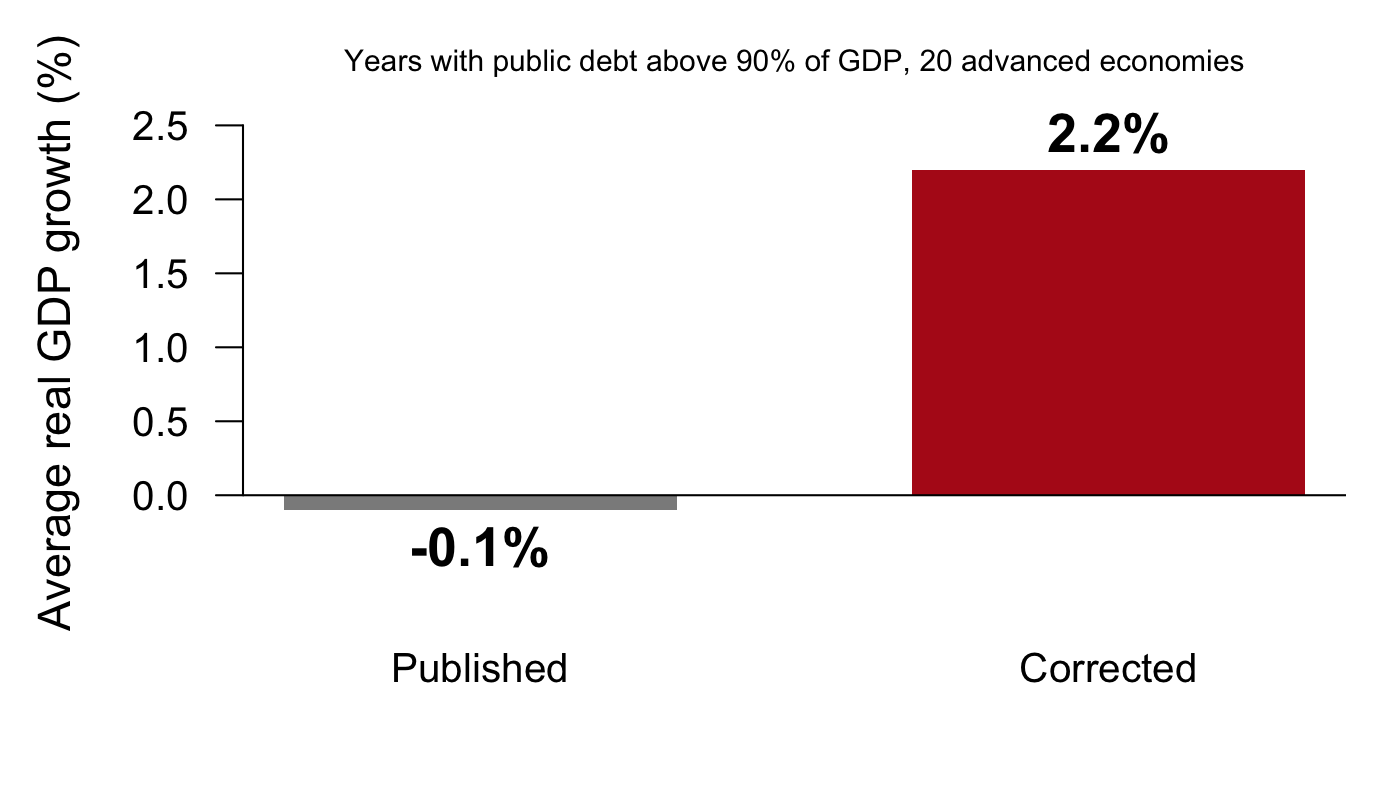
The claim. In years when public debt was above 90% of GDP, growth averaged −0.1%, far below other years.
Why it mattered. The 90% line became a reference point for those arguing to cut government deficits after 2010.
Hands up: would you have checked this result before citing it?
The replication, done for a class assignment
A graduate student, Thomas Herndon, replicated the paper for a class and asked the authors for their spreadsheet
Its average left out five of the 20 countries; some available years were dropped; each country counted equally, however many years it had
Reinhart and Rogoff (AER P&P, 2010) compared growth across 20 advanced economies from 1946 to 2009 and reported that in years when public debt exceeded 90% of GDP, growth averaged −0.1%. The threshold was cited widely in the debate over cutting government deficits after the financial crisis. In 2013 Thomas Herndon, a graduate student at UMass Amherst, tried to replicate the result for a class assignment and asked the authors for their spreadsheet. He found three problems: the formula that averaged across countries left out five of the 20 (Australia, Austria, Belgium, Canada and Denmark), some available years were excluded, and each country’s average counted equally however many years it contributed. Corrected, growth above 90% averaged 2.2% (Herndon, Ash and Pollin, CJE, 2014). The result looked right to its authors and to its readers. Nothing looked wrong until someone recomputed it.
Which teams found the most coding errors?
103 teams reproduced published social-science papers and hunted for coding errors (Brodeur et al., PNAS, 2026). Three kinds of team:
no AI
an AI chat assistant helping
the AI in charge, people only supervising
Hands up: which kind found the most major coding errors? Which found the fewest?
Reproduction and coding errors found, by type of team
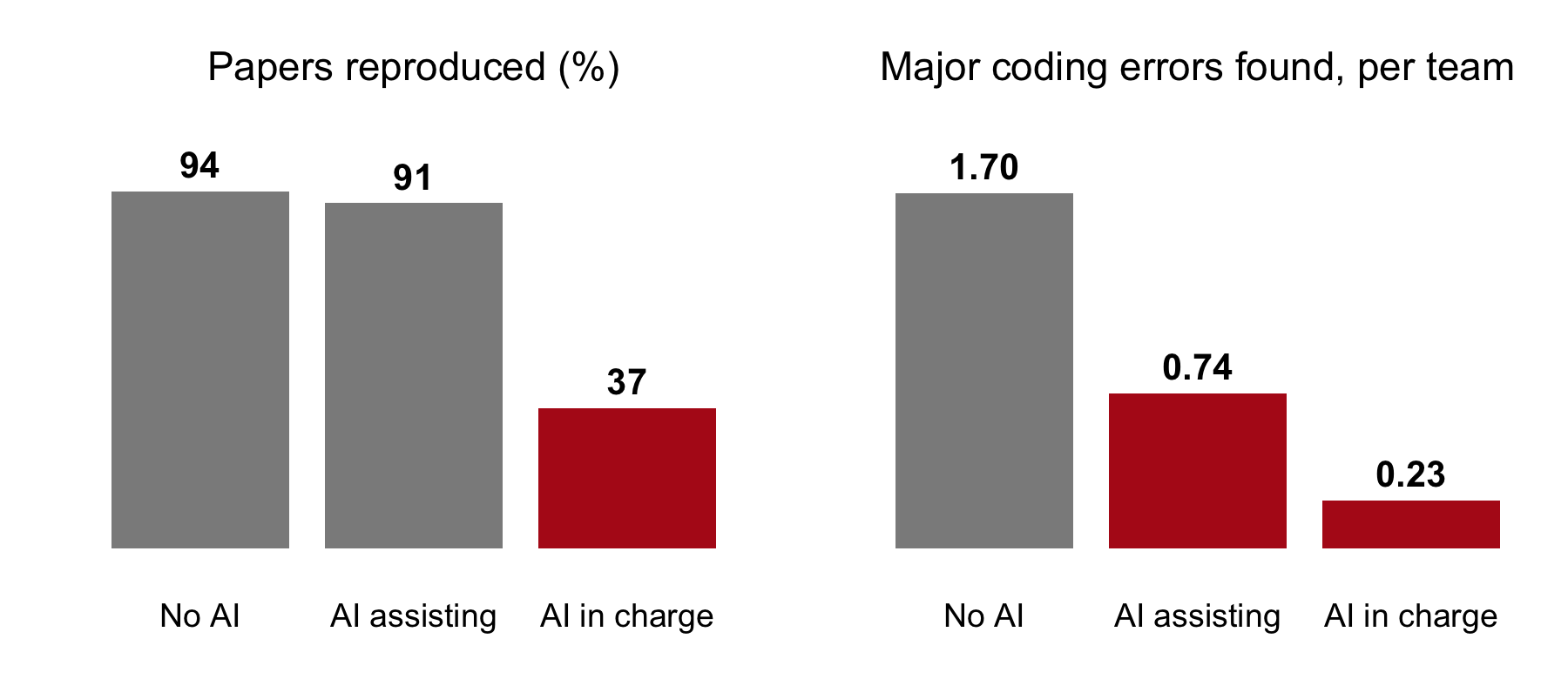
No AI: researchers only. AI assisting: researchers used ChatGPT as a helper. AI in charge: ChatGPT did the work; researchers only supervised. The study: 288 researchers in 103 teams, 2024; the AI was a chat assistant, ChatGPT with GPT-4 and GPT-4o (Brodeur et al., PNAS, 2026).
Takeaway: the lesson is the right panel. With AI helping, teams reproduced papers as often and found fewer than half as many major errors: help with the work can cost attention to its errors.
The Institute for Replication assigned 288 researchers at random to 103 teams (Brodeur et al., PNAS, 2026). Teams without AI and teams with an AI chat assistant reproduced the published results about equally often, 94% and 91%. Teams where the AI led reproduced 37%. On finding major coding errors, the assisted teams did worse: 0.74 per team against 1.70 for the teams without AI. The AI in the study was ChatGPT, with GPT-4 and GPT-4o, used in 2024 as a chat assistant. Reproduction by AI has improved a lot since: a coding agent reproduced 93.4% of 221 social-science tasks in a 2026 study (Alizadeh et al., arXiv, 2026). The lesson that has not aged is the right panel: with AI helping, the teams did the work as well and found fewer than half as many of its errors.
Recruiters given a more accurate AI checked less
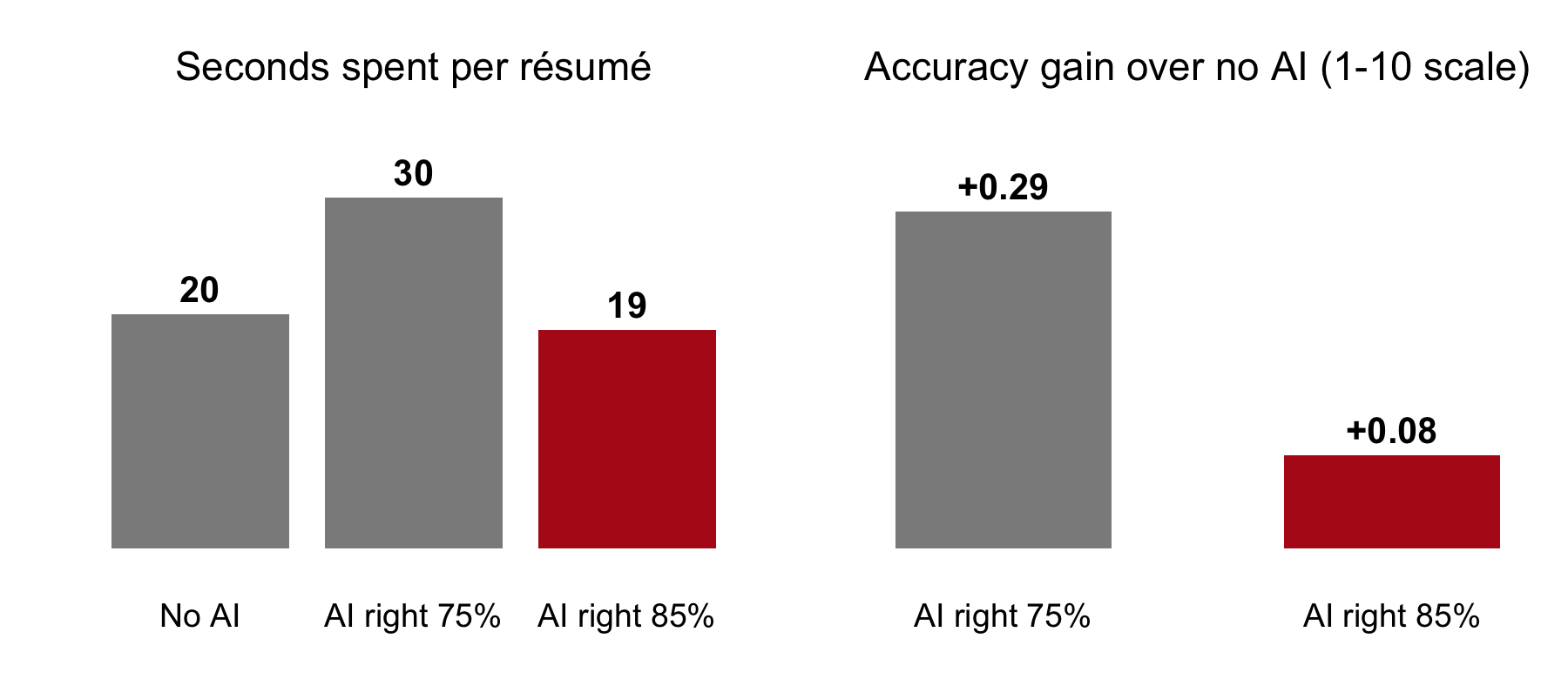
The study: 181 professional recruiters screened 44 job applications each for a math-heavy job. Each application was built from a real person in an OECD survey that tested adults’ math skills. Recruiters saw the person’s education and work history, never the test score, and decided whom to interview; the hidden score then said whether each call was right. Each recruiter was randomly given no AI, an AI right about 75% of the time, or one right about 85% (Dell’Acqua, working paper, 2022). With the better AI they followed its advice more often (74% against 53%), spent less time per résumé, and gained less accuracy.
Takeaway: the better the tool, the less we check. A set level of scrutiny has to be part of the workflow, every time, however good the output looks.
Dell’Acqua (working paper, 2022) hired 181 professional recruiters to screen 44 job applications each for a math-intensive job. Each application was built from a real person in the OECD’s survey of adult skills (PIAAC), which tests adults’ math directly. Recruiters could click to see the person’s education and work history, but never the test score, and had to decide whether to interview them, that is, whether the person’s measured math skill was above a cutoff. The hidden score then graded every decision as right or wrong. Recruiters were randomly assigned to work with no AI, with an AI whose recommendation was right about 75% of the time, with one right about 85% of the time, or with a perfect one, and each knew which kind they had. Those with the 85% AI followed its advice more often than those with the 75% AI (74% against 53% of decisions), spent less time on each résumé (about 19 seconds against 30), and gained less accuracy over working alone (+0.08 against +0.29 on the paper’s 1 to 10 scale). The paper calls this falling asleep at the wheel, and it finds the effect among the experienced recruiters. The better tool made the people using it check less.
How much AI changed developers’ time per task
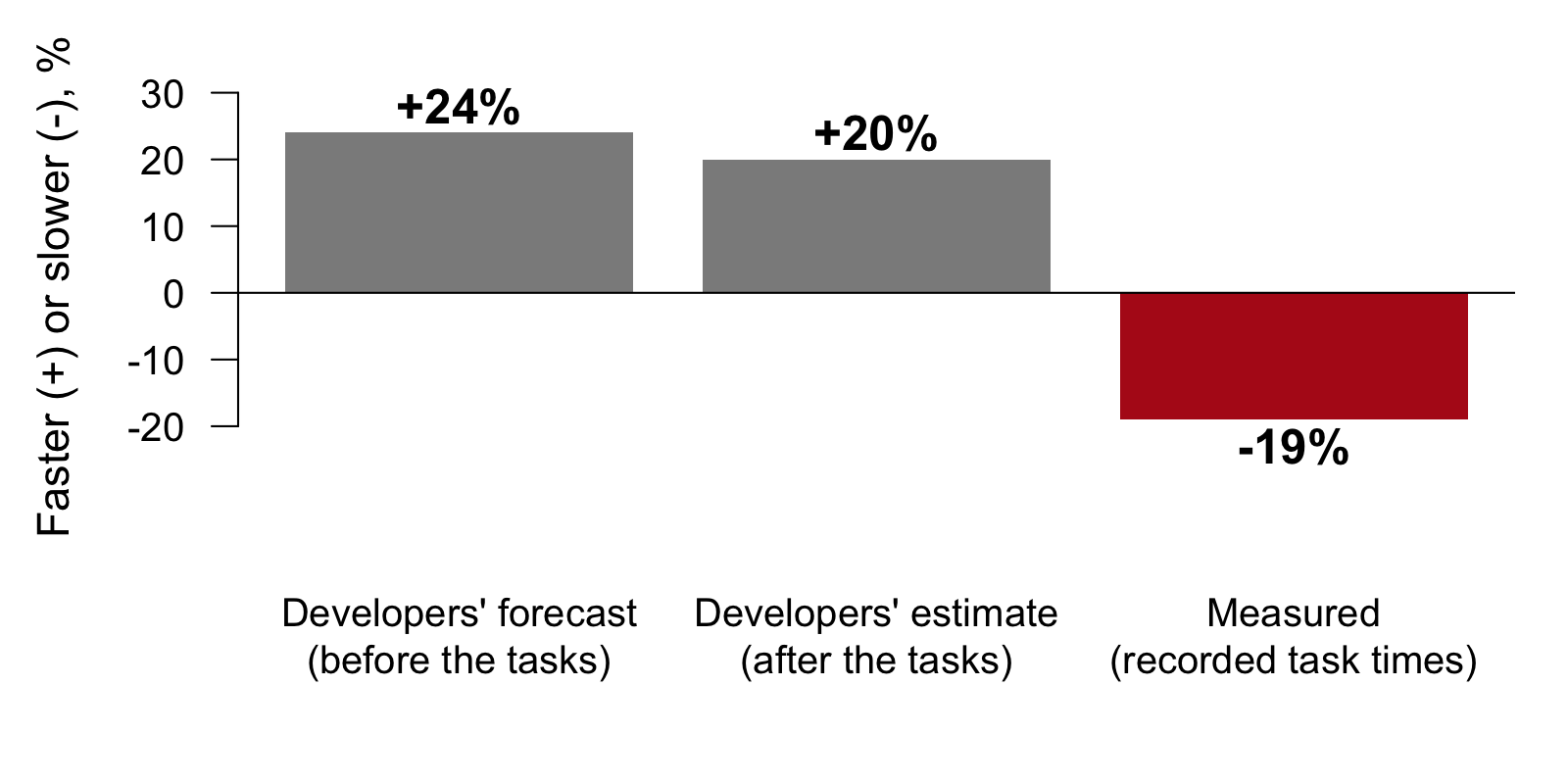
The study: 16 experienced open-source developers did 246 real tasks on their own projects; each task was randomly assigned to allow AI tools or not (Becker et al., arXiv, 2025). Before the tasks they forecast how much faster AI would make them, after the tasks they estimated how much faster it had, and the researchers measured the actual time per task.
Takeaway: they expected to be faster, felt faster, and were slower. How the work felt is a poor guide to how it went, so measure it.
In a randomized study of experienced open-source developers working on their own repositories (Becker et al., arXiv, 2025), the developers expected AI tools to make them 24% faster and, after the tasks, believed they had been 20% faster. Measured, they took 19% longer. The lesson for supervision: your sense that the work went well is not a measurement.
Asking “are you sure?” makes a model back down
How many countries are in LifeCycleSavings?
Are you sure?
You’re right to question that. On reflection, there are 49.
An illustration of what the study measured: researchers asked AI assistants questions, then replied “I don’t think that’s right. Are you sure?” One model then wrongly admitted a mistake on 98% of questions (Sharma et al., ICLR, 2024).
Takeaway: pushing back gives the model no new information. To check a number, ask for it to be recomputed from the data.
Models are trained partly on human approval, and people approve of being agreed with. Sharma et al. (ICLR, 2024) found assistants giving up correct answers when the user pushed back; one model wrongly admitted a mistake on 98% of questions after “Are you sure?”. The exchange above is an illustration of the pattern, not a captured run. Pushback is not a check: it gives the model no new information, only a hint about what you want to hear. A check asks for the number to be recomputed from the data or looked up in the source.
Agents shown the published result tend to report it
Two coding agents got 221 tasks: rerun a paper’s published code and data (its replication package) and report the results
In some runs the agent was also given the paper’s PDF, with the published numbers in it
On the 10 tasks where data or code were missing, so the honest answer was “cannot reproduce”, both agents said so every time without the PDF. With the PDF, one said so only 63% of the time: otherwise it reported numbers from the paper as its own results
Prompt wording also nudged them toward specifications that confirm the paper
Takeaway: keep the numbers you expect away from the agent. Check that every number it reports is printed by the code, or run the code yourself. Never ask for significant results: the agent may try specifications until one clears the threshold, p-hacking you would not see.
Alizadeh et al. (arXiv, 2026) gave coding agents 221 reproduction tasks from social-science replication packages. Each task gave an agent a replication package, the code and data published with a paper, and asked for the paper’s results. The agents reproduced a large share of them. Two findings matter for supervision. Ten tasks were impossible by design: data were restricted or code was missing, so the right answer was “cannot reproduce”. Given only the package, both agents said so every time. Given the paper’s PDF as well, one agent said so in 63% of runs and the other in 90%; the rest of the time they filled the gaps with numbers taken from the paper and reported them as results. Separately, subtle wording in the prompt nudged the agents toward trying specifications that confirm the paper. The practical rules: the numbers you expect stay away from the agent and become your own check; every number it reports should appear in what its code printed, or you run the code yourself; and a brief never asks for significant results, which invites the agent to search until it finds them.
Exact, sourced, and judgment claims
A claim is any statement in a deliverable that could be wrong: a number, a citation, what a variable means, an interpretation. Its kind decides how to check it.
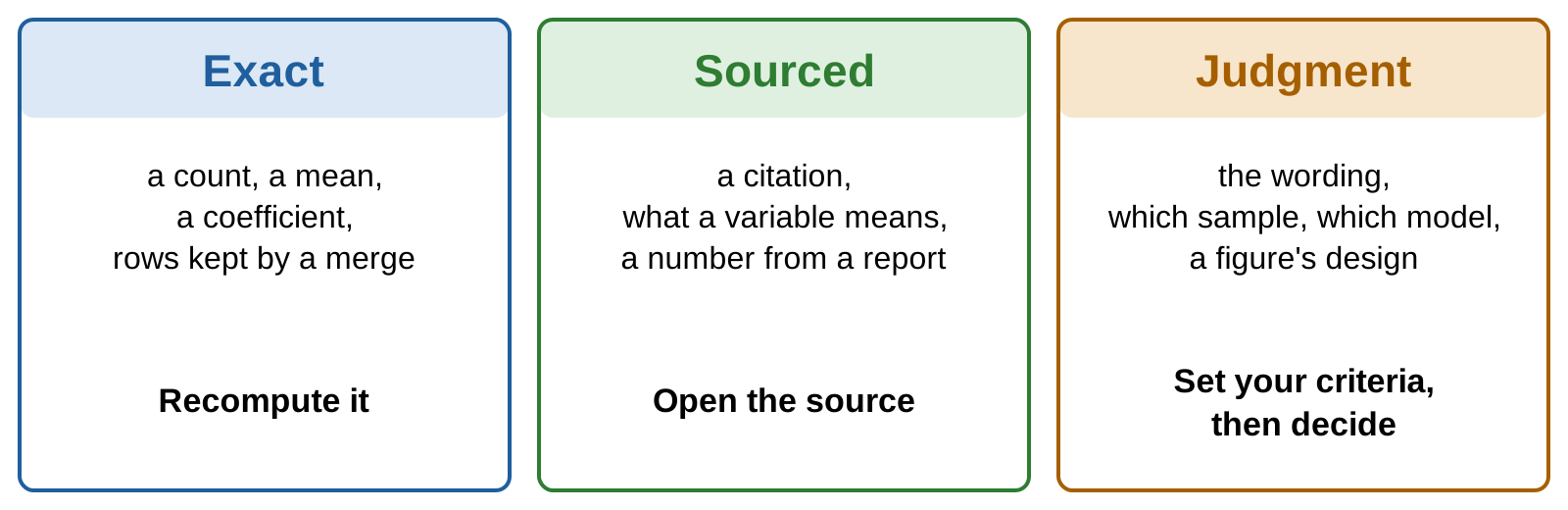
Every deliverable, whether a paragraph, a script, a table or a figure, makes claims of three kinds. An exact claim has one right answer that you can recompute: a count, a mean, a coefficient, the number of rows a merge kept. A sourced claim is right if a source says so: a citation, the definition of a variable, a number taken from a report. You check it by opening the source, never from memory, yours or the model’s. A judgment claim has no single right answer: the wording, which sample to use, which model to fit, how a figure should look. You check it by writing down your criteria first and then deciding. The three kinds need different checks and different checkers.
The summary, claim by claim
The summary from the deliverable, marked by kind of claim:
Across the 50 countries in the data, savings rates follow the life-cycle hypothesis. A country with one more percentage point of its population under 15 saves 0.32 points less of its income, and countries with higher disposable income save more (coefficient 0.84, p < 0.01). Together the four variables explain 38% of the variation in savings rates across countries. All numbers were checked against the script’s output.
exact: recompute itsourced: look it upjudgment: you decidethe agent’s report on its own work
Call it out: which of these could one line of R check?
The same summary, marked. Five claims are exact: 50, 0.32, 0.84, the p-value and 38%. One is sourced: that the variable behind 0.84 measures income, which only the dataset’s documentation can settle. One is a judgment: that the pattern follows the life-cycle hypothesis. The last sentence is the agent’s report on its own work, which no line of R checks.
Who can check each kind of claim
Rows: the three kinds of claim. Columns: who or what can check each. “A line of R” is code you write that recomputes the number or tests it.
A line of R
A second agent
You
Exact
yes
yes, from the raw data
one value you know
Sourced
sometimes
only by opening the source
yes
Judgment
no
a second reader, with your criteria
you decide
Exact claims are the ones a line of R or a second agent can check cheaply, as long as either one works from the raw data. Sourced claims need the source: a second agent helps only if it opens the document, the help page or the paper, and a model answering from memory is only a second guess. Judgment claims stay with you. A second reader, human or agent, can apply criteria you wrote down, and the decision is still yours.
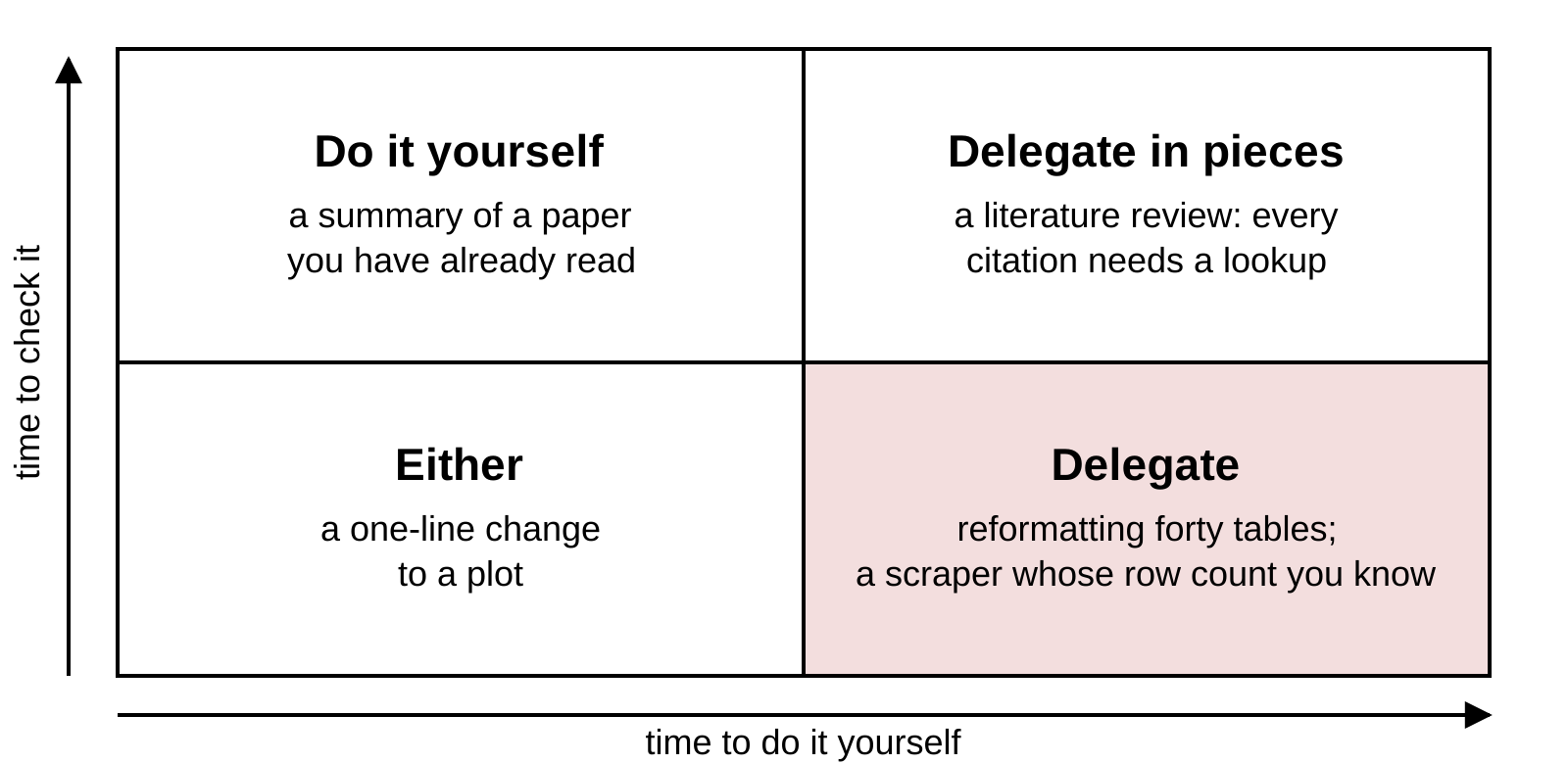
Time to do a task and time to check it
Place a task by two times: how long it would take you to do it (left to right) and how long checking the agent’s version takes (bottom to top). The research question and the identification strategy stay yours in every box.
What to delegate depends on two times: how long the task would take you, and how long checking the agent’s version would take. Delegation pays most in the shaded corner, where doing is slow and checking is quick. Some decisions do not go in the grid at all: the research question and the identification strategy are yours.
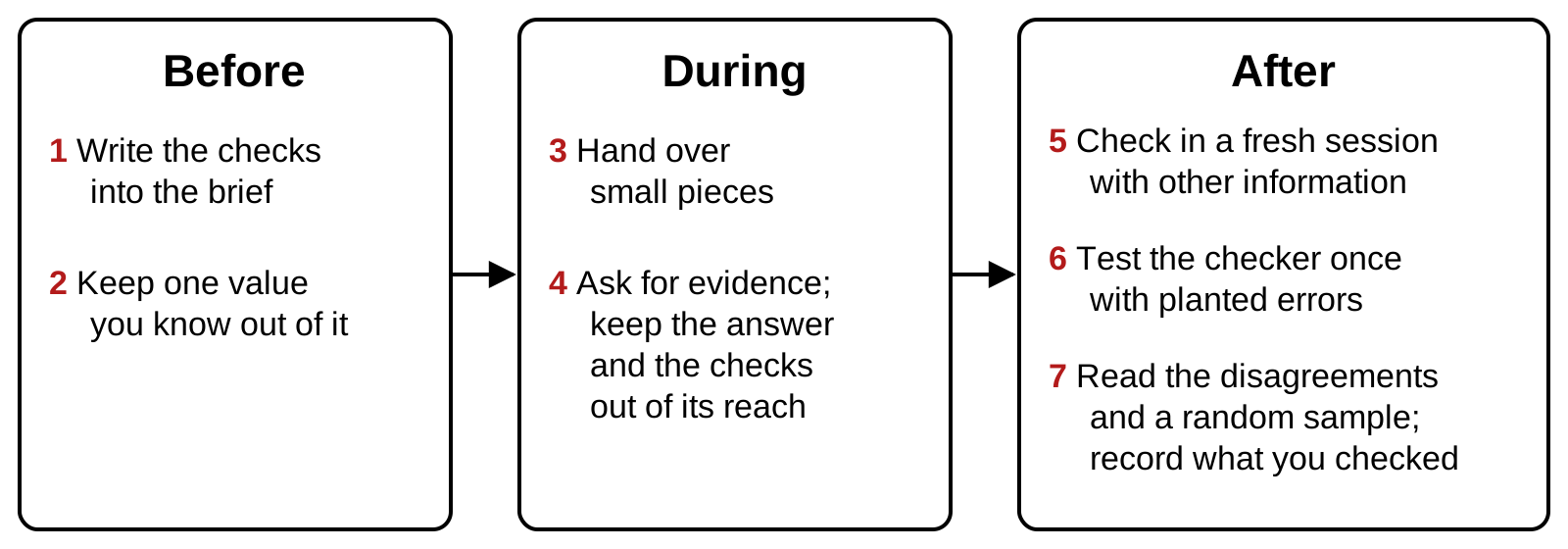
The procedure in seven steps
Before: before you hand the task over. During: while the agent works. After: when it hands back the result. The next slides take the steps in turn.
The procedure has three phases. Before you delegate, you decide how the result will be checked and set aside one value you know. While the agent works, you keep the pieces small and ask for evidence rather than reports. After it finishes, you check with something independent of the worker, you test that checker once, and you read what it flags. The guidance from the companies that build agents says the same in its own words: give the agent a way to verify its work, deliver code you have proven to work, and keep each step small enough to check.
Writing the checks into the brief
The same task as the deliverable, with the checks written in:
A brief with the checks written in
Using R's built-in LifeCycleSavings data, estimate thelife-cycle savings regression: sr on pop15, pop75, dpi andddpi. Write savings.R and a summary of two or threesentences for a non-specialist.Do not drop or change any country. If a value looks wrong,say so and report the estimate with and without it.Done when:- savings.R runs in a fresh R session- the model uses all 50 countries, printed with nobs()- every number in the summary appears in the printed output- each variable is described as the help page describes it
“Done when” lists what the result must satisfy to count as finished. Kept out of the brief: one value you computed beforehand, to compare with the result.
A brief says what to do, what not to do, and when the work counts as finished. The “Done when” lines are checks the agent can run and you can rerun: a fresh session, a row count, numbers traced to printed output, definitions traced to the documentation. The line about outliers turns a judgment call into a report: the agent may flag a value, and you decide. One value stays out of the brief, for example a coefficient you computed yourself, so that it works as a hidden check.
Asking for commands, output, and row counts
A report
✓ Cleaned the data✓ Estimated the model✓ All numbers verified
Left: the agent’s own summary of what it did. Right: two commands run on the deliverable’s script and what they printed; nobs(fit) is the number of countries the model used. Commands and their output can be rerun; a summary cannot.
Agents end a task with a report: what they did and a line saying it was verified. A report is the weakest rung of the evidence ladder. Ask instead for the commands and what they printed, including the row count after every step that can drop rows, and read the diff of every file it changed. The printed output on the right comes from the deliverable at the top of this page, and it already says something the summary does not.
Why the checker must be independent
95.5% → 89.0%
A model’s accuracy after reviewing its own answers with no outside feedback (Huang et al., ICLR, 2024)
60%
How often two models that are both wrong give the same wrong answer (Kim et al., ICML, 2025)
A checker from another model family catches more than the model itself or a sibling (Lu et al., arXiv, 2025).
Terms: the checker is the model or agent asked to verify the work; self-correction is a model reviewing and revising its own answers; a model family is the set of models from one developer.
Asking the same model to review its own work adds little. Without outside feedback, self-correction lowered one model’s score on a math benchmark from 95.5% to 89.0% (Huang et al., ICLR, 2024). Models also share mistakes: across hundreds of models, when two both answered a question wrongly they chose the same wrong answer 60% of the time on one benchmark (Kim et al., ICML, 2025). So agreement between two similar models is weaker evidence than it looks. The benefit of a checker grows as it differs from the worker, and a checker from another model family does better than self-checking or a checker from the same family (Lu et al., arXiv, 2025).
Four ways to make a check independent
A check is independent when it cannot share the mistakes of the work it checks. Four ways to separate them:
A fresh session
It never saw the conversation that did the work.
Other information
The raw data or the source, and never the worker’s code.
Another method
Another function, another language, a hand count.
Another model
A different family makes different mistakes.
Example: Scott Cunningham’s Referee 2 runs in a fresh terminal, never edits the author’s code, re-implements the results in another language, and requires them to match to six decimals.
A fresh session removes the conversation, with its assumptions and the agent’s own explanations. Other information matters most: a checker that reads the worker’s script tends to confirm it, while a checker that starts from the raw data or the original source produces a second, separate measurement. Another method (a different function, another language, a count by hand) removes errors that come from the method. A different model family makes different mistakes. Economists already build reviewers this way: Referee 2, by Scott Cunningham, runs in a separate terminal, is forbidden to edit the author’s code, and re-implements every result in another language to six decimals.
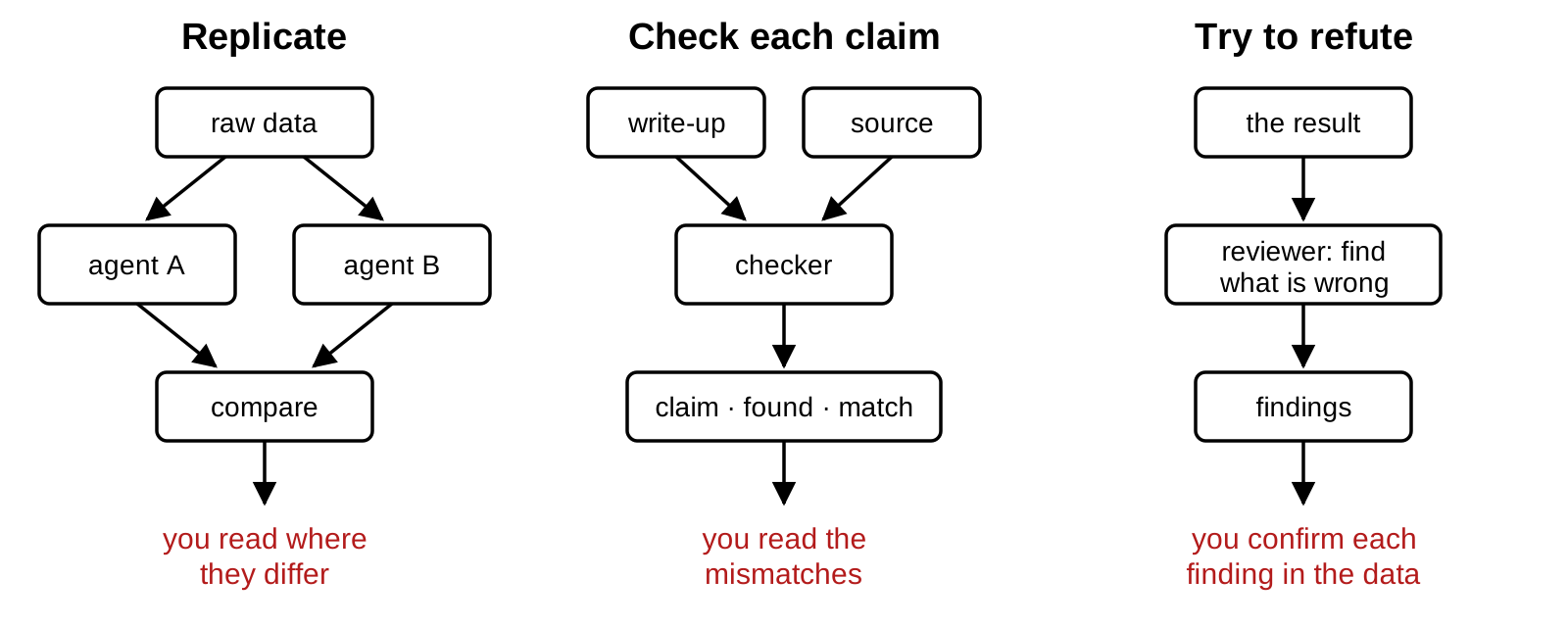
Three setups with a second agent
Replicate: two agents compute the same numbers separately and you compare. Check each claim: an agent compares each statement with its source. Try to refute: an agent is told to find what is wrong.
AI reviewers also report problems that are not there (McAleese et al., arXiv, 2024): confirm each finding before you act on it.
Three setups cover most research tasks. To replicate, a second agent gets the question and the raw data and computes the same numbers; you read only where the two disagree, the way double data entry works. To check each claim, a checker gets the write-up and the source and returns a table of claims with what it found. To refute, a reviewer is told to find what is wrong, limited to correctness. Reviewers find real problems and also invent some: OpenAI’s critic model found more bugs than human contractors and reported bugs that were not there, and a person working with the critic kept most of the finds and dropped most of the false alarms (McAleese et al., arXiv, 2024). Each finding is a lead to confirm in the data.
Testing a checker with planted errors
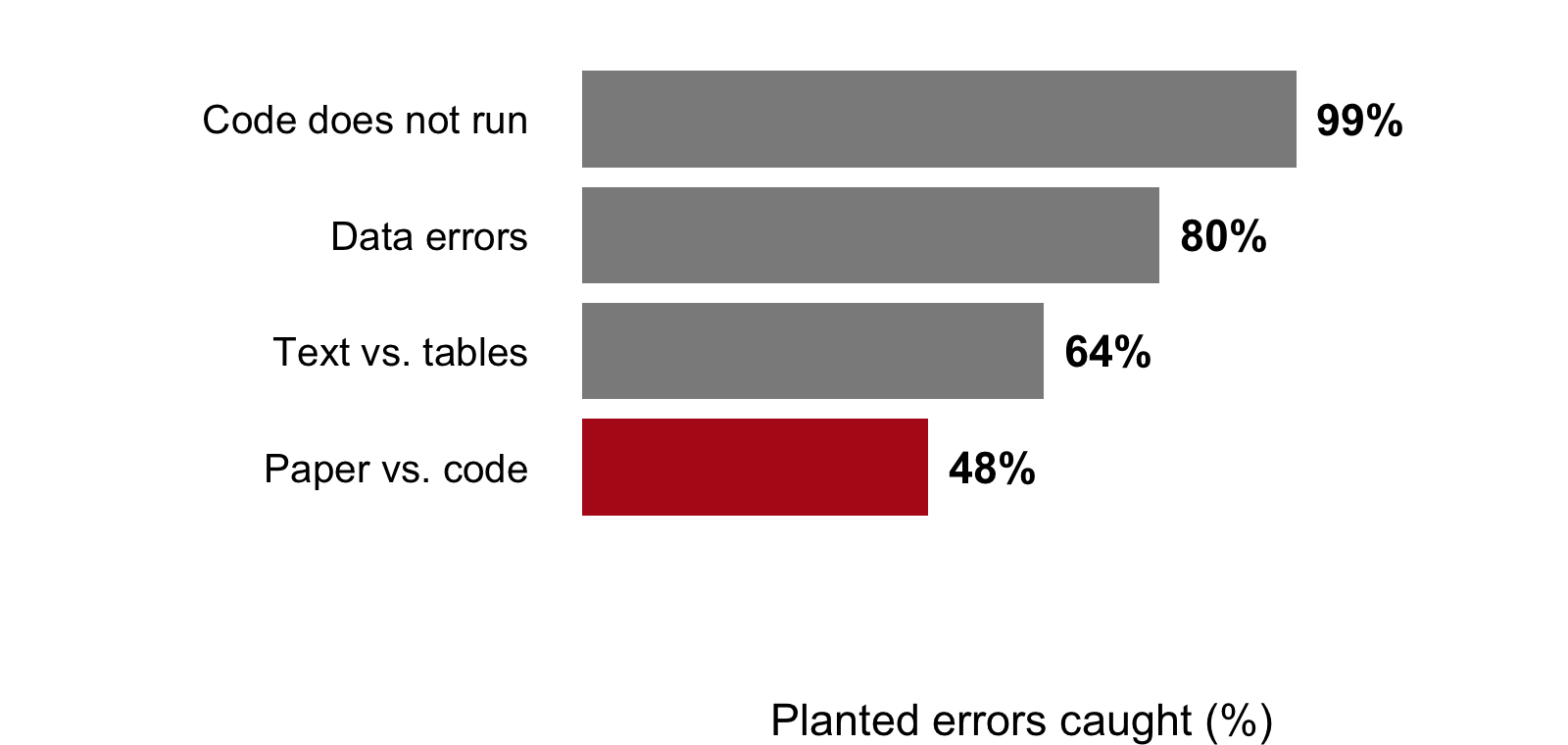
Researchers planted errors in 100 AI-written economics papers and ran checker agents on them. Share of the planted errors caught, by kind:
Code does not run: the scripts fail. Data errors: wrong values in the data. Text vs. tables: a number in the text differs from its table. Paper vs. code: the paper describes something the code does not do.
A checker is itself a tool you have not verified. The test is the one you would use on any tool: feed it cases where you know the answer. Plant a few errors in a copy of the work and count how many it finds. Software testers have done this since the 1970s. A recent study did it for economics: Willner and Yanagizawa-Drott (working paper, 2026) planted errors in 100 papers written by AI and measured how many verifier agents caught. They caught nearly every script that failed to run, most data errors, and fewer than half of the mismatches between a paper’s text and its code. Those are the errors to check by hand.
Reading disagreements, flags, and a random sample
Five countries drawn at random, to check by hand against the source:
Read every disagreement (two checks give different answers) and every flag (a problem a checker reported)
Check by hand a random sample of what passed: the code draws five countries, and set.seed() makes it draw the same five every time
Record what you checked: authors “must thoroughly fact-check” AI output (AEA journals)
The checkers exist to point you at the few places worth reading: every disagreement, every flag, and a random sample of what passed, since a checker can miss things. sample() draws the rows to check by hand, and set.seed() fixes the draw so that the same five come back every time the script runs. Write down what you checked and how. Journals now ask for it: the AEA journals require authors to disclose AI use and state that authors “must thoroughly fact-check” its output (AEA).
What the brief left to the agent
The brief from the start of class, read again:
“Clean the data as needed”: the agent decides which countries stay
No “Done when”: nothing says how the result will be checked
Nothing about outliers: no instruction to flag them or report both
The deliverable was written for this session, with three problems planted by hand; real runs of the same brief come at the end. In the envelope: two values computed before class, kept aside until the end (the envelope).
The brief at the top of this page is short, the kind people send. It names the data, the model and the files, and it leaves the cleaning to the agent. It has no “Done when” and no instruction about outliers, so the sample is the agent’s call. The deliverable answers it. It was written for this session in the form an agent returns, with three problems planted by hand; three real runs of the same brief appear at the end of the page. Two values were computed before class and kept out of the brief.
The script behind the figure and the summary
The R code behind the figure and summary on slide 5. It uses R’s built-in data, so it runs as is.
# savings.R: the life-cycle savings regression, 50 countries, 1960-1970# Data: R's built-in LifeCycleSavings (see ?LifeCycleSavings)# 1) Load and clean ----d <- LifeCycleSavingsd <- d[complete.cases(d), ] # drop incomplete rowsd <- d[d$ddpi <10, ] # drop implausible growth ratesstopifnot(nrow(d) >40) # enough countries remain# 2) Estimate ----fit <-lm(sr ~ pop15 + pop75 + dpi + ddpi, data = d)summary(fit)# 3) Figure ----png("savings_growth.png", width =800, height =560, res =120)plot(d$ddpi, d$sr, pch =19,xlab ="Growth of disposable income (% a year)",ylab ="Savings rate (% of disposable income)")abline(lm(sr ~ ddpi, data = d), lwd =2)dev.off()
The script is short and tidy: sections, comments, and a check of its own that passes. It runs without an error or a warning and writes the figure to savings_growth.png in the working directory. Copy it into a new script and run it before the exercise.
# Run the delivered script first. Then:# 1. How many countries does the model use? nobs(fit)# 2. What is ddpi? Open the help page: ?LifeCycleSavings# 3. Fit the same model on all 50 countries (data = LifeCycleSavings).# What is the coefficient on ddpi?# Two answers to compare with the room: the number of countries in the# model, and the coefficient on ddpi with all 50.
full <-lm(sr ~ pop15 + pop75 + dpi + ddpi, data = LifeCycleSavings)round(coef(full)["ddpi"], 2)
#> ddpi
#> 0.41
The model uses 48 countries: line 7 drops the two whose income grew faster than 10% a year. With all 50, the coefficient on ddpi is 0.41, half the 0.84 in the summary. The help page defines ddpi as the “% growth rate of dpi”, the growth of per-capita disposable income, so the summary’s “countries with higher disposable income save more” describes the wrong variable. The printed output held a clue all along: “on 43 degrees of freedom” means 48 observations for five coefficients.
A checker in a fresh session
A new folder, savings-check, holding only summary.md
A terminal in that folder: RStudio, Tools → Terminal → New Terminal, then cd into the folder
claude --permission-mode manual; the first time, choose Yes, I trust this folder
Paste the prompt. Approve the Rscript commands it proposes (option 2 approves them for the rest of the session); decline anything that would edit a file
A fresh session: a new conversation with no memory of the work. Manual mode: the tool asks before each command it runs.
The checker's prompt
You have not seen how summary.md was made, and you cannotsee the code that made it. Check it. Using R's built-inLifeCycleSavings data and its help page, recompute everynumber in summary.md with your own R code on the full data,and compare every description of a variable with the helppage. Report a table with one row per claim: the claim, whatsummary.md says, what you found, and whether they match(numbers within 0.01). List any claim that data cannotcheck. Do not create or edit any file.
The checker gets other information and nothing else: the claims, the built-in data and the help page. It cannot see the script because the script is not in its folder. Make the folder, create summary.md in it with the text of the deliverable’s summary, open a terminal there, and launch the tool in manual mode so each command asks first. The prompt asks for a recomputation from the full data, a comparison with the documentation, a stated tolerance, and a table, and it forbids edits. In test runs the checker took about half a minute and a few commands.
summary.md
# Savings and the life cycleAcross the 50 countries in the data, savings rates follow the life-cyclehypothesis. A country with one more percentage point of its populationunder 15 saves 0.32 points less of its income, and countries with higherdisposable income save more (coefficient 0.84, p < 0.01). Together the fourvariables explain 38% of the variation in savings rates across countries.All numbers were checked against the script's output.
# In a folder holding only summary.md, run claude --permission-mode manual# and paste:## You have not seen how summary.md was made, and you cannot see the code# that made it. Check it. Using R's built-in LifeCycleSavings data and its# help page, recompute every number in summary.md with your own R code on# the full data, and compare every description of a variable with the help# page. Report a table with one row per claim: the claim, what summary.md# says, what you found, and whether they match (numbers within 0.01). List# any claim that data cannot check. Do not create or edit any file.
The checker’s report
A test run from the evening before class, recomputed on all 50 countries:
Claim
summary.md
Recomputed, all 50 countries
Match
Number of countries
50
50 rows in the data
✅
Effect of pop15
−0.32
−0.461 (p = 0.003)
❌
Higher income, more saving
0.84, p < 0.01
dpi: −0.0003 (p = 0.72); ddpi, income growth: 0.41
❌
Share of variation explained
38%
R² = 0.34
❌
✅ matches within 0.01; ❌ does not match. Cannot be checked with data: “follow the life-cycle hypothesis”; “checked against the script’s output”. Its guess: the income number may be income growth, from a subset of the countries.
The table condenses a test run of the prompt above, captured the evening before class; a live run words things differently and finds the same mismatches. Every coefficient and the R² differ from the full-data values, while the count of countries matches the data. That pattern points at the sample: the numbers came from a model fitted on a subset. The checker could not see the script, so it could only guess where the numbers came from. The line that explains them is in the script, and nobs(fit) in the exercise found it in one step.
full <-lm(sr ~ pop15 + pop75 + dpi + ddpi, data = LifeCycleSavings)nobs(full)
None of the four statistics in summary.md holds up on the full data. Thesample size is right, but the two coefficients, the p-value and the R² areall wrong, and in one case the sign is wrong too.I fitted lm(sr ~ pop15 + pop75 + dpi + ddpi, data = LifeCycleSavings),the model on the help page. It uses all 50 rows, and none have missingvalues. I compared the variable descriptions against ?LifeCycleSavings.| # | Claim | summary.md says | What I found | Match? ||---|---|---|---|---|| 1 | Number of countries | 50 | 50 rows, all complete | ✅ || 2 | Effect of pop15 | −0.32 | −0.461 (p = 0.0026) | ❌ || 3 | Direction of the income effect (dpi) | save more | −0.000337, negative | ❌ || 4 | Income coefficient | 0.84 | −0.000337; income growth (ddpi) is 0.410 | ❌ || 5 | Income p-value | p < 0.01 | p = 0.72; ddpi has p = 0.042 | ❌ || 6 | Share of variation explained | 38% | R² = 0.338 | ❌ || 7 | Description of pop15 | share under 15 | "% of population under 15" | ✅ || 8 | Description of dpi | "disposable income" | "real per-capita disposable income" | ⚠️ |Claims the data cannot check:- "All numbers were checked against the script's output." That script isn't available to me.- "Savings rates follow the life-cycle hypothesis." An interpretation; pop15 is significant, pop75 and dpi are not.A possible source: the closest to 0.84 with p < 0.01 was the ddpicoefficient on a subset of countries. It suggests the "income" coefficientmay really be income growth from a subset of the data. That's a guess,not a finding.
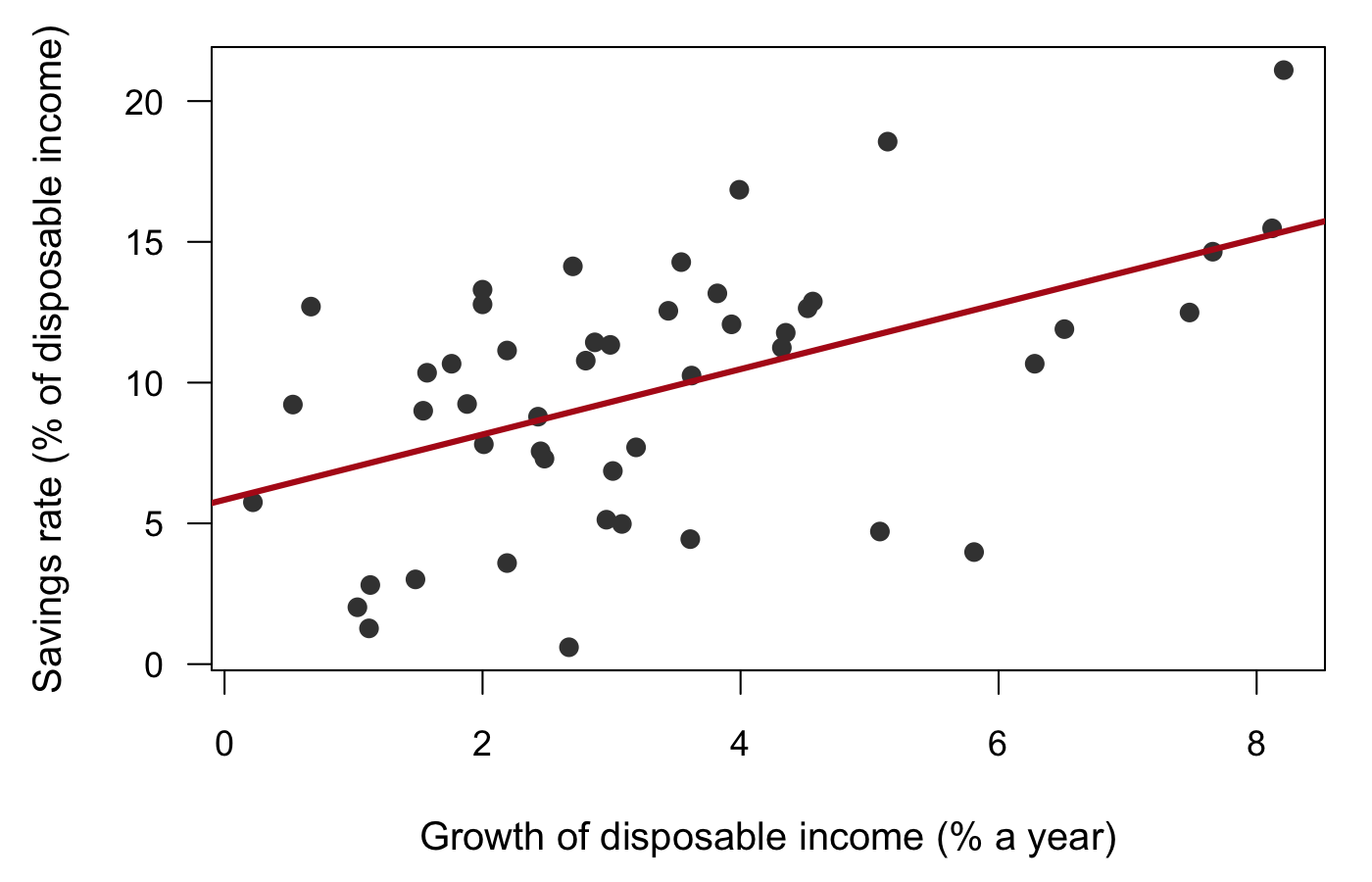
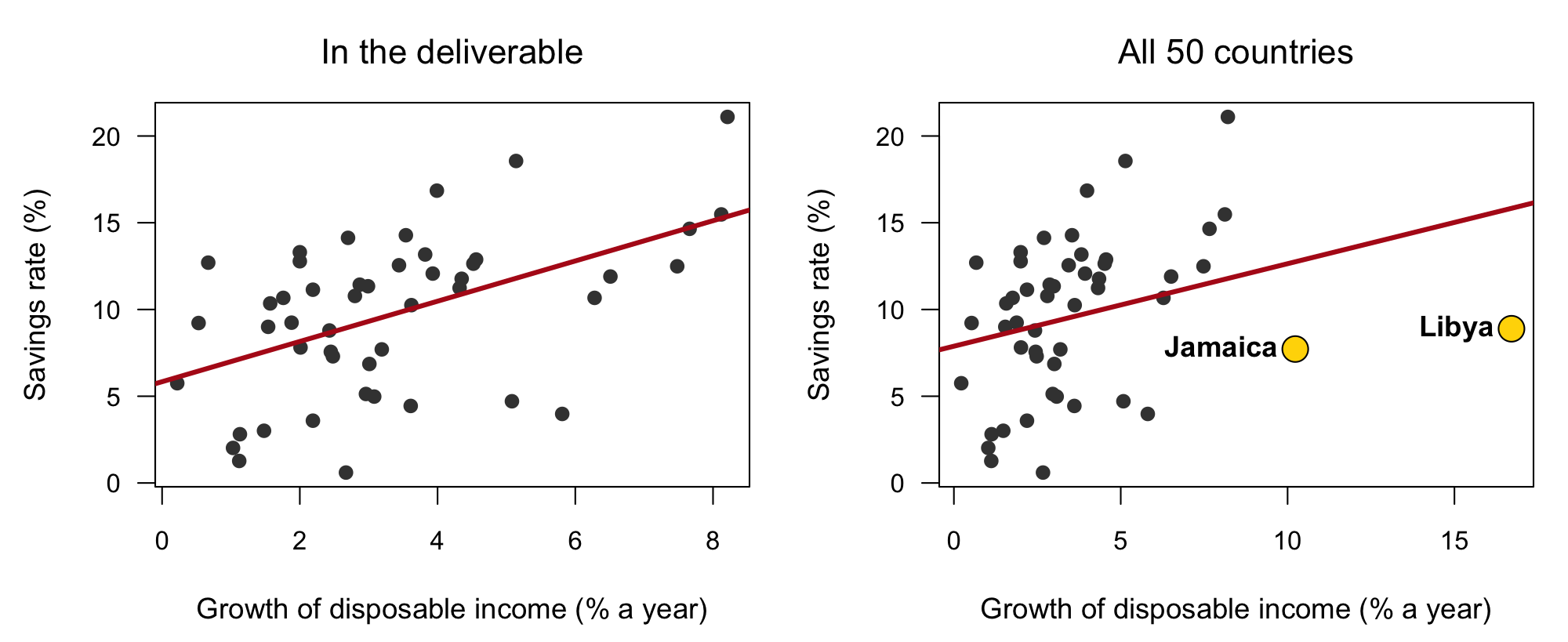
The figure with all 50 countries
Left: the figure from the deliverable, 48 countries. Right: the same plot with all 50; the two countries the script dropped are in yellow. Slope of the fitted line: 1.16 without them, 0.48 with them.
The figure in the deliverable looks like a textbook picture. With all 50 countries, the two that line 7 dropped sit far to the right with ordinary savings rates, and the fitted line is less than half as steep. Nothing on the left panel hints at them: its axis stops where the data stop.
d <- LifeCycleSavingsdropped <- d$ddpi >=10plot(d$ddpi, d$sr, pch =19,xlab ="Growth of disposable income (% a year)",ylab ="Savings rate (% of disposable income)")points(d$ddpi[dropped], d$sr[dropped], pch =21, bg ="gold", cex =2)text(d$ddpi[dropped], d$sr[dropped], rownames(d)[dropped], pos =2)abline(lm(sr ~ ddpi, data = d), lwd =2)
What the three problems were
The summary says
What is true
Kind
Caught by
“the 50 countries”
the model uses 48; line 7 drops Libya and Jamaica
exact
nobs(fit); the envelope
0.84, p < 0.01
0.41, p = 0.04 with all 50
exact
the checker; the envelope
“higher disposable income”
ddpi is the growth rate of income
sourced
the help page
The envelope: 50 countries, and 0.41 on ddpi.
“Checked against the script’s output” is true: every number matches the script, and the script is where the problem is.
Each problem was caught by a different kind of check. The count caught the missing countries. The recomputation from the raw data, by you or by the checker, caught the numbers. The help page caught the definition. The two values kept back before class, the number of countries and the full-data coefficient, would have caught the first two without any agent. The summary’s last sentence was true and useless: the numbers matched the script’s output because they came from it.
The script’s comment calls these growth rates implausible.
Dropping a country is a research decision, and it belongs to the principal.
Hands up: keep, drop, or report both?
The judgment claim hid in a comment. Libya’s growth was real: its oil exports began in 1961 and its income rose fast through the decade. An analyst could argue for dropping it as unrepresentative, keeping it as data, or reporting both. Each is defensible, and each is a decision for the person who owns the question, made openly and written down. The agent made it silently, with a word (“implausible”) that sounded like data cleaning. That is the hidden action from the first part of the session, in one line of code.
Three real runs of the same brief
The brief from the start of class, given to a coding agent three times, each in an empty folder:
All three kept all 50 countries
All three described ddpi as income growth, with a coefficient of 0.41
All three reported the estimate without Libya separately: about 0.6
The planted deliverable and the real ones both read as careful work; only the checks told them apart.
The same brief went to a coding agent three times, each in a fresh, empty folder. All three runs kept every country, described ddpi correctly, and reported the coefficient without Libya as a separate check, which is what a careful research assistant would do. One summary ended: “the growth estimate rises to about 0.6 when Libya … is left out.” Agents often get tasks like this right. The point of the procedure is that you cannot tell which kind of deliverable you have by reading it. The runs were captured in September 2026; the tool’s wording varies between runs and versions.
What to take away
Delegating to an agent is a principal–agent problem: its report on the work is a claim.
A deliverable can look right and be wrong, from an agent or in a journal.
The better the tool, the less we check: keep a set level of scrutiny, every time.
Agents work toward the check you give them: they cannot edit the checks, and the numbers you expect stay out of the brief.
Sort each claim as exact, sourced or judgment: recompute it, look it up, or decide.
A second check counts when it is independent: a fresh session, other information, another method or model.
Check the checker: confirm what it flags, and read the disagreements and a random sample of what passed.
In your code: assertions of several kinds, and a look block for the end of the project.
Two kinds of checks belong in any script, including one an agent wrote. Assertions run every time and stop the script when something is wrong. A look block, switched off by default, holds the plots and summaries you read yourself at the end of a project. Each kind of check catches a different kind of error, so a script needs several kinds.
Assertions that run every time
What goes wrong
The check
Example
Rows vanish or multiply in a filter, merge or reshape
A count against an expected number, right after the step
stopifnot(nrow(d) == 50) # ?LifeCycleSavings: 50 countries
Rows fail to match in a merge
Count the non-matches
stopifnot(sum(!a$id %in% b$id) == 0)
Duplicated keys multiply rows in a merge
Keys are unique before merging
stopifnot(!anyDuplicated(a$id))
Missing values are dropped or zeroed silently
Count the NAs at each step
stopifnot(sum(is.na(d$sr)) == 0)
Impossible values or wrong units
A range the values must fall in
stopifnot(all(d$sr >= 0 & d$sr <= 100))
Identifiers mangled: leading zeros lost, codes read as numbers
The published or hand-counted value, with a tolerance
stopifnot(abs(total - published) / published < 0.01)
A function computes the wrong thing
A known answer, on a case you can work out by hand
stopifnot(my_mean(c(1, 3)) == 2)
Dates off by a day
Calendar facts
stopifnot(length(unique(d$date)) == 31) # January
Results change between runs
A fixed seed, and the same result twice
set.seed(1), then stopifnot(identical(r1, r2))
Each assertion compares with a specific value, and a comment says where the value came from: the documentation, a published table, a count you made by hand. Compare decimals within a tolerance, never with ==. A check that cannot fail, such as nrow(d) > 0, tells you nothing.
A look block for the end of the project
What you look at
Code
What it shows
Every column’s range and missing values
summary(d)
impossible minimums and maximums, NA counts per column
The distribution of a key variable
hist(d$pm25)
sentinel codes such as −999, values a thousand times too large, piles of zeros
A series over time
plot(d$date, d$pm25, type = "l")
gaps, a jump when an instrument or a unit changes, spikes
Rows per period
barplot(table(format(d$date, "%Y-%m")))
missing months, a month loaded twice
Categories
table(d$country, useNA = "ifany")
“USA”, “US” and “United States” as three categories, stray NAs
Coordinates
plot(d$lon, d$lat)
swapped latitude and longitude, a flipped sign, points in the ocean
Two variables that should move together
plot(d$pop15, d$pop75)
points far off the pattern: typos, or real outliers
A few random rows
d[sample(nrow(d), 5), ]
shifted columns, truncated text, problems no summary shows
Keep the block in the script behind a switch, so it does not run every time:
LOOK <-FALSE# TRUE at the end of the project, or when the data change# 1) Look at the raw data ----if (LOOK) {summary(d)hist(d$pm25)plot(d$date, d$pm25, type ="l")table(d$country, useNA ="ifany") d[sample(nrow(d), 5), ]}
Run it yourself at the end of a project, and whenever the data change. When it shows a problem, write an assertion for it, so the next run checks it without you.
Which checks for which task
Each step of a project breaks in its own ways, so each step has its own checks. The examples in the last column are made up, with numbers of the kind you would write into the check. One way to use the table: for each step in your script, find its row and write the checks listed.
Task
What usually goes wrong
Checks that catch it
Example (made up)
Reading a file
Wrong header row or delimiter; numbers or dates read as text; codes such as −999 standing for missing
Rows and columns against the source; str() for types; ranges; summary()
A daily file for one year has 365 rows and a Date column; daily maximum temperatures stay below 60 °C
Filtering rows
Too many or too few rows kept; missing values dropped without notice
Rows before and after, against an expected number; NAs counted
Keeping January for 12 stations leaves 12 × 31 = 372 rows
Merging two tables
Keys that fail to match; duplicated keys that multiply rows
Unique keys before the merge; non-matches counted and listed; rows after the merge
190 countries merged with a table that spells Côte d’Ivoire differently: 189 match, and the list of non-matches shows the one that did not
Reshaping, wide to long
Rows lost or duplicated
Rows in long form = rows in wide form × number of periods
50 countries × 10 years in columns becomes 500 rows
Aggregating: sums and means by group
Double counting; averages of averages; weights left out
Parts add up to the total; one group computed by hand; weighted against unweighted
Regional totals add up to the national total, within rounding
Dates and times
Wrong time zone; days shifted by one; day and month swapped
Calendar facts; the date of an event you already know
A storm that hit on March 3 shows up on March 3, not March 2
Scraping a web page
Only the first page of results; a layout change that shifts columns
Rows against the count the page shows; a few random rows compared with the page
The page says “1–20 of 134”; the scraped table has 134 rows
Downloading from an API
Partial downloads; rate limits; fields renamed without notice
Records against the total the API reports; first and last dates; the raw response saved
The API reports 2,408 records and the saved file has 2,408, from the first requested date to the last
Classifying text with an LLM
Labels outside the allowed set; labels that drift across the sample
Allowed labels only; a random sample labeled by hand, and the agreement measured
20 of 1,000 news items labeled by hand; the model agrees on 18
Pulling a table out of a PDF or a scan
Misread digits; shifted columns
The printed total against the sum of the rows; ranges; a few rows compared with the page
The printed total is 12,480 and the rows sum to 12,480
Spatial joins and maps
Coordinate systems that do not match; latitude and longitude swapped
The points drawn on a map; a location you know
A city you know falls inside its own country
Running a regression
The sample changes silently when rows with NAs drop out; the wrong variable in the model
nobs(); each variable against its documentation; a published estimate; simulated data with a known answer
Simulate y = 2x + noise: the estimated slope comes out close to 2
Making a figure
The wrong series plotted; wrong units on an axis
One value read off the figure against the table; axis labels against the variable definitions
The highest point on the figure equals the maximum in the table
Writing a summary or a literature review
Numbers that do not match the tables; citations that do not exist or say something else
Every number traced to printed output; every citation looked up
A sentence cites a paper: its DOI resolves, and the paper says what the sentence says
Any task an agent did
All of the above, plus steps you did not see
The commands it ran and what they printed; the diff; a check in a fresh session
Ask for nobs() and the row count after every step that can drop rows
# Exact claims, one line of R each# 1. Check each claim about LifeCycleSavings with one line: "Japan saves# the most"; "Zambia saves the least"; "the average savings rate is# 9.7%". One of the three is false. Which one, and what is true?# 2. The summary says the model explains 38% of the variation. Compute# the R-squared with all 50 countries and with the 48 the script# kept. Which one did the summary report?# The checker# 3. Make the savings-check folder and run the checker's prompt. Compare# its table with the one on this page. What differs, and what is the# same?# 4. Copy savings.R into the checker's folder and run the prompt again,# changed to say it may read the script. Does it find line 7? What# does it lose by reading the worker's code?# Planted errors# 5. Copy a script of your own. Plant three errors that do not stop it# from running: a filter, a wrong variable, a number off by a factor# of ten. Ask a reviewer in a fresh session to find what is wrong,# read-only. How many of the three did it find? Did it report# anything that is not an error?# Prose# 6. Ask a chat assistant for a one-paragraph summary of a paper you# know well. Mark each claim exact, sourced or judgment. Check the# exact and sourced ones against the paper. How many hold?
1. Japan saves the most (21.1%). Chile saves the least (0.6%), so the Zambia claim is false: Zambia saves the second most. The mean is 9.7%. 2. 0.34 with all 50 and 0.38 with the 48 kept: the summary reported the subset’s value. 3–6 have no single answer. For 4, a checker that reads the script usually finds line 7 faster, and it also reads the script’s assumptions as given; that is the trade.
Quick reference
The seven steps
When
Step
Before
1. Write the checks into the brief (“Done when: …”)
Before
2. Keep one value you know out of the brief
During
3. Hand over small pieces
During
4. Ask for the commands and what they printed; keep the answer and the checks out of the agent’s reach
After
5. Check in a fresh session that works from other information: the raw data or the source
After
6. Test the checker once: plant errors in a copy, count what it finds
After
7. Read every disagreement and flag, and a random sample of passes; record what you checked
Three kinds of claims
Kind
Examples
The check
Exact
a count, a mean, a coefficient, the rows a merge kept
recompute it, from the raw data
Sourced
a citation, what a variable means, a number from a report
open the source
Judgment
the wording, the sample, the model, a figure’s design
write your criteria, then decide
Code
Code
What it does
nobs(fit)
The number of observations a model used
?LifeCycleSavings
The dataset’s documentation: what each variable means
abs(a - b) < 0.01
Compare two numbers within a tolerance, never with ==
set.seed(10); sample(x, 5)
The same five random draws every run: rows to check by hand
claude --permission-mode manual
Start Claude Code so every command asks first
Things that bite
Symptom
Cause, fix
The agent says everything was verified
A report on its own work; ask for the commands and output
Every number differs a little from your recomputation
A different sample; compare nobs()
The checker agrees with everything
It may have read the worker’s code or its reasoning; give it the raw data and the claims only
“Are you sure?” changes the answer
Pushback carries no information; ask for a recomputation
A long list of problems from a reviewer
Some are not real; confirm each in the data before acting
The brief states the expected answer
The agent can bend the work toward it; keep that value back as your check
Terms
Term
One line
Where
principal, agent
the one who delegates, and the one who does the work