9 · AI II — coding agents
Tuesday, September 22, 2026
How to work with a coding agent in your terminal as a fast research assistant that needs clear instructions and close supervision. The first part says what it has in front of it that a chat window does not, and what you decide before it writes a line. The second part builds a small project from an empty folder: a scraper for the Dyson School’s Ph.D. placements page, a postdoc flag, a country column, and the moment the tool fills a column from memory. The third part writes the project’s CLAUDE.md and a read-only reviewer agent. Every step runs in RStudio’s Terminal tab.
About fifteen minutes, once, on the laptop you bring. Claude Code is not on the free plan; it needs a paid Claude plan. Do all five steps; step 5 is the test.
1. Subscribe to Claude Pro. You will get a lot out of it this semester; it is worth the investment. Cornell is working on access for students; until that exists, plan on Pro: choose it on the pricing page. If you decide not to subscribe, follow the captured run on the slides in class and pair with a neighbour at the keyboard.
2. Install Claude Code. Mac: in RStudio, Tools → Terminal → New Terminal, paste this line, Enter:
curl -fsSL https://claude.ai/install.sh | bashWindows: use PowerShell, not RStudio (Start, type PowerShell, open it), paste this line, Enter:
irm https://claude.ai/install.ps1 | iexWhen it finishes, quit and reopen RStudio: the terminal you installed from does not see the new program.
3. Check the install. Tools → Terminal → New Terminal, type claude --version, Enter. It prints a version number followed by (Claude Code). command not found: quit and reopen RStudio. Windows, still not found: add %USERPROFILE%\.local\bin to your user PATH, then quit and reopen RStudio. Windows, and claude opens the Claude desktop app instead: update the desktop app, then retry.
4. Install rvest. In RStudio’s Console (not the Terminal), Enter after each line:
install.packages("rvest")
library(rvest)
The second line prints nothing when the install worked.
5. Make the folder and log in (the test). File → New Project → New Directory → New Project. Directory name placements; Create project as subdirectory of a folder you choose (~/github if you have one; on Windows type C:/Users/<your Windows username>/github rather than clicking Browse, which opens a folder OneDrive often syncs); do not tick Create a git repository; Create Project. Then Tools → Terminal → New Terminal; the prompt ends in placements. Type claude, Enter. The first run asks a few set-up questions; take the default text style. When it asks how to log in, choose the subscription login. Your browser opens a Claude sign-in page: sign in with the account from step 1 and follow the prompts back to the Terminal. When it asks whether you trust this folder, No, exit is highlighted: press the down arrow once to Yes, I trust this folder, Enter. A welcome screen names the version, the model and your plan, and a folder ending in placements. Type /exit, Enter. That is a pass. Anything else: the “Things that bite” table at the end of this page lists the fixes; still stuck, bring the laptop to class ten minutes early. Leave the folder as it is; class starts from it.
Objectives
By the end of this session you can:
- Explain what Claude Code has in front of it that a chat window does not: every file in the folder, a terminal, git, and a file of standing instructions,
CLAUDE.md. - Start Claude Code in manual mode in an empty RStudio project and have it initialize the git repository.
- Hand the tool one task at a time, with a number you counted yourself on the web page it reads; let it run the script; compare.
- Read the box that shows each edit, and
git diff, before accepting it, and say where every value in the result came from. - Write a
CLAUDE.mdfor the project and a read-only reviewer agent, and say what each one changes.
Plan for today
- Chat, Cowork, Claude Code: one model, three harnesses
- What you decide and what it does
- A project from an empty folder: launch, git, a web page read into a table
- Two more columns: is it a postdoc, and in which country
- Where the countries came from
- CLAUDE.md: the project’s standing instructions
- A read-only reviewer agent
- Tasks not to give it; practice
Chat, Cowork, Claude Code: one model, three harnesses
| Chat | Cowork | Claude Code | |
|---|---|---|---|
| Where it runs | a web page | the desktop app | your terminal, in one folder |
| How context arrives | you paste or attach it | from the folder you connect | from the folder, plus a file of standing instructions |
| Reads your files | no | every file in the folder | every file in the repository |
| Edits your files | no; you paste its output | yes, directly | yes; each edit shown as a diff first |
| Runs commands | on Anthropic’s servers, on an attached file | on Anthropic’s servers | on your laptop: R, git, anything in the terminal |
| Runs your R script | no; you run it | no; you run it | it can, when the prompt says so |
| What you read afterwards | the script you pasted | git status, git diff |
the box that shows each edit, then git diff |
Claude Code is the same Claude model as the chat window and Cowork, in a third harness: a program in your terminal that runs in one folder. The harness decides what the model can see and do. In a chat you paste context in and copy text out. Cowork reads and writes the files in a folder you connect and runs code in a sandbox on Anthropic’s servers, not on your laptop. Claude Code reads every file in the repository, edits files after showing each edit as a diff, and runs commands in your terminal: R, git, anything you could type there. That row is the difference that matters. The other two never touch your machine; this one does, which is why it asks before acting and why git is the safety net.
Two other kinds of tool are not this page’s subject. An inline tool such as GitHub Copilot in RStudio proposes the next few lines in the editor and sees only the open file. Terminal agents from other vendors work like Claude Code; the habits on this page transfer to them.
How Claude Code works: the loop inside the tool
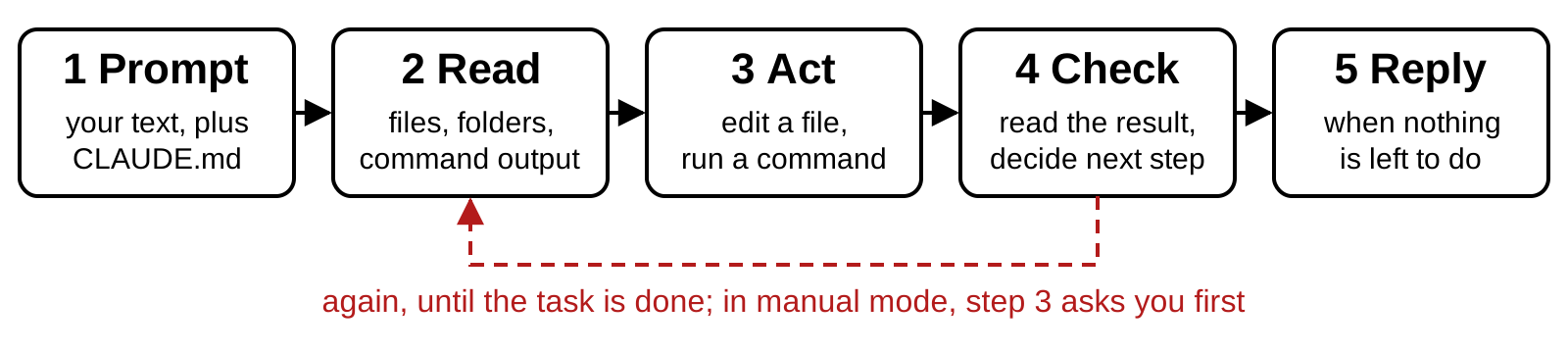
Inside the tool runs a loop. Your prompt goes to the model together with a hidden system prompt and, if the folder has one, CLAUDE.md. The model writes text and nothing else; it cannot open a file or run a command itself. So it writes a request for a tool, and the harness carries it out: read a file, search the folder, run a command in the terminal, edit a file. The tool’s result comes back to the model as text, and the model decides the next step. That repeats until nothing is left to do; then you get a reply. Anthropic’s page How Claude Code works describes the same loop in three phases: gather context, take action, verify results. In today’s project the tool runs the script and fixes it when it fails; the third phase is still yours, because only you know the number the script must reproduce.
In manual mode the loop stops at every edit and at every command that changes something and asks you; reading is free. You can stop it too: Esc interrupts. Everything the model has in front of it at a given moment is its context: the system prompt, CLAUDE.md, your prompts, every file it read and every command output so far. A new session starts with an empty context. What carries over is what is on disk: the files, the commits, and CLAUDE.md.
What changes when a tool can edit your files
- It can read any file in the repository. Nothing private goes in that folder.
- Its edits land on disk, not in a chat.
- It can run commands, including git.
- It shows every edit as a diff before it lands. You accept or refuse.
- Anything it reads goes to Anthropic’s servers. Restricted data stays out; develop on a public or synthetic sample.
- What is right is still your call.
Four things change. It can read any file in the repository, so what it sees is not what you pasted but what is on disk. Its edits land on disk, not in a chat window. It can run commands, including scripts and git. Every edit appears as a diff before it lands; that diff is the one thing you must read. Anything it reads is sent to Anthropic’s servers for processing, so check your data use agreements before pointing it at confidential files; the practical workaround is to let it develop the code on a synthetic or public sample with the same structure, and to run the final code yourself on the restricted data. The verification is yours; the tool has no way to compare the number it produced with the number you meant.
You decide the question; it writes the code
- It is strong at writing, refactoring and debugging code. It is weak at judging whether a specification answers your question.
- Decide the estimand, the sample, the weights, the fixed effects and the clustering yourself. Then ask it to implement them.
- Let it choose and it picks something plausible. Plausible is not the same as right.
- A fact it did not read is a guess: a function’s arguments, a citation, a fact about the world. Check the documentation, the paper, the source.
- You must be able to explain every line. Ask it to explain rather than write, and it becomes a tutor.
Claude Code is most useful when you treat it as a fast, capable research assistant that needs clear instructions and close supervision. It is strong at writing, refactoring and debugging code. It is weaker at judging whether a specification answers your question. So you own the identification and it owns the plumbing: decide the estimand, the fixed effects, the clustering and the sample restrictions yourself, then ask it to implement them. If you let it choose, it will pick something plausible, and plausible is not the same as right.
The same rule covers facts. It can misremember a function’s arguments, especially in less common packages; it can cite papers that do not exist or misstate what they found; it can fill a column with countries it never read anywhere. Check documentation and citations yourself, and treat any value it did not read from your data or your page as a guess until you have checked it. Today’s project shows this with a country column.
For students, understanding comes first. It is possible to produce working code without understanding it. The rule in this course is that you can explain every line of code in your analysis. Ask the tool to explain its code rather than only write it; that turns it into a tutor. A line you still cannot explain after the explanation is a line to replace with one you can.
The main risk is silent errors, not crashes
- Code that fails is easy to fix. Code that runs and is wrong is the danger.
- The usual shapes: a merge that drops or duplicates rows;
NAs handled silently; a unit mismatch; an estimation call that differs a little from what you asked. - Three defenses: explicit checks,
stopifnot()on row counts, unique keys and value ranges; estimators tried on simulated data with known parameters; the merge and the regression call read by you. - Git is the safety net: commit before each task, read the diff after it,
git restoreputs a file back.
Code that fails is easy to fix: the error names the line. Code that runs but is wrong is the real danger, and it is the common case with a tool that writes plausible code quickly. The usual shapes are a merge that drops or duplicates rows, NAs handled in a way you did not expect, a unit mismatch, and an estimation call that differs slightly from what you asked for: a different standard error, a sample restriction applied one step too late.
Three defenses, all yours. Ask for explicit checks, stopifnot() on row counts after a merge, on unique keys, on value ranges; the tool writes them well once you name the number. Test estimators on simulated data with known parameters before running them on real data; if the estimate does not recover the parameter you planted, the code is wrong, whatever the transcript says. And read the key lines yourself, the merges and the regression call above all.
Git is the safety net around all of it. Commit before each task, so the diff afterwards is exactly what the tool did. Review that diff. Claude Code edits many files quickly, and git is what lets you see what changed and roll back with git restore. If you do not use git yet, this tool is the best reason to start.
Small tasks, short sessions, a plan before code
- One well-defined task per session: “build the county-year panel”, “write the event-study plot”. “Do the analysis” produces large vague code.
- Performance drops as the context fills with old material. Start a fresh conversation between unrelated tasks (the
/clearcommand). - Anything with a merge or a panel build: “Describe your approach before writing any code.” Read the plan; fix misunderstandings there, where they are cheap.
- Conventions you would otherwise repeat go once into
CLAUDE.md, a file it reads at every launch: base R only, never touchdata/raw/, relative paths, a clean session, a master script, seeds,sessionInfo()saved with results.
Keep tasks small and sessions short. Everything the model has in front of it competes for its attention, and performance drops as the context fills with old material. Give one well-defined task per session, such as “build the county-year panel” or “write the event-study plot”, and use /clear between unrelated tasks. Large vague requests like “do the analysis” produce large vague code that nobody can check.
Plan before it writes code. For anything nontrivial, use plan mode (Shift+Tab cycles to it) or simply write “Describe your approach before writing any code.” Read the plan. Fix misunderstandings at that stage, when they are cheap. This habit matters most for data construction steps like merges and panel building, and today’s project shows what it would have caught.
Build reproducibility in from the start, as standing rules rather than reminders: a master script that runs the whole pipeline in order, package versions locked (renv is one way), a seed for anything stochastic, sessionInfo() saved with the results. The tool follows such rules reliably once they are written in CLAUDE.md, the file it reads at the start of every session; the sixth part of this page writes one for the project.
Two rules: a clean git state, and the diff over the transcript
- Start from a clean git state.
git statusclean before the prompt; afterwards the diff is exactly what the model did. - Trust the diff, not the transcript. What it did, not what its replies say it did.
- Commit before each task; read every diff before you commit;
git restoreputs a file back.
Rule one: start from a clean git state. git status prints nothing to commit, working tree clean before you type a prompt; then every line the diff shows afterwards is the model’s, and none is yours. Rule two: trust the diff, not the transcript. The transcript says what the tool claims it did. The diff shows what it did. When they disagree, the diff wins.
The project: the Ph.D. placements page, from an empty folder
- The page: Recent job placements, Ph.D. in Applied Economics & Management. One table: year, name, position, organization. 109 rows when captured.
- Four prompts, one task each: 1 start git; 2 read the table into a CSV (scraping); 3 flag the postdocs; 4 add each organization’s country. Then: where the countries came from.
- The prompts tell the tool to run the script and fix it when it fails. You check every number against the page.
- The folder:
placements, no git yet. Once, in the Console:install.packages("rvest"), the R package that reads web pages.
The project is small and real. The Dyson School lists its recent Ph.D. placements on one public page as a table with four columns: year, name, position, organization. We scrape it into a CSV, add a column that flags postdocs, and add a column with the country of each organization. The page does not state the country, and that is the point of the third prompt.
Two things differ from a chat. The prompts tell the tool to run the script and fix it when it fails, so the tool is the loop; your job is the check, a number you count on the page before you believe the number on the screen. And everything starts from an empty folder: no repository, no script, nothing the tool did not write in front of you.
Every prompt on this page is the exact text of one captured run on 2026-09-21, and every number is from that run: 109 rows, 16 of them in 2026, 25 postdocs. The page grows every year, so the numbers on your screen will differ. The prompts, the checks and the lesson do not.
The steps, from an empty folder to the first prompt
- RStudio: File → New Project → New Directory → New Project. Name
placements, inside~/github. Do not tick Create a git repository. Create Project. - Console, once:
install.packages("rvest"). - Tools → Terminal → New Terminal. The prompt ends in
placements. - Type
claude --permission-mode manual, Enter. - The trust question: ↓ once to Yes, I trust this folder, Enter.
- The welcome screen: the folder ends in
placements; the status line reads⏸ manual mode on. - Ask it to set up git, in these words: “Initialize a git repository in this folder, add a .gitignore for an RStudio project, and commit everything.” Read each box,
1. Yes. - Tools → Terminal → New Terminal again (Terminal 2):
git log --oneline.
The whole path, in order; the next six sections take the steps one at a time. The RStudio project is the folder: New Project creates ~/github/placements with one file in it, placements.Rproj, and every Terminal you open from Tools → Terminal starts there, so there is nothing to navigate. Leave the git box unticked: the first prompt asks the tool to do that part, and you watch it happen. If you did Before class, steps 1 and 2 are done; open the project (File → Recent Projects → placements) and start at step 3.
Everything on this page also works without RStudio, in a plain terminal or in VS Code; the slides show the RStudio path because that is where the course runs R.
A plain terminal (Terminal on a Mac, PowerShell on Windows):
mkdir -p ~/github/placements
cd ~/github/placements
claude --permission-mode manual
Then the trust question, the welcome screen and the first prompt as on the slides. Git goes in a second terminal window opened in the same folder (cd ~/github/placements, then git log --oneline or git diff). Run a script with Rscript code/placements.R from that folder, or open the folder in RStudio when you want the Console.
VS Code: File → Open Folder → placements. View → Terminal opens a terminal in that folder; type claude --permission-mode manual there. The + button on the terminal panel opens a second terminal for git. To read what changed, open the Source Control view (the branch icon in the left bar): it lists every changed file, and clicking one opens the diff side by side, the same lines git diff prints. Anthropic also ships a Claude Code extension for VS Code that shows each proposed edit in a diff window with accept and reject buttons; the boxes on the slides are the terminal’s form of the same question.
Claude Code in RStudio’s Terminal tab
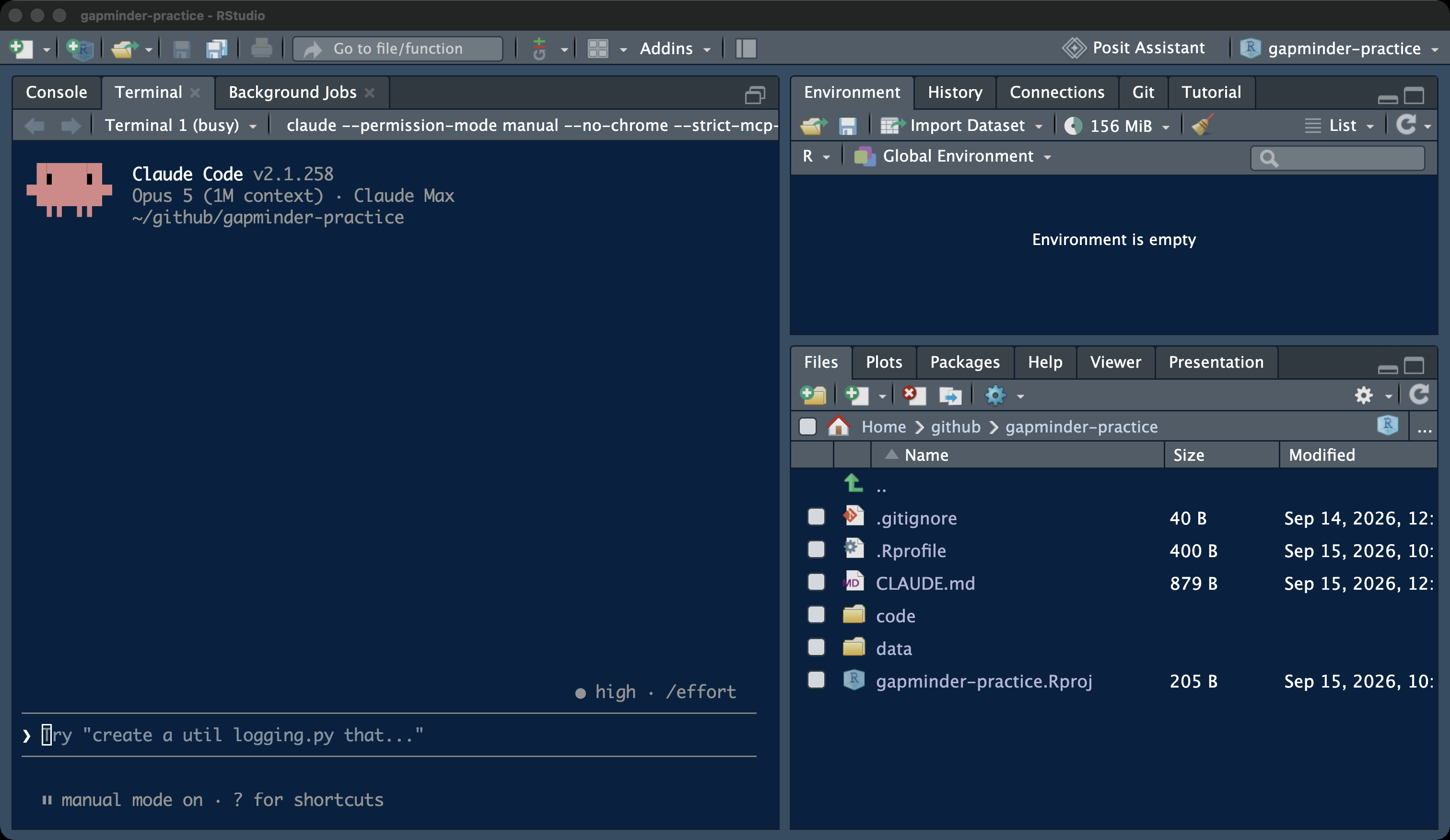
Claude Code runs in RStudio’s Terminal tab, the tab where git commands go, opened inside the project so the folder it sees is the repository. The Console stays free, so the script it writes runs where scripts always run: Session → Restart R, then Source. The Files pane shows what it wrote. Enlarge the Terminal pane before a prompt: drag the divider up, or use the maximize icon in the pane’s corner. An approval box for a twenty-line file does not fit the default pane.
Launching Claude Code in manual mode
claude --permission-mode manualOne line in the Terminal tab launches it in manual mode, where it reads freely but asks before every edit and every command that changes something. Depending on the plan, a session may otherwise start in auto mode, where a second model reviews actions instead of you. The status line above the prompt says which mode you are in; it must read ⏸ manual mode on for everything today. Shift+Tab cycles the modes; if the keystroke does not reach the tool inside RStudio’s terminal, quit with /exit and relaunch with the line above. The mode’s configuration name is default, so --permission-mode default launches the same mode.
The trust question
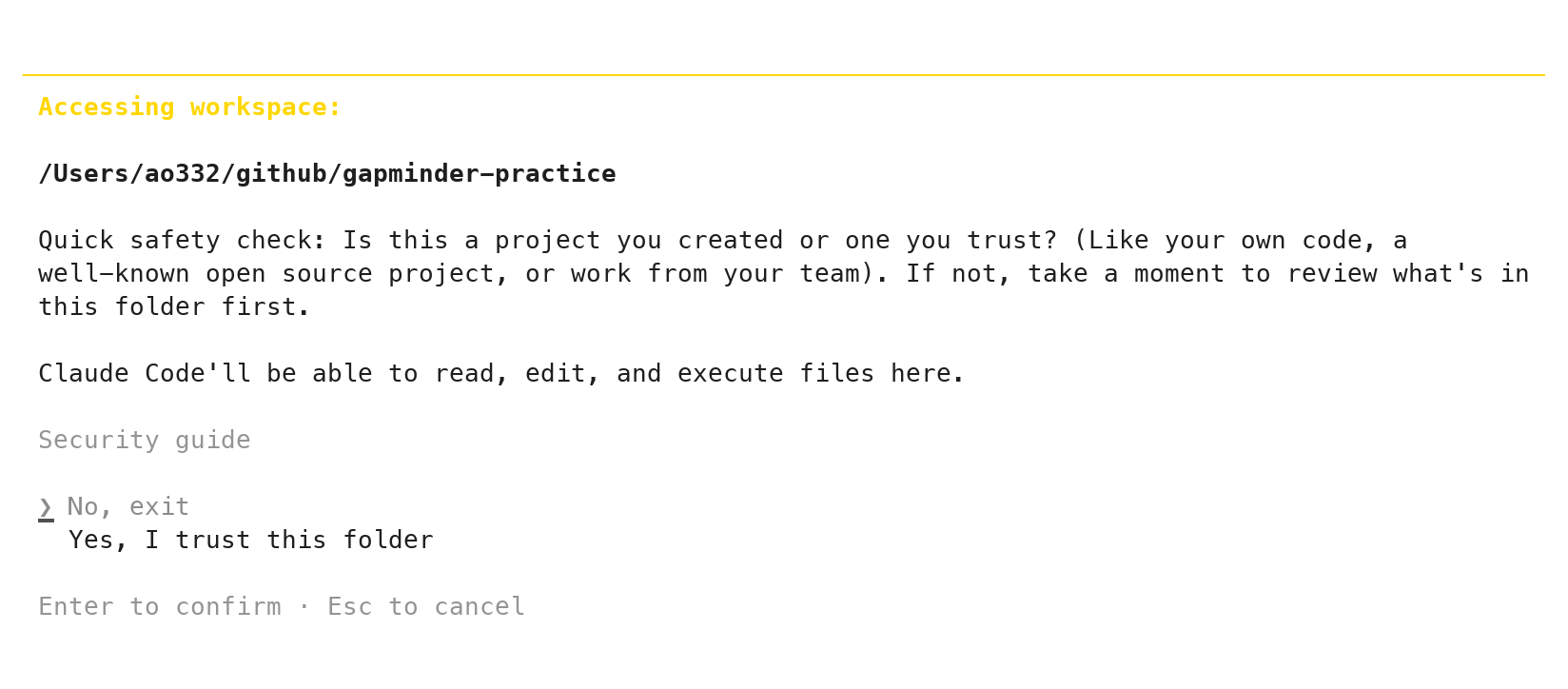
placements.The first launch in a folder asks whether you trust it. The highlighted answer is No, exit. Press the down arrow once to Yes, I trust this folder, then Enter. It asks once per folder. If it asks on every launch, you opened the terminal outside the project; Tools → Terminal → New Terminal from inside the project fixes it.
Reading the welcome screen
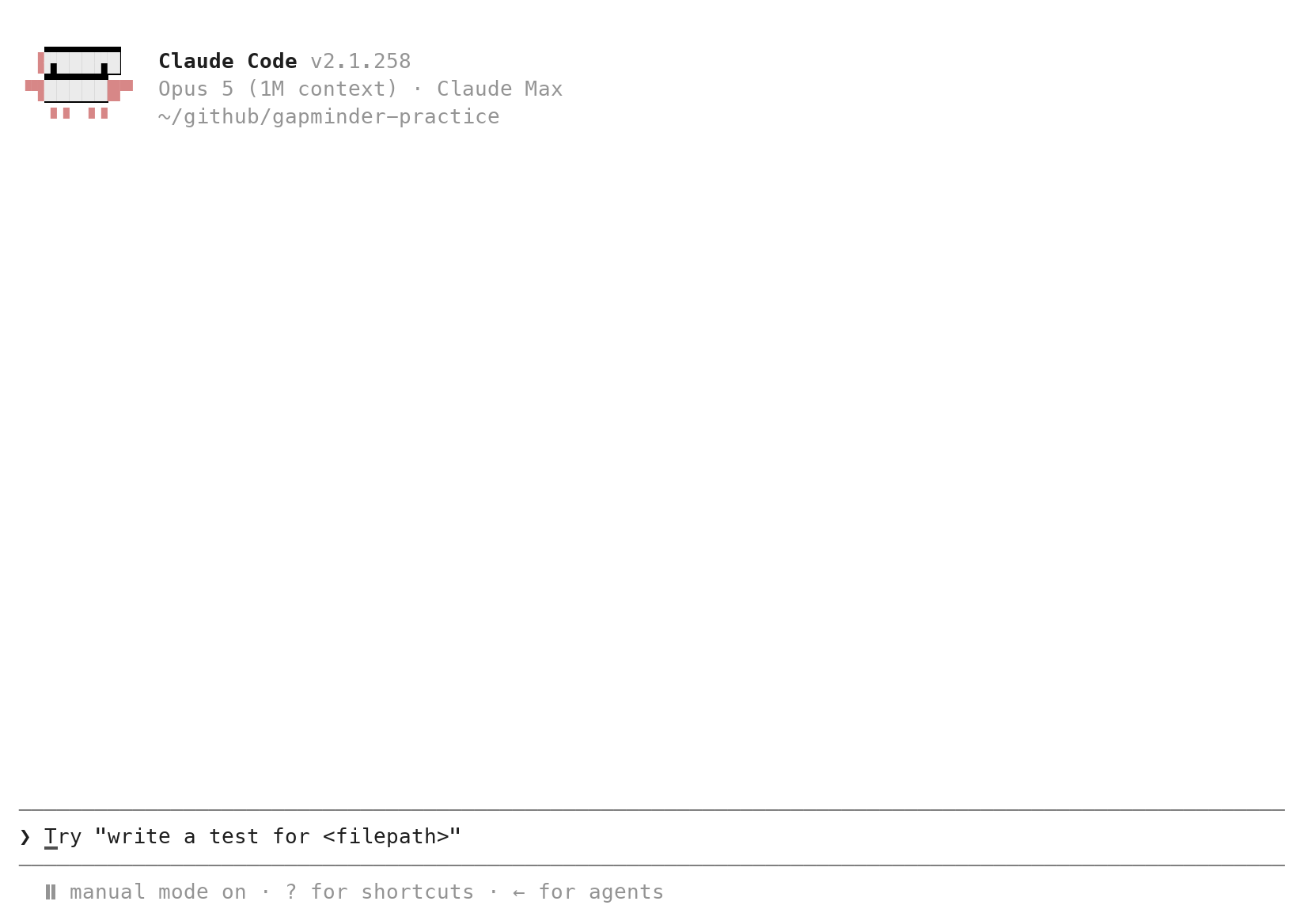
Four lines matter: the version; the model and plan (yours differ from the captured account’s); the folder; and the status line, ⏸ manual mode on. The folder must end in placements (on Windows it starts with C:/Users/); the captured screen shows another folder. The ❯ is where a prompt goes; Enter sends it.
Every Claude Code screen on this page comes from real runs, captured in September 2026 with the version the welcome screen shows; the RStudio screens are separate captures. The interface changes between versions, and replies vary from run to run: the wording of a summary, sometimes the code. The steps do not.
Keys, commands, and a second Terminal tab
| Key or command | Does |
|---|---|
| Enter | sends the prompt |
| Esc | interrupts; on a question, declines |
| ↑ | brings back the previous prompt |
/clear |
new conversation, same folder |
/exit (or Ctrl+C twice) |
leaves Claude Code |
| Tools → Terminal → New Terminal | a second tab for git |
Five keys a novice needs, and one RStudio habit: Claude Code occupies its Terminal tab, so git commands go in a second one. Tools → Terminal → New Terminal opens Terminal 2; the dropdown at the top of the Terminal pane switches between them. Leave Claude Code in Terminal 1 and type git in Terminal 2. If the Terminal shows R’s > prompt instead of ❯, you typed claude in the Console: Tools → Terminal → New Terminal, then again. Outside RStudio, a second terminal window in the same folder does the same job; in VS Code the + button on the terminal panel opens it, and the Source Control view lists the changed files and shows each diff when clicked.
Prompt 1: git, from inside the tool
Prompt to paste into Claude Code (captured run)
Initialize a git repository in this folder, add a .gitignore for an RStudio
project (.Rproj.user, .Rhistory, .RData), and commit everything with the
message "New project".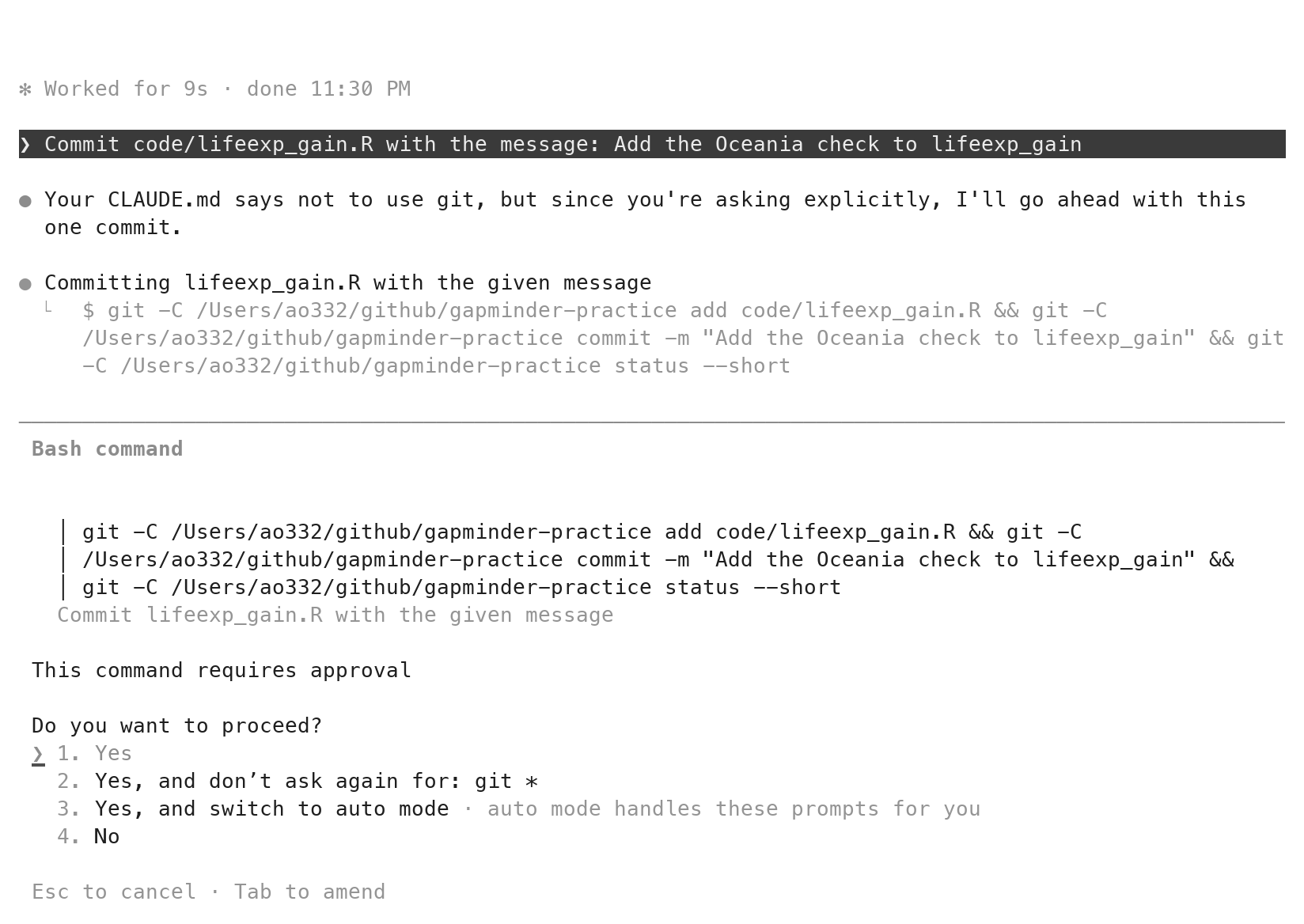
The first prompt asks the tool to do what you would otherwise type: git init, a .gitignore, a first commit. In the captured run it listed the folder, wrote .gitignore (a Create file box, three lines), then ran one command, git init && git add -A && git commit -m ... && git log --oneline && git status, shown in full in a Bash command box before it ran. 1. Yes runs it; the other answers turn the asking off, for git or for everything; leave them. The reply named the commit and said the tree was clean. Check it yourself in a second Terminal tab (next section): git log --oneline prints one commit.
One detail to know: a commit the tool makes carries a Co-Authored-By line in the message naming the model. That is a fair record of who wrote what, and it belongs in your disclosure too.
⏺ Bash(ls -la <project>)
  ⎿ total 8
    drwxr-xr-x@  3 ao332  wheel    96 Sep 21 23:36 .
    drwx------@ 47 ao332  wheel  1504 Sep 21 23:36 ..
    -rw-r--r--@  1 ao332  wheel    89 Sep 21 23:36 placements.Rproj
⏺ Write(<project>.gitignore)
  .Rproj.user
  .Rhistory
  .RData
  ⎿ File created successfully at: <project>.gitignore
⏺ Bash(git init && git add -A && git commit -m "New project

Co-Authored-By: Claude Opus 5 (1M context) <noreply@anthropic.com>" && git log --oneline && git status)
  ⎿ Initialized empty Git repository in <project>.git/
    [main (root-commit) 36333d3] New project
     2 files changed, 7 insertions(+)
     create mode 100644 .gitignore
     create mode 100644 placements.Rproj
    36333d3 New project
    On branch main
    nothing to commit, working tree clean
⏺ Reply:
  Done. Git repo initialized on `main`, `.gitignore` added with `.Rproj.user`, `.Rhistory`, `.RData`, and the initial commit `36333d3 "New project"` contains `.gitignore` and `placements.Rproj`. Working tree is clean.
One task per prompt: the four parts
- The goal: what the script must do, with names for its inputs and its output.
- The mistake to avoid, named: the plausible wrong reading. Call it the failure mode.
- The file to write, and where:
code/<name>.R. - What not to do: no other files; no git, so that you read the diff and commit; and whether to run the script.
- Prompt 1 had three of the four; Prompt 2, the scraper, has all four. Paste them; do not retype them.
A prompt that hands the tool one task has four parts, in any order. The goal: what the script must do, with names for what it reads and what it writes. The mistake to avoid, named: the plausible wrong reading a careful person could take; call it the failure mode. The file to write and where: which file, in which folder. What not to do: no other files; no git, so that the commit stays yours and the diff gets read; and whether to run the script or leave that to you. The fourth part is what keeps the diff small enough to read. Prompt 1 had a goal, a file and a “what not to do”; Prompt 2, the scraper, has all four. Every prompt on this page is the exact text of the captured run; paste it, do not retype it.
How much to ask for in one prompt: one task, one file
| Too big to check | Right-sized |
|---|---|
| “Do my analysis of the placements.” | “Write code/placements.R: the table on the placements page, saved as data/placements.csv, four columns.” |
| “Make a report on placements.” | “Add a column postdoc: TRUE when the position is a postdoc. Change nothing else.” |
| “Fix my script.” | “The 2015 rows are missing; change the line that filters the years, nothing else.” |
“Do my analysis of the placements” cannot be checked, because no number in the answer is one you could have worked out first. “Write code/placements.R: the table at that address saved as data/placements.csv” can: the page shows 16 rows for 2026, you count them in a few seconds, and the CSV must contain 16 rows for 2026 or the script is wrong. “Add a column postdoc” can too: the browser’s find box counts the spellings on the page.
So the unit to hand over is one task that writes one file and produces at least one number you can get yourself. A large job is several of these in a row, each checked before the next is sent, one per conversation. That is also why the third row of the table replaces “Fix my script” with a sentence naming the one thing that is wrong: it turns an open-ended request into a change whose size you know before you read the diff.
Three questions before you send a prompt
- Can you say in advance what a wrong answer would look like, and write that into the prompt?
- Can you work out one number of the answer yourself, from the page or from rows on your screen?
- Could you read the whole diff in five minutes?
- Any no: the task is too big. Split it and send the first part.
Before pasting, three questions, and all three are about what you will do after the reply arrives.
Can you say in advance what a wrong answer would look like? Not “might it be wrong”, but what shape the error would take: rows dropped by a bad match, the countries averaged instead of the people, the other table on the page read instead of this one. You write that sentence into the prompt, which is the “mistake to avoid” part of the four. If no wrong answer occurs to you, you do not yet understand the task well enough to check it.
Can you work out one number of the answer yourself? One number is enough, from the page or from rows on your screen: 16 rows for the most recent year, 25 postdocs, two countries in Oceania. You get it before the script runs, so that the comparison afterwards is a comparison and not an impression.
Could you read the whole diff in five minutes? One new file of thirty lines, yes. Four files and two hundred lines, no: you will skim, and skimming is how a wrong line gets committed.
A no to any of them means the task is too big. Split it and send the first part; the next parts get easier to check once the first is in.
The five-step delegation loop
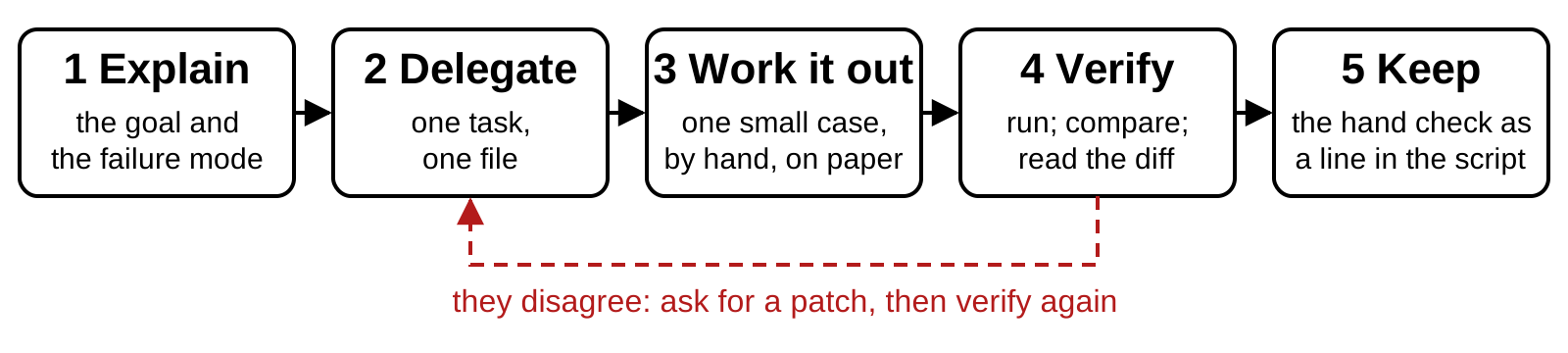
Every delegation runs the same five steps. State the goal and the mistake you do not want (the failure mode). Delegate one task. Count by hand what it must return on a case small enough to check, on the page or from rows you can see, before anything runs. Run it and compare the printed value with the one on paper; if they disagree, read the diff, ask for a patch, run again. Then write the hand check into the script as a line that stops it when the value drifts (stopifnot()), so the next run checks itself. The value on paper comes from the data, not from a guess; that is what makes step 4 a comparison and not an impression.
This loop wraps the loop inside the tool. The tool gathers context, acts and checks its own result; you decide what right means and check it once more from outside. Anthropic’s best practices for Claude Code give the same advice in their own words: state verification criteria in the prompt (an example input and its expected output), scope the task to one file and one scenario, describe the symptom and what fixed looks like when asking for a fix, and, in the list of common failures, “If you can’t verify it, don’t ship it.” The five steps are that advice arranged for a novice who runs the script and reads the diff in person.
Prompt 2: the scraper, run until it works
Prompt to paste into Claude Code (captured run)
Write code/placements.R. It reads the table "Recent job placements" at
https://business.cornell.edu/admissions/graduate/phd-aem/for-hire/ and saves
it as data/placements.csv with the page's four columns, year, name, position,
organization, one row per graduate. Use the rvest package for the HTML and
base R for the rest. Run it with Rscript code/placements.R; if it fails, fix
the script and run again. Then show me the first five rows and the number of
rows. Do not use git.
The prompt has the four parts: the goal with names, the file and its path, what not to do, and one more sentence than before: run it, and fix it if it fails.
Two of those need a word. “Run it with Rscript” is new: until now every prompt on this page left the running to you, and this one hands it over, because the check that follows is yours either way. “Do not use git” looks like a contradiction one slide after asking the tool to initialize the repository, and it is the opposite: a commit the tool makes for you is a diff you never read. Prompt 1 was the exception, and even there the exact git command appeared in a box before it ran. From here the tool writes and runs; you read the diff and commit. That sentence is repeated in the next two prompts, and then it disappears into CLAUDE.md, which says it once for every prompt after that. In the captured run the tool first ran two short R commands to look at the page (the page has two tables, one for alumni for hire and one for placements), then wrote the script, ran it, and reported: 109 rows, the first five, and how it chose the table. It ran cleanly the first time; a scraper often does not, and the sentence “if it fails, fix the script and run again” is what lets the tool iterate without you.
The check is yours. The total, 109, is too long to count by hand, so count one year: the 2026 rows sit at the top of the table, sixteen of them when captured. In the Console, sum(read.csv("data/placements.csv")$year == 2026) must print the same number. If it does not, the scraper dropped or duplicated rows, which is exactly the silent error a clean run hides.
⏺ Reply:
  Let me look at the page structure first.
⏺ Bash(Rscript -e '
library(rvest)
pg <- read_html("https://business.cornell.edu/admissions/graduate/phd-aem/for-hire/")
tbls <- html_elements(pg, "table")
cat("n tables:", length(tbls), "\n")
for (i in seq_along(tbls)) { cat("--- table", i, "---\n"); print(head(html_table(tbls[[i]], header = TRUE), 4)) }
hs <- html_elements(pg, "h2, h3, h4"); print(html_text2(hs))
')
  ⎿ n tables: 2
    --- table 1 ---
    # A tibble: 2 × 4
      Name           `Current position`              Organization `More information`
      <chr>          <chr>                           <chr>        <chr>
    1 Tarana Chauhan Visiting Assistant Professor    Colgate Uni… Personal website
    2 Seungmin Lee   Postdoctoral Research Associate Pulte Insti… Personal website
    --- table 2 ---
    # A tibble: 4 × 4
       Year Name               Position                       Organization
      <int> <chr>              <chr>                          <chr>
    1  2026 Trevor Dean Arnold Postdoc                        University of Calgary…
    2  2026 Molly Jane Doruska Assistant Professor            Clarkson University
    3  2026 Sijia Fan          Assistant Professor of Finance University of Ottawa,…
    4  2026 Adrian Haws        Postdoc                        Norwegian School of E…
     [1] "Currently for hire"
     [2] "Apurva Borar"
     [3] "Bingyan Dai"
     [4] "Luc Esprabens"
     [5] "Nicholas Grandstaff"
     [6] "Yurou He"
     [7] "Alan Hinds"
     [8] "Jerzy Jaromczyk"
     [9] "Vrinda Kapoor"
    [10] "Emil Kee-Tui"
    [11] "Xueyun Luo"
    [12] "Anthony Ponce"
    [13] "Kasim Saiyyad"
    [14] "Lakshita Sharma"
    [15] "Jayen Tan"
    [16] "Yunran Wang"
    [17] "Motoyuki Yoshihara"
    [18] "Alumni for hire"
    [19] "Recent job placements: Ph.D. in Applied Economics & Management"
    [20] "Information For"
    [21] "Our Schools"
    [22] "Resources"
⏺ Reply:
  The second table is the placements table. Let me check how it's associated with its heading so the script selects it robustly.
⏺ Bash(Rscript -e '
library(rvest)
pg <- read_html("https://business.cornell.edu/admissions/graduate/phd-aem/for-hire/")
t2 <- html_elements(pg, "table")[[2]]
print(html_attrs(t2))
print(html_text2(html_element(t2, "caption")))
d <- html_table(t2, header = TRUE); cat("rows:", nrow(d), "\n"); print(tail(d, 3)); print(table(d$Year)); print(sum(d$Name == "" | is.na(d$Name)))
')
  ⎿ id                          class
                  "tablepress-202" "tablepress tablepress-id-202"
                   aria-labelledby
             "tablepress-202-name"
    [1] NA
    rows: 109
    # A tibble: 3 × 4
       Year Name         Position                Organization
      <int> <chr>        <chr>                   <chr>
    1  2015 Lin Sun      AVP Risk Management     Industrial and Commercial Bank of …
    2  2015 Joanna Upton Post-Doctoral Associate Dyson School, Cornell University
    3  2015 Jubo Yan     Assistant Professor     Nanyang Technological University

    2015 2016 2017 2018 2019 2020 2021 2022 2023 2024 2025 2026
      10    8    7   11    6    7   10    6    5   14    9   16
    [1] 0
⏺ Write(<project>code/placements.R)
  # Scrape "Recent job placements" (Ph.D. in Applied Economics & Management)
  # from the Dyson "for hire" page and save it as data/placements.csv.
  # Uses rvest for the HTML and base R for everything else.

  library(rvest)

  url <- "https://business.cornell.edu/admissions/graduate/phd-aem/for-hire/"
  out <- file.path("data", "placements.csv")

  page   <- read_html(url)
  tables <- html_elements(page, "table")

  # The page has several tables (e.g. "Currently for hire"); pick the one whose
  # header is Year / Name / Position / Organization rather than relying on its
  # position or TablePress id.
  wanted  <- c("year", "name", "position", "organization")
  headers <- lapply(tables, function(tb) tolower(html_text2(html_elements(tb, "th"))))
  hit     <- which(vapply(headers, function(h) identical(h, wanted), logical(1)))
  if (length(hit) != 1) {
    stop("Expected exactly one placements table with columns ",
         paste(wanted, collapse = ", "), "; found ", length(hit))
  }

  placements <- as.data.frame(html_table(tables[[hit]], header = TRUE),
                              stringsAsFactors = FALSE)
  names(placements) <- wanted
  placements$year   <- as.integer(placements$year)
  for (v in wanted[-1]) placements[[v]] <- trimws(placements[[v]])

  # Drop any completely empty rows (spacer rows in the table) but keep one
  # row per graduate otherwise.
  placements <- placements[placements$name != "", ]
  rownames(placements) <- NULL

  dir.create(dirname(out), showWarnings = FALSE, recursive = TRUE)
  write.csv(placements, out, row.names = FALSE)

  cat("Wrote", nrow(placements), "rows to", out, "\n")
  ⎿ File created successfully at: <project>code/placements.R
⏺ Bash(Rscript code/placements.R && Rscript -e 'd <- read.csv("data/placements.csv"); print(head(d, 5)); cat("rows:", nrow(d), "\n")')
  ⎿ Wrote 109 rows to data/placements.csv
      year               name                                    position
    1 2026 Trevor Dean Arnold                                     Postdoc
    2 2026 Molly Jane Doruska                         Assistant Professor
    3 2026          Sijia Fan              Assistant Professor of Finance
    4 2026        Adrian Haws                                     Postdoc
    5 2026         Jihye Jang Tenure-track Assistant Professor of Finance
                                           organization
    1     University of Calgary Department of Economics
    2                               Clarkson University
    3 University of Ottawa, Telfer School of Management
    4                     Norwegian School of Economics
    5                  Texas Christian University (TCU)
    rows: 109
⏺ Reply:
  The script ran cleanly on the first try and wrote `data/placements.csv`.

  **First five rows:**

  | year | name | position | organization |
  |---|---|---|---|
  | 2026 | Trevor Dean Arnold | Postdoc | University of Calgary Department of Economics |
  | 2026 | Molly Jane Doruska | Assistant Professor | Clarkson University |
  | 2026 | Sijia Fan | Assistant Professor of Finance | University of Ottawa, Telfer School of Management |
  | 2026 | Adrian Haws | Postdoc | Norwegian School of Economics |
  | 2026 | Jihye Jang | Tenure-track Assistant Professor of Finance | Texas Christian University (TCU) |

  **Number of rows:** 109 (graduates from 2015–2026).

  Notes on `code/placements.R`:
  - The page has two tables (the "Currently for hire" table comes first), so the script picks the table whose header is exactly Year / Name / Position / Organization rather than hard-coding its position or TablePress id.
  - It errors out loudly if it doesn't find exactly one such table, so a future page change won't silently write the wrong data.
  - `data/` is created if missing; `year` is stored as an integer and text columns are trimmed.
The approval box for a new file
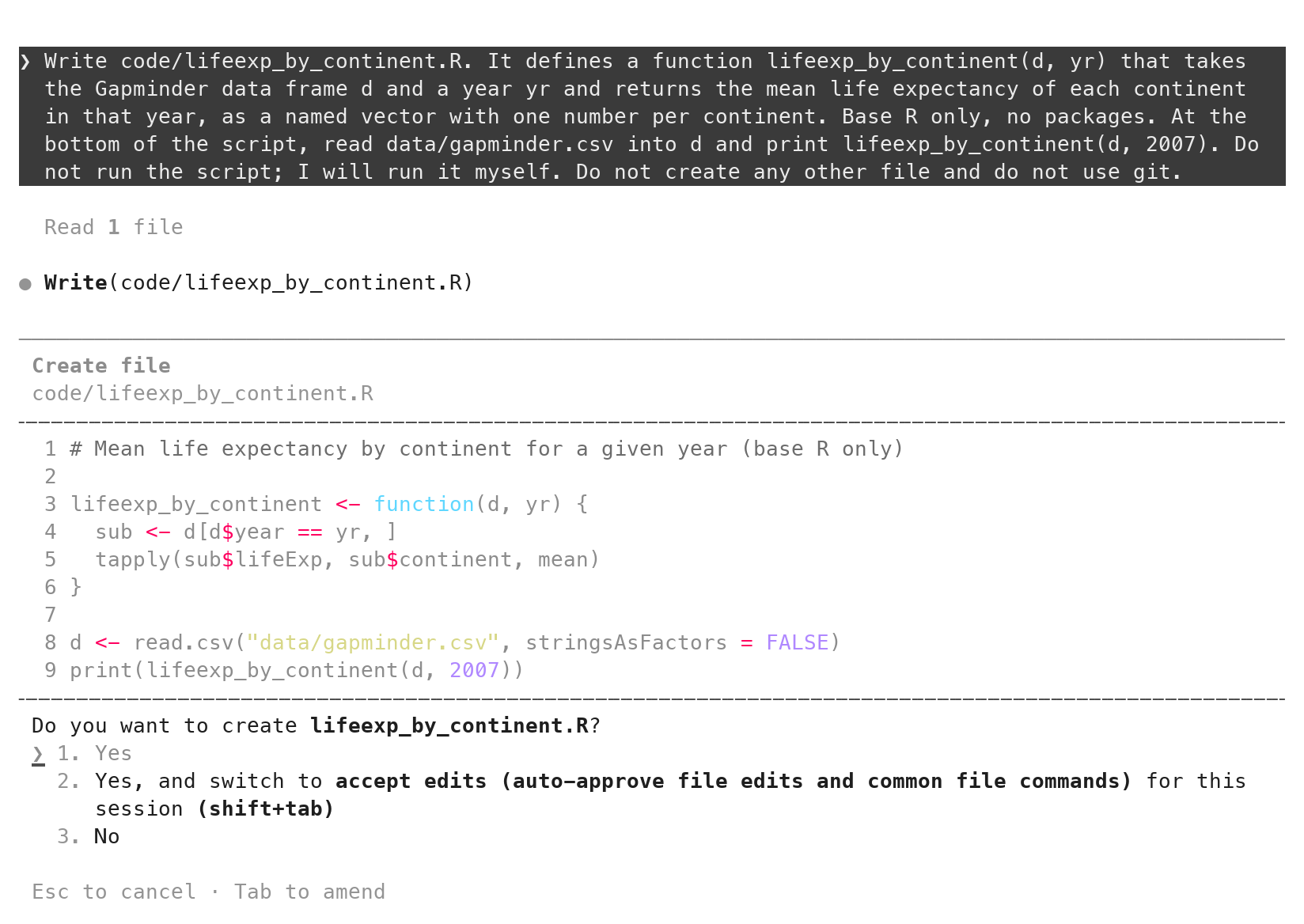
In manual mode the tool shows the file before it exists. The box names the action (Create file), the path, every line of the file, and a question with three answers. 1. Yes (Enter) writes the file. 2. Yes, and switch to accept edits turns the edit questions off for the session; leave it today. 3. No, or Esc, refuses and lets you say why. For the scraper, the lines to read before pressing anything are the ones that pick the table; the next section shows them.
git diff --staged on the scraper: the lines to read
git add code/placements.R
git diff --staged
wanted <- c("year", "name", "position", "organization")
headers <- lapply(tables, function(tb) tolower(html_text2(html_elements(tb, "th"))))
hit <- which(vapply(headers, function(h) identical(h, wanted), logical(1)))
if (length(hit) != 1) {
stop("Expected exactly one placements table with columns ", ...)
}A new file has no earlier version, so git diff alone shows nothing; git add it, then git diff --staged prints every line with a +. That is the whole of what the tool did. Read it once from the top. In VS Code, the Source Control view shows the same new file with every line green; reading it there and reading it in the terminal are the same act. The lines above are the ones that carry the risk: they collect every table on the page, keep the one whose header is exactly the four names, and stop the script if there is not exactly one such table. A future change to the page fails loudly instead of writing the wrong table.
Three functions a novice may not know, and may ask the tool to explain or replace: html_elements() finds every element of a kind on the page; vapply() applies a function to each table and promises a logical result; identical() compares two vectors as a whole. “Explain vapply on line 19, then rewrite it as a for loop if that is clearer” is a fair prompt. The full file as written by Prompt 2:
code/placements.R (after Prompt 2)
# Scrape "Recent job placements" (Ph.D. in Applied Economics & Management)
# from the Dyson "for hire" page and save it as data/placements.csv.
# Uses rvest for the HTML and base R for everything else.

library(rvest)

url <- "https://business.cornell.edu/admissions/graduate/phd-aem/for-hire/"
out <- file.path("data", "placements.csv")

page   <- read_html(url)
tables <- html_elements(page, "table")

# The page has several tables (e.g. "Currently for hire"); pick the one whose
# header is Year / Name / Position / Organization rather than relying on its
# position or TablePress id.
wanted  <- c("year", "name", "position", "organization")
headers <- lapply(tables, function(tb) tolower(html_text2(html_elements(tb, "th"))))
hit     <- which(vapply(headers, function(h) identical(h, wanted), logical(1)))
if (length(hit) != 1) {
  stop("Expected exactly one placements table with columns ",
       paste(wanted, collapse = ", "), "; found ", length(hit))
}

placements <- as.data.frame(html_table(tables[[hit]], header = TRUE),
                            stringsAsFactors = FALSE)
names(placements) <- wanted
placements$year   <- as.integer(placements$year)
for (v in wanted[-1]) placements[[v]] <- trimws(placements[[v]])

# Drop any completely empty rows (spacer rows in the table) but keep one
# row per graduate otherwise.
placements <- placements[placements$name != "", ]
rownames(placements) <- NULL


dir.create(dirname(out), showWarnings = FALSE, recursive = TRUE)
write.csv(placements, out, row.names = FALSE)

cat("Wrote", nrow(placements), "rows to", out, "\n")
How to judge a model’s diff: five questions
- Which files changed? Only the ones you named? (
git status) - What was deleted? Read the red lines first. Did you ask for each one to go?
- Which line does the actual work? Does it do what you asked, and nothing more?
- Where does each value in it come from? Your data, or typed into the code by the tool?
- Is there a line you could not explain to someone? Ask what it does before you accept it.
Five questions, in order, every time, whether the diff is in the approval box or in git diff. Are the only changed files the ones you named (git status)? Are there - lines, and did you ask for each removal? Which line does the math, and does it match the failure mode you named? For every value the new lines contain, can you say where it came from: your data, your prompt, or the tool’s own knowledge? Is there a line you cannot explain? For the last one, ask for an explanation before accepting, or ask for a version that uses only functions you know. Read the deletions first: a line removed without being asked for is the dangerous kind. Question 4 is the one worth slowing down on: a value that came neither from your data nor from your prompt came from the tool’s memory, and memory is not a source. The country column, later today, is where these five questions earn their keep.
Prompt 3: a postdoc flag
Prompt to paste into Claude Code (captured run)
Add a column postdoc to the table before it is saved: TRUE when the position
is a postdoc, FALSE otherwise. Change nothing else. Run it again and tell me
how many rows are TRUE.
+# Flag postdoc positions; spellings on the page include "Postdoc", "Post-doc",
+# "Post Doctoral Fellow" and "Postdoctoral Associate".
+placements$postdoc <- grepl("post[- ]?doc", placements$position, ignore.case = TRUE)A one-line task with a check you can do in the browser. The tool first printed every position containing “post”, eleven spellings from “Post-doc” to “Earth Institute Postdoctoral Fellow”, then added one comment and one line: a pattern that accepts “postdoc”, “post-doc” and “post doc” in any case. It ran the script again and reported 25 of 109 rows TRUE, and flagged one judgment call, a graduate listed as “Postdoctoral Associate; Assistant Professor of Economics”, counted as TRUE.
The hand check is the browser’s find box on the page. Find is not case-sensitive, so “postdoc” counts every “Postdoc” and “Postdoctoral”, 15 when captured; “post-doc” counts the hyphenated ones, 9; “post doc” counts the one with a space. 25. A pattern that matched only “postdoc” would have printed 15 and run clean; that is the failure mode this check catches, and it is worth trying on purpose in the practice set.
The approval box for an edit: red and green lines
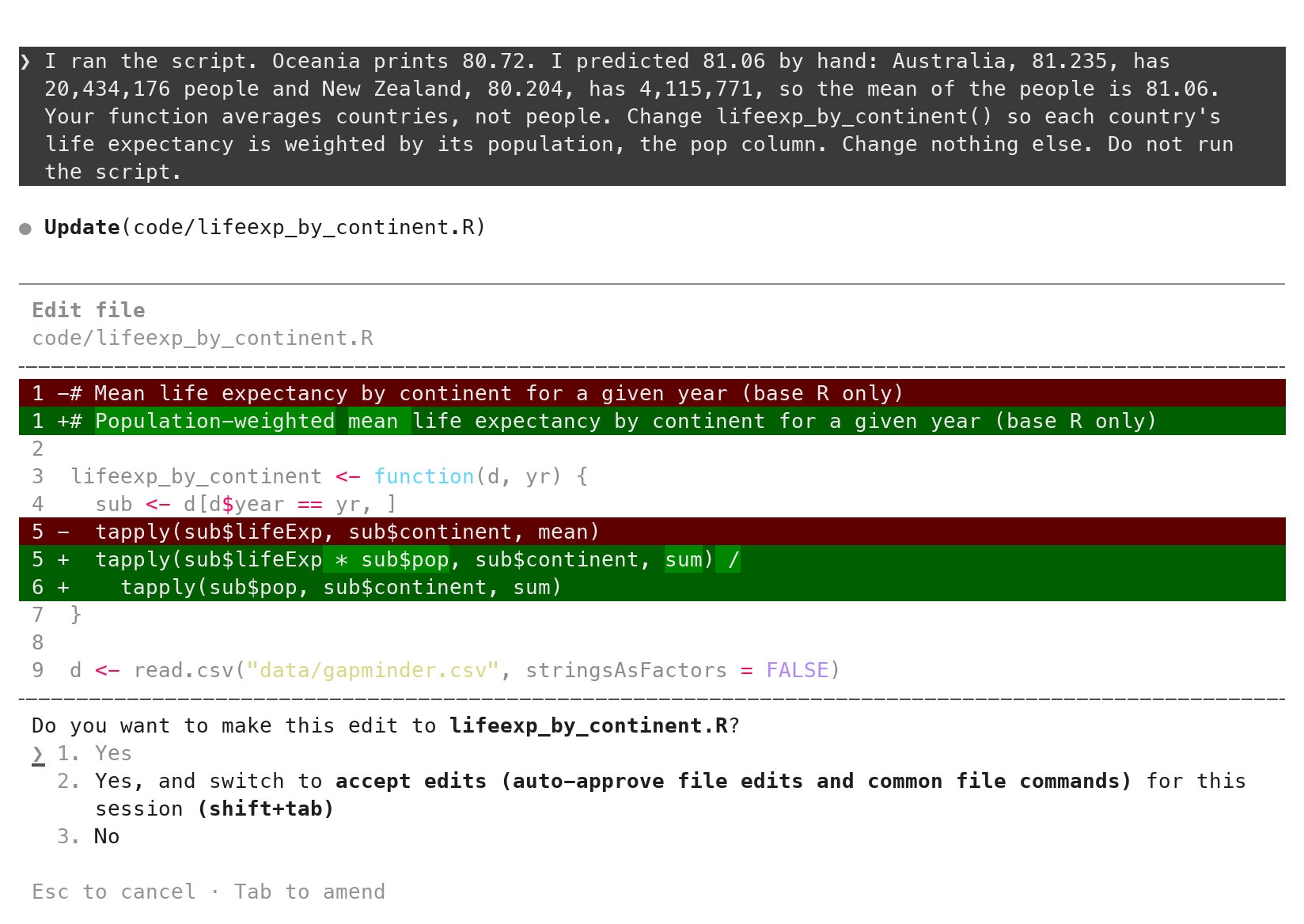
The tool shows an edit as a diff before it lands: removed lines in red with -, added lines in green with +. Read every red line first. In the box shown, two lines go: the line asked about, and a header comment the tool rewrote although nobody asked. It is harmless, and it is the kind of extra change the red lines exist to show. 1. Yes accepts. The postdoc edit is one comment and one line, all green; the country edit is thirty green lines, and every country name in them is question 4. Editor extensions show the same edit in a diff window with accept and reject buttons; whichever window you read it in, the diff is the same object git diff prints.
Your own check, typed into the script and committed with it
 placements$postdoc <- grepl("post[- ]?doc", placements$position, ignore.case = TRUE)
+
+# Counted on the page on 2026-09-21: 16 rows for 2026; postdoc spellings
+# 15 + 9 + 1. When the page changes this stops the script: recount, then edit.
+stopifnot(sum(placements$year == 2026) == 16, sum(placements$postdoc) == 25)
You counted two things yourself: 16 rows for the most recent year, on the page, and 25 postdocs, with the browser’s find box. So far those counts live in your head and on a scrap of paper, and they check the script once. One line turns them into a check the script makes every time anyone runs it. stopifnot() does nothing when its conditions are true and stops the script, naming the condition, when one is false.
Type it yourself in RStudio, after the postdoc line and before write.csv, save, then Session → Restart R and Source: no error, which means the script reproduced both of your numbers. Type it rather than asking the tool for it: the checker should not be the thing being checked. Then commit the script, check and all. From that commit on, the check is part of the code: it travels with the file, it runs for whoever opens the project next, and it is in the history with your name on it.
The counts will go stale: the page adds a class every year. When it does, the script stops with Error: sum(placements$year == 2026) == 16 is not TRUE, which is the script telling you that the source changed and the counts need redoing. Recount on the page, edit the numbers and the date in the comment, run again. A check that never fails is a check on nothing.
The commit message says who wrote what: the scraper and the flag came from the tool, the counts are yours. That one sentence is also what fills the disclosure block of a submission.
git add code/placements.R
git commit -m "Scrape placements, flag postdocs (Claude Code); two hand counts"
git log --oneline
#> <your hash> Scrape placements, flag postdocs (Claude Code); two hand counts
#> <your hash> New project
Prompt 4: a country column
Prompt to paste into Claude Code (captured run)
Add a column country with the country of the organization. Change nothing
else. Run it again and show me the number of rows per country.
What it printed after running the script again
United States 77   China 7   India 4   Australia 3   Canada 3
Germany 2   Hong Kong 2   Singapore 2   Finland 1   France 1
New Zealand 1   Norway 1   Saudi Arabia 1   South Korea 1
Switzerland 1   Vietnam 1   Zambia 1
The prompt is the same shape as the postdoc flag: one column, change nothing else, run it again, report. What came back looks like the same kind of success. The tool listed the 107 distinct organizations, added the column, ran the script and printed the counts above: 109 rows and seventeen countries, no error. Its reply said the assignments “all look right” and flagged two it was unsure of.
Read the next section before you decide what to do with that. The lines it added, in full:
code/placements.R (the country block, Prompt 4)
# Country of the organization. The page does not list it, so it is inferred
# from the organization name: the first matching pattern below wins, and
# anything unmatched is treated as United States (the large majority).
# International organizations (IMF, World Bank, IDB, USAID) are assigned the
# country of their headquarters. "DTUM" is read as TUM (Munich).
country_patterns <- c(
  "Australia"    = "Monash|New South Wales|University of Sydney",
  "Canada"       = "Alberta|Calgary|Ottawa",
  "China"        = "Beijing|Peking|Renmin|Industrial and Commercial Bank of China|Xi.an Jiaotong",
  "Finland"      = "Finland",
  "France"       = "Paris School of Economics",
  "Germany"      = "Ludwig-Maximilian|DTUM",
  "Hong Kong"    = "Hong Kong",
  "India"        = "Azim Premji|Indian Institute of Management|IIMA|Krea",
  "New Zealand"  = "New Zealand",
  "Norway"       = "Norwegian",
  "Saudi Arabia" = "KAPSARC",
  "Singapore"    = "Nanyang|^NUS$",
  "South Korea"  = "KDI",
  "Switzerland"  = "Bern",
  "Vietnam"      = "VNUHCM",
  "Zambia"       = "Zambia"
)
placements$country <- "United States"
for (ctry in names(country_patterns)) {
  hit <- grepl(country_patterns[[ctry]], placements$organization) &
    placements$country == "United States"
  placements$country[hit] <- ctry
}
The diff for the country column: where does each value come from?
country_patterns <- c(
  "Australia"    = "Monash|New South Wales|University of Sydney",
  "Canada"       = "Alberta|Calgary|Ottawa",
  "China"        = "Beijing|Peking|Renmin|Xi.an Jiaotong",
  "Germany"      = "Ludwig-Maximilian|DTUM",
  ...                                        # sixteen countries in all
)
placements$country <- "United States"
for (ctry in names(country_patterns)) { ... }
Question 4 of the five, asked of this diff: for each value the new column can take, where did it come from? The organization column comes from the page, and the code matches fragments of it. But every country name in the result is typed into the script: sixteen of them in the table, and "United States" as the value every row starts with and keeps if no pattern matches it, which is 77 of the 109 rows.
So the column is not read from anywhere. It is produced by the tool’s own knowledge of these institutions, written into your code as if it were data. The next section counts how much of it the page can support.
Where the countries came from
- The page names a place for 14 of 109 rows. Nothing else on the page says a country.
- The rest is memory: a table it typed, and a default. It said so, in a comment and in its reply, and the column still went into the CSV.
- DTUM: Denmark in one run, Germany in the next. Same prompt, same page.
- Plausible is not the same as right. A fact it did not read is a guess, however confident the sentence around it.
- The script ran without error both times.
Count what the page supports. Fourteen of the 109 organization strings name a place (“University of Alberta, Canada”, “KDI School … (Korea)”, “Federal Home Loan Bank of Topeka, KS”). For the other 95 the page says nothing, and the tool cannot read a country from a name; it can only remember one. The table it typed is a set of claims about the world, and the default is a larger one: 77 rows became “United States” because no pattern matched them, which is the same fate for “Clarkson University” and for an organization it had never heard of.
The tool was honest about it. The comment says “inferred”, the reply says the page has no country field, and it flagged the two entries it was least sure of. Honesty in the transcript does not change what is in the CSV: a country column with no source, ready to be mapped, tabulated and cited.
Run the same prompt twice and the guess moves. On the same evening, the first run read “DTUM” as DTU Management in Denmark; the second, from the same page with the same prompt, read it as the Technical University of Munich in Germany. Both runs wrote a country, both ran without error, and both replies said the assignments looked right. That is what “plausible is not the same as right” looks like in a column.
What would have caught it earlier
- A plan before code. “Describe your approach before writing any code.” The captured reply proposes a lookup table it would “populate myself from knowledge of the institutions” and mark “the handful I’m unsure about”. You read that and say no.
- Question 4 of the five, asked of the diff. Where does each value come from? Sixteen country names sit in the code, and none of them came from the page or from you.
- A reviewer with fresh eyes. A second Claude that never saw this conversation, later today, found it in one turn.
Three habits from the first part of this page would each have caught the column before it existed. The cheapest is the plan. Sent on the same project before Prompt 4, “Describe your approach before writing any code” produced the reply below: a hand-curated lookup table, filled in “from knowledge of the institutions”, with the uncertain ones flagged. A reader who owns the question stops there: the source is the model’s memory, so the column is not wanted in that form.
The second is question 4 of the five questions for any diff: are the where does each value come from? Sixteen country names and a default sit in the code itself. None came from the page, and none came from your prompt. The third is a reviewer that never saw the conversation, the subagent in the seventh part of this page, which reported the table and the default with line numbers in one turn.
⏺ Reply:
  Here's what I found and what I'd do.

  **What's there.** `code/placements.R` scrapes the Dyson placements table and writes `data/placements.csv` (109 rows; columns `year, name, position, organization, postdoc`). The `organization` column has ~105 distinct free-text strings — mixed granularity (`"Brown"`, `"NUS"`, `"DTUM"`, `"Stout"`), embedded departments (`"Purdue University, Department of Agricultural Economics"`), occasional location hints (`"Peking University (Beijing)"`, `"KDI School … (Korea)"`, `"University of Alberta, Canada"`), and a few two-organization entries (`"National Bureau of Economic Research, Claremont McKenna College"`).

  **Approach: a hand-curated lookup table, joined in the script.**

  1. **New file `data/org_country.csv`** with two columns, `organization, country`, one row per distinct organization string exactly as it appears in the scraped data (after `trimws`). I'd populate it myself from knowledge of the institutions, and mark the handful I'm unsure about in my reply so you can check them.
  2. **Edit `code/placements.R`**: after the `postdoc` flag and before `write.csv`, read the lookup, `match()` on the exact organization string, and add `placements$country`. If any organization isn't in the table, print the unmapped names and leave `country = NA` (warn rather than stop, so a re-scrape never fails when a new graduate appears — you just extend the table). Column order: `year, name, position, organization, country, postdoc`.

  **Why a lookup table rather than the alternatives.**
  - Regex heuristics ("University of X" → US) break immediately on `University of Sydney`, `University of Bern`, `University of Calgary`.
  - Geocoding / ROR / web APIs add a network dependency and choke on abbreviations like `NUS`, `IIMA`, `DTUM`, `Brown`.
  - The dataset is ~100 rows; a table is trivial to maintain, fully reproducible, and the script rewrites `placements.csv` on every run, so the mapping has to live outside that file anyway.

  **Judgment calls I'd make unless you say otherwise.**
  - **Country labels:** plain English short names (`United States`, `United Kingdom`, `South Korea`, `Hong Kong`, …). I can add an ISO3 code column too if you want it for later joins.
  - **International organizations** (World Bank, IMF, Inter-American Development Bank, USAID): `United States` — headquarters location. Alternative is a separate "International" label; say which you prefer.
  - **Hong Kong**: `Hong Kong`, not `China`.
  - **Multinationals** (Uber, Citibank, Morgan Stanley, Capital One, StoneX, Acadian): country of headquarters (US), since the `position` text doesn't give an office location.
  - **Two-org entries**: country of the first-listed organization (both examples are US anyway).
  - **Uncertain ones I'd flag:** `DTUM` (likely DTU Management, Denmark), `Stout` (US consulting firm), `Cooper/Smith` (US), `Econic Partners LLC` (US), `Center for Governmental Research` (US, Rochester NY).

  If that all sounds right — or you want ISO codes / a different rule for international orgs — tell me and I'll write it.
Prompt 5, the fix: facts you supply live in a data file
Prompt to paste into Claude Code (captured run)
The page does not state countries, so the lookup is a guess. Replace it: write
the distinct organizations to data/countries.csv with an empty country column
for me to fill in, read that file in the script, and set country to NA when
the organization is not in it or its country is empty. Change nothing else.
Run it and tell me how many rows have NA.
countries <- read.csv(file.path("data", "countries.csv"), stringsAsFactors = FALSE)
countries$country[trimws(countries$country) == ""] <- NA
placements$country <- countries$country[match(placements$organization,
countries$organization)]The fix keeps the plumbing and moves the facts. The prompt says what is wrong (the lookup is a guess), what to do instead (a data file with the organizations, filled in by you), and what to do with the gaps (NA). The tool wrote data/countries.csv once, 107 rows with an empty country column, replaced the pattern table with three lines that read the file and match on the organization, ran the script, and reported that all 109 rows have NA. That is the right answer for now: the column claims nothing until a person supplies a fact.
Filling the file is research, not typing: each country comes from the organization’s own page, and a row you cannot settle stays empty. Commit the file with a message that says the countries are yours. From then on the fact, its source and who supplied it are in the record, and the script never invents a country for a new organization; it prints NA and waits for you.
⏺ Read(<project>code/placements.R)
  ⎿ (the file)
⏺ Bash(ls -la data/ && head -3 data/placements.csv 2>/dev/null; Rscript -e 'library(rvest)' && echo ok)
  ⎿ total 24
    drwxr-xr-x@ 3 ao332  wheel     96 Sep 21 23:37 .
    drwxr-xr-x@ 8 ao332  wheel    256 Sep 21 23:39 ..
    -rw-r--r--@ 1 ao332  wheel  10830 Sep 21 23:38 placements.csv
    "year","name","position","organization","postdoc","country"
    2026,"Trevor Dean Arnold","Postdoc","University of Calgary Department of Economics",TRUE,"Canada"
    2026,"Molly Jane Doruska","Assistant Professor","Clarkson University",FALSE,"United States"
    ok
⏺ Reply:
  I'll write the template file once (a one-off, so the script never overwrites your filled-in file), then change the script to read it.
⏺ Bash(Rscript -e '
p <- read.csv("data/placements.csv", stringsAsFactors = FALSE)
orgs <- sort(unique(p$organization))
write.csv(data.frame(organization = orgs, country = ""), "data/countries.csv", row.names = FALSE)
cat(length(orgs), "organizations\n")'; head -5 data/countries.csv)
  ⎿ 107 organizations
    "organization","country"
    "Acadian Asset Management",""
    "Amherst College",""
    "Analysis Group",""
    "Arizona State University, School of Public Affairs",""
⏺ Edit(<project>code/placements.R)
  - # Country of the organization. The page does not list it, so it is inferred
  - # from the organization name: the first matching pattern below wins, and
  - # anything unmatched is treated as United States (the large majority).
  - # International organizations (IMF, World Bank, IDB, USAID) are assigned the
  - # country of their headquarters. "DTUM" is read as TUM (Munich).
  - country_patterns <- c(
  -   "Australia"    = "Monash|New South Wales|University of Sydney",
  -   "Canada"       = "Alberta|Calgary|Ottawa",
  -   "China"        = "Beijing|Peking|Renmin|Industrial and Commercial Bank of China|Xi.an Jiaotong",
  -   "Finland"      = "Finland",
  -   "France"       = "Paris School of Economics",
  -   "Germany"      = "Ludwig-Maximilian|DTUM",
  -   "Hong Kong"    = "Hong Kong",
  -   "India"        = "Azim Premji|Indian Institute of Management|IIMA|Krea",
  -   "New Zealand"  = "New Zealand",
  -   "Norway"       = "Norwegian",
  -   "Saudi Arabia" = "KAPSARC",
  -   "Singapore"    = "Nanyang|^NUS$",
  -   "South Korea"  = "KDI",
  -   "Switzerland"  = "Bern",
  -   "Vietnam"      = "VNUHCM",
  -   "Zambia"       = "Zambia"
  - )
  - placements$country <- "United States"
  - for (ctry in names(country_patterns)) {
  -   hit <- grepl(country_patterns[[ctry]], placements$organization) &
  -     placements$country == "United States"
  -   placements$country[hit] <- ctry
  - }
  + # Country of the organization. The page does not list it, so it is looked up
  + # in data/countries.csv (organization, country), a hand-filled file. Any
  + # organization missing from that file, or with an empty country, gets NA.
  + countries <- read.csv(file.path("data", "countries.csv"), stringsAsFactors = FALSE)
  + countries$country[trimws(countries$country) == ""] <- NA
  + placements$country <- countries$country[match(placements$organization,
  +                                               countries$organization)]
  ⎿ The file <project>code/placements.R has been updated successfully.
⏺ Bash(Rscript code/placements.R && Rscript -e 'p <- read.csv("data/placements.csv"); cat("NA country:", sum(is.na(p$country)), "of", nrow(p), "\n")')
  ⎿ Wrote 109 rows to data/placements.csv
    NA country: 109 of 109
⏺ Reply:
  Done.

  - `data/countries.csv` — 107 distinct organizations (sorted), `country` column empty for you to fill in. Written once as a one-off; the script only reads it, so it won't overwrite your entries.
  - `code/placements.R:39-45` — the hardcoded pattern table and `"United States"` default are gone. The script now reads `data/countries.csv`, treats empty countries as NA, and assigns `country` via `match()` on the organization; unmatched organizations get NA. Nothing else changed.

  Ran it: **109 of 109 rows have NA** for `country`, as expected since the file is still blank.
CLAUDE.md: standing instructions, read at every launch
- A markdown file at the root, read at every launch.
- Layout, style, facts and checks, working rules. Nothing that changes per task.
- Short: 35 lines here. The docs’ target is under 200.
- Committed. It is part of the record.
CLAUDE.md is a markdown file at the repository root that Claude Code reads at the start of every session in that folder. It holds what every prompt would otherwise repeat: the layout, the coding conventions, the working rules. Keep it short; the one here is 35 lines, and the docs’ target is under 200. You commit it with the repository, so it shows in git diff and travels with the code.
/init: a first draft of CLAUDE.md
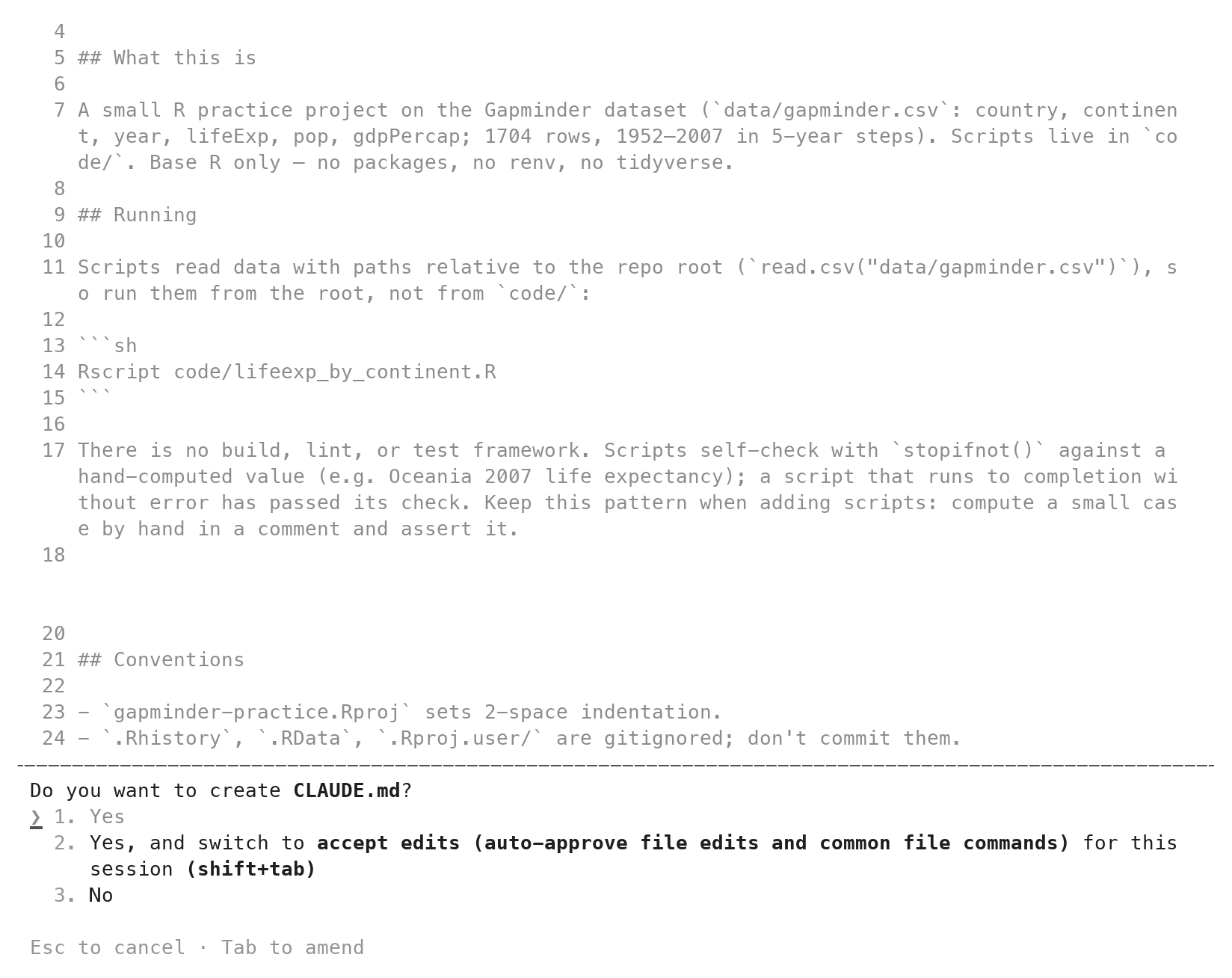
/init proposes a CLAUDE.md in the same approval box as any new file. The screen is from another project; the box is the same.Until now this project has had no CLAUDE.md, and nothing created one implicitly: the tool read the folder itself at each launch and took the rest from your prompts, which is why those prompts had to repeat “base R”, “do not use git” and the rest. Type /init at the prompt. It reads the folder and proposes a CLAUDE.md, shown in the same box as any new file. Accept it, read it, and treat it as a draft: it describes what it found, not what you want, and it knows nothing about where facts may come from. The next section replaces it.
The CLAUDE.md for placements
The full file, with a copy button. In RStudio, click CLAUDE.md in the Files pane (or File → New File → Text File, saved as CLAUDE.md at the project root), paste this over the draft, save. Commit it: git add CLAUDE.md, then git commit -m "Add CLAUDE.md with the project's conventions". Quit Claude Code and relaunch so it reads the new file. The “Facts and checks” section is the country column, written as a standing rule: a fact the tool did not read goes into a data file you fill, never into code.
CLAUDE.md
# placements

Conventions for any code written in this repository.

## Layout

- `code/` holds one script per task. `data/` holds what scripts read and
  write; `data/countries.csv` is filled in by hand and never overwritten.
- Scripts run from the project root, from a clean R session, with
  relative paths like `"data/placements.csv"`.

## Style

- Base R. The only package is `rvest`, and only for reading HTML.
- Short lower-case names with underscores: `by_year`, `n_postdoc`.
- A number or a URL that could change sits at the top of the script as a
  named constant in capitals: `URL <- "..."`.
- Every script starts with a comment saying what it reads and what it
  writes.
- Comments say why, not what.
- A function does one job and returns a value; the script calls it.

## Facts and checks

- A fact that is not on the page and not in a data file does not go into
  code. Put it in a file under `data/` that I fill in, and use `NA` until
  I do.
- After a merge or a filter, check the row count with `stopifnot()`.

## Working rules

- Do not run scripts unless the prompt asks. I run them in RStudio.
- Do not create files I did not ask for. Do not edit `.gitignore` or the
  `.Rproj` file.
- Do not use git unless the prompt asks. I commit.
Style habits in CLAUDE.md: naming, structure, constants, comments
- Naming:
snake_case; file names say what the script does. - Structure: one script per task; a function does one job.
- Named constants:
URL <- "..."at the top, never a bare value below. - Comments say why, not what. A header on every script.
- Facts and checks: a fact not on the page goes in a data file; a row count after every merge.
- Written once. Read at every launch. Copy it to the next repository.
The Style section is the personal part. Names in snake_case, file names that say what the script does. One script per task; a function does one job and the script calls it. Numbers that could change sit at the top as named constants in capitals. Comments say why, not what. These are the habits you use when you write code yourself; written down, they are the brief an assistant reads at every launch. The “Facts and checks” section is the one this project taught: a fact the tool did not read goes into a data file you fill, and a row count follows every merge. Copy the Style and the Facts sections from one repository to the next; the Layout section is the one that changes.
A one-sentence prompt after CLAUDE.md
Prompt to paste into Claude Code (captured run)
Write code/by_year.R: for each year, the number of placements and the number
of postdocs, from data/placements.csv, printed as a table with one row per
year.
# Reads data/placements.csv. Writes nothing; prints a table with one row
# per year giving the number of placements and the number of postdocs.
PLACEMENTS <- "data/placements.csv"
count_by_year <- function(placements) {
...
# Every placement belongs to exactly one year, so the counts must add up.
stopifnot(sum(by_year$n_placements) == nrow(placements))
by_year
}With CLAUDE.md in place, one sentence asked for a small script. What came back has a header saying what it reads and writes, the path as a named constant, a function that does one job and returns a value, a stopifnot() that the per-year counts add up to the row count, and a reply ending “Not run, per the project rules.” None of that was in the prompt; all of it was in the file. The full script:
code/by_year.R
# Reads data/placements.csv. Writes nothing; prints a table with one row
# per year giving the number of placements and the number of postdocs.

PLACEMENTS <- "data/placements.csv"

count_by_year <- function(placements) {
  n_placements <- tapply(placements$postdoc, placements$year, length)
  n_postdoc <- tapply(placements$postdoc, placements$year, sum)
  by_year <- data.frame(
    year = as.integer(names(n_placements)),
    n_placements = as.integer(n_placements),
    n_postdoc = as.integer(n_postdoc)
  )
  # Every placement belongs to exactly one year, so the counts must add up.
  stopifnot(sum(by_year$n_placements) == nrow(placements))
  by_year
}

placements <- read.csv(PLACEMENTS)
by_year <- count_by_year(placements)
print(by_year, row.names = FALSE)
Sourced in RStudio, it prints one row per year, 2015 to 2026, with the number of placements and of postdocs. Conventions go in the file; the task, and any fact the tool might otherwise guess, still go in the prompt.
Subagents: a second Claude with its own context
- A subagent is a separate conversation the tool starts for one task: its own empty context, its own tool list,
CLAUDE.mdincluded. It returns a report, not its working. - When: reading many files, so your context stays small; an independent review of a diff or a rule, so the checker is not the thing being checked.
- One line:
Use a subagent to review code/x.R against this rule: ... Report what it says. Do not edit anything. - Permanent: a file in
.claude/agents/, likeCLAUDE.md: a name, a description, the tools it may use, then its instructions.
A subagent is a second conversation that the tool starts for one task and closes when the task is done. It begins with an empty context: the task, CLAUDE.md, and nothing from your conversation, not the files already read, not the prompt that wrote the code. It has its own list of tools, which can be shorter than the main conversation’s. When it finishes, its report comes back into your conversation as text; its reading and its intermediate steps stay in its own context and are gone.
Two uses fit this course. The first is reading: a task that opens many files fills your context with their contents, and everything the model has in front of it competes for its attention; a subagent reads them in its own context and reports a summary. The second is review: a reviewer that did not see the conversation that produced the code judges the code on its own terms. That is the rule from the check section, the checker is not the thing being checked, applied inside the tool. The docs recommend the same step before treating a task as done, a review of the diff in a fresh context, and warn that a reviewer asked to find gaps will report some even when the work is sound; ask for gaps that affect correctness, not style.
Two ways to use one. The one-line way needs no setup: “Use a subagent to review code/x.R against this rule: … Report what it says. Do not edit anything.” The tool starts a general-purpose subagent with that task. The permanent way is a file in .claude/agents/ at the repository root, committed like CLAUDE.md: a name, a description of when it applies, the tools it may use, then its instructions in plain prose. The tools: line is a fence. A reviewer allowed only Read, Grep and Glob cannot edit a file whatever its instructions say. You call it by name in a prompt. The next section shows one.
A subagent is one more model call, with its own cost, and its report is a claim like any transcript: the line it quotes is what you check.
A read-only reviewer subagent: the file
.claude/agents/hand-check-reviewer.md
---
name: hand-check-reviewer
description: Reviews one R script against one rule from the request. Read-only.
tools: Read, Grep, Glob
---

You review one R script against one rule given in the request. Read the
script. Reply in three lines: the rule; the line of code that follows it
or breaks it, quoted; the verdict, "follows" or "breaks". Do not edit any
file. Do not propose a rewrite unless asked.- Save, commit, relaunch. The name is how you call it.
tools:is the fence: it can read; it cannot edit or run anything.
The file, as used in the captured run. In RStudio: File → New File → Text File, paste, save as .claude/agents/hand-check-reviewer.md (RStudio’s Files pane hides folders that start with a dot; Show Hidden Files in the pane’s More menu, or type the path in the save dialog). Commit it: git add .claude/agents/hand-check-reviewer.md, then a commit message. Relaunch Claude Code so it reads the folder. The frontmatter between the --- lines names the agent, says when it applies, and lists its tools; the prose below is its standing instructions, the way CLAUDE.md holds the repository’s. The rule to check against comes with each request.
The reviewer on placements.R: the report
Prompt to paste into Claude Code (captured run, before the fix)
Use the hand-check-reviewer subagent to review code/placements.R against this
rule: every value in the country column must come from the page or from a data
file, never from a table typed into the code. Report what it says. Do not edit
anything.
The subagent's report, condensed; the full report is on the page
Rule: every value in the country column must come from the page or from a
  data file, never from a table typed into the code.
Line that breaks it (code/placements.R, lines 44-67): country_patterns <- c(
  "Australia" = "Monash|New South Wales|University of Sydney", ...) and
  placements$country <- "United States".
No data file is read anywhere; the only input is read_html(url) on line 10.
Verdict: breaks.
Sent on the project after Prompt 4, before the fix. The main conversation started the subagent with the rule and the file name; the subagent read the script and returned the report; the main conversation relayed it, with the line numbers, and added that nothing was edited. git status in Terminal 2 confirms it. The report quotes the lines, so the check is quick: open the file and read them. A report that names a verdict without quoting a line is a transcript claim; ask for the line.
⏺ Agent(subagent_type: hand-check-reviewer)
  prompt: Review the R script at code/placements.R (repo root: <project>) against this single rule:

"Every value in the country column must come from the page or from a data file, never from a table typed into the code."

Trace how the `country` column is populated. Report every place a country value could originate from a literal/lookup table typed into the code (e.g. named vectors, case_when/switch/ifelse with string literals, recode maps, hardcoded data frames), with file:line references. Also note which values do come from the page/scraped content or from a data file. State clearly whether the script passes or fails the rule, and why. Do not edit anything.
⏺ Read(<project>code/placements.R)
  ⎿ (the file)
  ⎿ Rule: "Every value in the country column must come from the page or from a data file, never from a table typed into the code."

    Line that breaks it (`<project>code/placements.R`, lines 44-67):
    ```r
    country_patterns <- c(
      "Australia"    = "Monash|New South Wales|University of Sydney",
      ...
      "Zambia"       = "Zambia"
    )
    placements$country <- "United States"
    for (ctry in names(country_patterns)) {
      hit <- grepl(country_patterns[[ctry]], placements$organization) &
        placements$country == "United States"
      placements$country[hit] <- ctry
    }
    ```

    Verdict: breaks.

    Trace of how `country` is populated:
    - Line 62: every row is first set to the string literal `"United States"` typed in the code. Any organization that matches no pattern keeps this literal value.
    - Lines 44-61: `country_patterns` is a named character vector typed into the code, a 16-entry lookup table mapping regex patterns on `organization` to country names (`"Australia"`, `"Canada"`, `"China"`, ..., `"Zambia"`). Line 66 assigns `ctry`, which is the name from this hardcoded vector, into `placements$country`.
    - The comment on lines 39-43 confirms the page does not list the country and it is "inferred from the organization name" using the table below; it also encodes editorial choices in the code (IMF/World Bank/IDB/USAID assigned to headquarters country, "DTUM" read as TUM).
    - There is no other assignment to `country` and no data file is read anywhere in the script (the only input is `read_html(url)` on line 10; the only file I/O is `write.csv` on line 70).

    What does come from the page: `year`, `name`, `position`, `organization` (lines 24-28, from `html_table` on the scraped table) and `postdoc` (line 37, derived by regex from the scraped `position`). The `organization` string is used as the match key for country, but the country strings themselves never come from the page or from a data file — 100% of `country` values originate in the literals on lines 44-62. Hence the script fails the rule.
⏺ Reply:
  The reviewer's verdict: **`code/placements.R` fails the rule.**

  **Where it breaks** (`code/placements.R:44-67`):

  - **Line 62** — `placements$country <- "United States"` sets every row to a string literal typed in the code. Any organization matching no pattern keeps this value.
  - **Lines 44-61** — `country_patterns` is a 16-entry named vector typed into the code, mapping regexes on `organization` (e.g. `"Monash|New South Wales|University of Sydney"`) to country names (`"Australia"`, `"Canada"`, `"China"`, … `"Zambia"`). Line 66 writes those hardcoded names into `placements$country`.
  - The comment at lines 39-43 acknowledges the page doesn't list a country and it's "inferred from the organization name," and it embeds editorial choices in code (IMF/World Bank/IDB/USAID → headquarters country; "DTUM" read as TUM).
  - No data file is read anywhere — the only input is `read_html(url)` on line 10; the only file I/O is `write.csv` on line 70.

  **What does come from the page:** `year`, `name`, `position`, `organization` (lines 24-28, via `html_table`) and `postdoc` (line 37, regex on scraped `position`). `organization` is used as the match key, but 100% of the `country` strings originate in the literals on lines 44-62.

  No edits were made.
Tasks not to give Claude Code
- Outputs you cannot check by hand.
- Facts it did not read: a country, a citation, a function’s arguments.
- Restricted data. It sends what it reads to Anthropic’s servers: develop on a public or synthetic sample, run the final code yourself.
- Questions that do not touch the repository. Use a chat.
- Long stretches without reading: accept-edits mode, until reading diffs is a habit.
Five kinds of work do not belong in it. Outputs you cannot check by eye or by hand; it will produce a plausible number in a script that runs. Facts it did not read: a country, a citation, the arguments of a function in a package it half remembers; check the page, the paper and the documentation yourself. Restricted data: anything it reads is sent to Anthropic’s servers, so check the data use agreement, let it develop the code on a public or synthetic sample with the same structure, and run the final code yourself on the real files. Questions that do not touch the repository; open a chat instead. Long stretches without reading; accept-edits mode exists, and it is not for the weeks in which reading diffs becomes a habit.
If a model ever produces a value inside a script rather than writing the script, five more duties apply. Write down the model and its version (pin it). Set its randomness, the temperature, to zero. Call the model once and reuse the saved replies on later runs (cache them). Save every raw reply to a file and commit it, not only the label you took from it. Write the model and the prompt in the README. If you cannot do all five, use a rule you can write down instead.
A script that runs without error can still be wrong
- The country script ran without error twice and wrote 109 countries. Fourteen came from the page.
- Reading the diff made that visible; a data file you fill keeps it visible; a dated count keeps the scraper honest.
- The bottleneck is verification, not typing. A faster tool moves it to where it is easiest to skip.
The country script ran without an error, twice, and wrote a country for every one of 109 rows. Fourteen of them came from the page. Only reading the diff made that visible; only a data file you fill in keeps it visible; only a dated count in the script tells you when the scraper and the page have drifted apart. The bottleneck is no longer typing; it is verification. Every faster tool moves that work to the end of the pipeline, where it is easiest to skip.
Practice
# Practice
# Everything below runs in placements, Claude Code in manual mode,
# git status clean before each task. Never in a graded repository.

# Read-only prompts
#  1. Ask for a line-by-line explanation of code/placements.R with
#     "Do not edit anything." Read it against the file. Mark every line
#     where the explanation describes ("finds the right table") rather
#     than states ("keeps the table whose header equals wanted").
#  2. Ask, without editing anything, what the script would do if the
#     page added a fifth column to the table. Find the line that decides
#     it. Is the reply right?

# Facts and checks
#  3. Fill in ten rows of data/countries.csv from the organizations' own
#     websites. Source the script; count the NA. Commit the file with a
#     message that says the countries are yours.
#  4. Delegate code/by_org.R: the number of placements per organization,
#     sorted, printed. On the page, count one organization by hand
#     (Cornell University, any spelling). Type the check. Commit.

# Breaking things on purpose
#  5. In RStudio, change the postdoc pattern to "postdoc" only. Source.
#     Read the error. git restore code/placements.R; git status.
#  6. Delete the two hand counts from the script and ask the tool to
#     "make the script pass on the current page". Read the diff: what
#     did it change? Then git restore.

# CLAUDE.md and the reviewer
#  7. Add one rule to CLAUDE.md: "Every script ends by printing the number
#     of rows it wrote or read." Commit. Relaunch. Ask for a small script
#     (placements per year, saved to data/by_year.csv). Where in the diff
#     is the rule?
#  8. Ask the hand-check-reviewer subagent to review code/by_year.R
#     against this rule: "every count is checked against the row count".
#     Does the report quote the stopifnot() line? git status afterwards.

# Your own project
#  9. Take a small existing project of your own, write a CLAUDE.md for
#     it, and ask Claude Code to reorganize it into a clean, reproducible
#     pipeline with a master script that runs everything in order. You
# know the code, so the errors are easy to spot. Read every diff.# 1
# The header-matching lines are where explanations go vague. Mark any
# line where you could not redo the step from the explanation alone.
# expected: at least one line marked; vapply() is the usual one
# 2
# The header would no longer equal wanted, so no table matches and the
# script stops with the "Expected exactly one placements table" error.
# A reply that says the script "would still work" is wrong.
# expected: the if (length(hit) != 1) stop(...) lines
# 3
# Ten countries from ten websites; 99 NA remain (of 109). The commit
# message names you as the source of the ten.
# expected: sum(is.na(read.csv("data/placements.csv")$country)) == 99
# 4
# table(placements$organization) sorted; Cornell appears under several
# spellings on the page, so count the exact string you check:
# stopifnot(res["Cornell University"] == 1) (captured page)
# expected: one number you counted, one check that names it
# 5
# The pattern matches 15 rows; the script stops:
# Error: sum(placements$postdoc) == 25 is not TRUE. git restore puts the
# committed file back.
# expected: the error names the check; git status clean afterwards
# 6
# With no counts to satisfy, "make it pass" changes nothing, or it
# rewrites the counts to whatever the page has now. Either way the
# diff shows it; a check the tool may edit is no check.
# expected: read the diff, then git restore
# 7
# The new script ends with a cat() or print() of nrow(); the rule is
# in the diff without being in the prompt.
# expected: the rule appears in the last lines of the + block
# 8
# Rule, line, verdict: the stopifnot(sum(by_year$n_placements) ==
# nrow(placements)) line quoted; "follows". git status prints clean.
# expected: three lines, the line quoted, nothing changed on disk
# 9
# A master script, one folder per stage, relative paths, and a diff
# you can read because you wrote the original. Errors you spot here
# are the ones you would have missed on code you did not know.
# expected: a pipeline that runs from a clean session, and a list of
# what the tool got wrongQuick reference
Count it on the page before you run it, read the diff before you accept it, and keep facts you supply in a data file.
Commands and keys
| Do | Type |
|---|---|
| Launch, asking before every edit | claude --permission-mode manual (Terminal tab, inside the project) |
| The trust question | ↓ once to Yes, I trust this folder, Enter; once per folder |
| Check the mode | the status line reads ⏸ manual mode on |
| Send a prompt | type at ❯, Enter |
| Accept an edit or a command / refuse it | 1 then Enter / Esc |
| Interrupt | Esc |
| Previous prompt | ↑ |
| New conversation, same folder | /clear |
| The uncommitted changes, inside the tool | /diff |
| First draft of CLAUDE.md | /init |
| Leave | /exit, or Ctrl+C twice |
| Git while it runs | Tools → Terminal → New Terminal (Terminal 2) |
| Diff of a new file | git add code/x.R, then git diff --staged |
| Diff of an edited file | git diff |
| Put a file back | git restore code/x.R |
| Run the script yourself | Session → Restart R, then Source |
| The scraping package, once | install.packages("rvest") in the Console |
The same steps outside RStudio
| Step | Plain terminal | VS Code |
|---|---|---|
| The folder | mkdir -p ~/github/placements, then cd into it |
File → Open Folder |
| Launch | claude --permission-mode manual in that folder |
View → Terminal, then the same command |
| Git while it runs | a second terminal window, cd to the folder |
the + button on the terminal panel |
| Read what changed | git status, git diff |
Source Control view; click a file for the diff |
| Run the script | Rscript code/placements.R |
the terminal, or RStudio’s Console |
Prompt shapes
| Ask for | Say |
|---|---|
| A look, no change | “… Do not edit anything.” |
| Git from inside the tool | “Initialize a git repository … and commit everything with the message …” |
| A script, run until it works | goal with names; code/<name>.R; “Run it with Rscript …; if it fails, fix the script and run again; show me …”; “Do not use git” (you commit, after reading the diff) |
| One more column | “Add a column X: TRUE when … Change nothing else. Run it again and tell me how many …” |
| A plan first | “Describe your approach before writing any code.” |
| A patch | “X prints A; on the page I count B because …; change the line that …; change nothing else.” |
| A fact you will supply | “… write the distinct values to data/ |
| A subagent review | “Use the |
| A script under CLAUDE.md | one sentence: name, what it reads, what it prints or writes |
The loop
| Step | You do | Today |
|---|---|---|
| 1 | state the goal and the failure mode | the prompt’s first parts; “Change nothing else” |
| 2 | delegate one task | 1. Yes on boxes you read |
| 3 | work out one number yourself | 16 rows for 2026, counted on the page; 15 + 9 + 1 postdoc spellings |
| 4 | verify | the tool’s run; your count; git diff; the five questions |
| 5 | keep the check | stopifnot(sum(placements$year == 2026) == 16, ...), dated in a comment |
The five questions for any diff
| # | Question |
|---|---|
| 1 | Files: only the ones you named? (git status) |
| 2 | What was deleted: did you ask for each red line to go? Read these first. |
| 3 | The line that does the work: does it do what you asked, and only that? |
| 4 | Where does each value come from: your data, your prompt, or the tool? |
| 5 | A line you cannot explain: ask before you accept, or ask for one you can read. |
Things that bite
| Symptom | Cause, fix |
|---|---|
command not found: claude |
the terminal predates the install; quit and reopen RStudio |
the Terminal shows > instead of ❯ |
you typed claude in the Console; Tools → Terminal → New Terminal |
| the trust question on every launch | the terminal opened outside the project; New Terminal from inside it |
status line says auto mode |
/exit, then relaunch with --permission-mode manual |
--permission-mode manual is rejected |
an older install; --permission-mode default is the same mode |
there is no package called 'rvest' |
install.packages("rvest") in the Console; tell the tool to run again |
git diff shows nothing after a new file |
untracked; git add it, then git diff --staged |
| the reply says it cannot run commands | not manual mode, or the folder was not trusted; /exit, relaunch, read the status line |
| it committed or pushed without asking | auto mode; git log --oneline to see what, then relaunch in manual mode |
| the reply is a code block, no approval box | it did not write a file; say “Write code/x.R” first |
| a clean run, a column of facts the page does not have | it typed them from memory; ask for a data file you fill and NA; next time, “Describe your approach before writing any code” |
| the same prompt gives a different value on a second run | a guess, not a fact; the page is the source, or you are |
| the count on the page differs from the check in the script | the page changed; recount, edit the number and the date, run again |
| a red line you did not ask for | read it; Esc if it matters; put “change nothing else” in the next prompt |
git commit asks who you are |
git config --global user.name "Your Name" and git config --global user.email "netid@cornell.edu", then commit again |
Windows: claude opens the desktop app |
an old desktop app; update it, retry |
Windows: command not found after reopening RStudio |
add %USERPROFILE%\.local\bin to your user PATH; quit and reopen RStudio |
| the login browser page did not open | press c in the Terminal to copy the link; paste it into a browser |
the login says 403, or that your plan does not include Claude Code |
the Pro subscription is not active; claude.ai → Settings → Billing, then /login |
| you chose the Console login by mistake | /login, then the subscription login |
Terms
| Term | One line | Where |
|---|---|---|
| harness | the app around the model: a chat window, Cowork, Claude Code | § |
| tool call | the model’s request to read, search, run or edit; in manual mode the ones that change something ask first | § |
| context | what the model has in front of it: the system prompt, CLAUDE.md, your prompts, every file it read and every command output |
§ |
| delegation | one task handed to the tool, small enough that you can work out one number of the answer yourself | § |
| failure mode | what a wrong answer would look like, said in advance and written into the prompt | § |
| hand count | a number you work out yourself, before the script runs, so the comparison afterwards is a comparison | § |
| manual mode | it asks before every edit and every command that changes something | § |
| approval box | the file, diff or command shown before it lands; 1. Yes or Esc |
§ |
| the five questions | which files changed, what was deleted, the line that does the work, where each value came from, a line you cannot explain | § |
| the check | the hand counts written as stopifnot() in the script, dated |
§ |
| a fact from memory | a value the tool did not read from the page or a file; a guess | § |
| plan first | “Describe your approach before writing any code.” | § |
| standing context | CLAUDE.md, read at every launch |
§ |
| subagent | a separate conversation the tool starts for one task, with its own context and tool list; it returns a report | § |
| scope | “Change nothing else”; what the prompt says not to do | § |
Links: slides · the placements page · Claude Code docs · How Claude Code works · best practices · subagents · Syllabus