HW2 · What was the wind doing?
Out Wed Oct 7 · due Fri Oct 16, 11:59 pm
AI assistance is recommended on this one. See the rule near the bottom: use it, disclose it, and write the change note yourself.
What happened
HW1 ended on a puzzle. The air across the Los Angeles basin was worse in early December than in the week of the fires, on days when nothing was burning anywhere in the state. And the fire’s own smoke, from two fires that burned for three weeks, was gone from the monitors within days.
Both fires were driven by the Santa Ana winds, a dry wind that blows from the desert, over the mountains, and out to sea. On the night of 7 January 2025 it gusted past 100 km/h. The rest of the winter the basin’s air mostly sat still, and Los Angeles in winter is famous for inversions: a lid of warm air that traps whatever is emitted underneath it.
Many of the sites that measure PM2.5 also measure wind, and EPA publishes that record too, every day, for every instrument. This assignment puts the two records side by side and asks: was it the wind?
What you produce
One figure, and a note.
It is your HW1 figure with one new panel. Panel A is unchanged. Panel B is new: wind speed across the wind monitors, each day, summarised exactly the way panel A summarises PM2.5. Panel C is HW1’s heat map, relettered but otherwise unchanged.
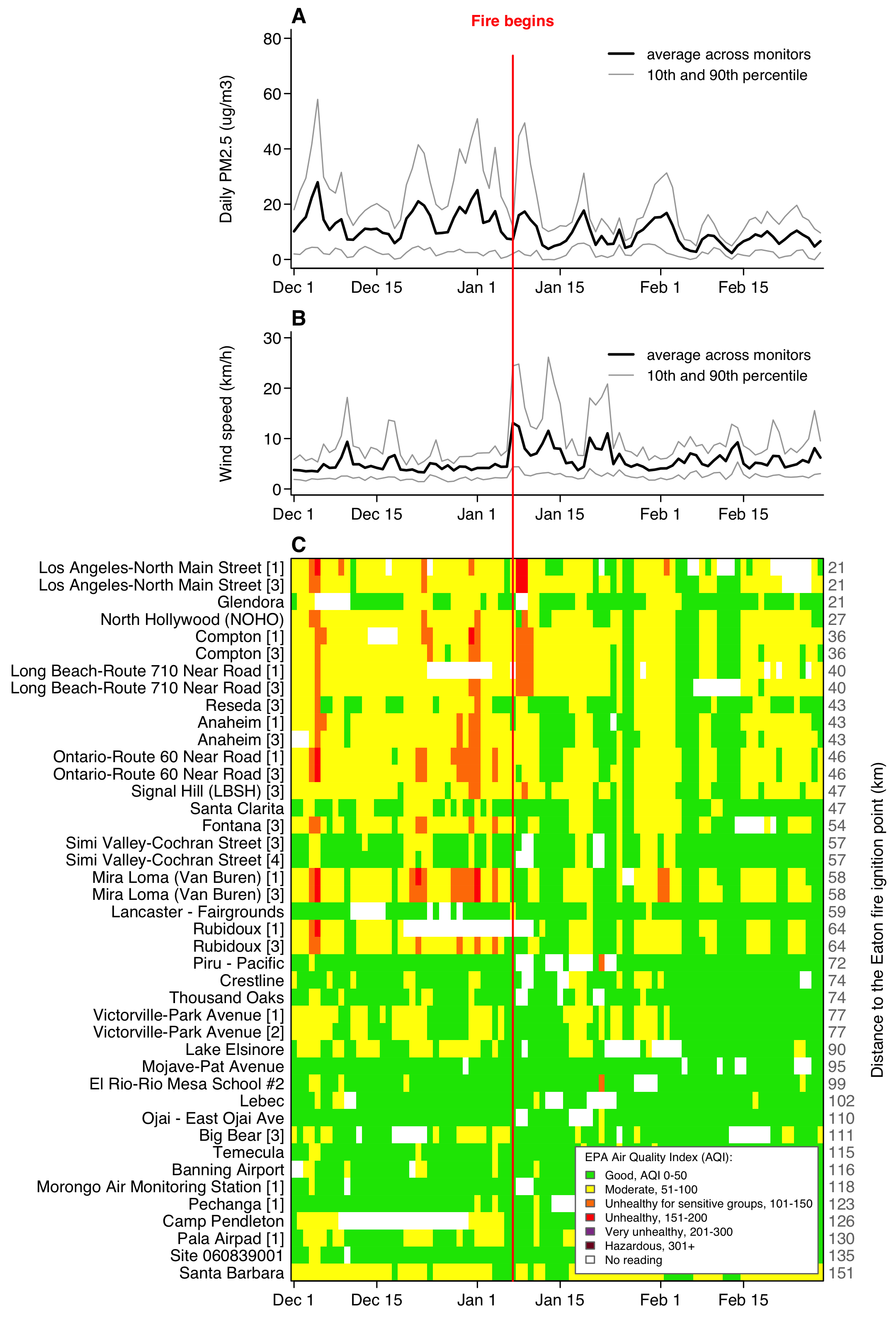
Study it before you write a line. The network’s worst days, in early December and at New Year, are days when the wind across the basin averaged under 5 km/h. The fire week is the one stretch where the basin was windy and dirty at the same time.
The note is a short file, CHANGES.md, that says what you changed from your HW1 project and why, what you checked, and how you used AI. The format is below.
What you get
Your own HW1, already in the repo. Clone hw2-<your username> and your HW1 submission is sitting there as the first commit, with hw1.Rproj renamed hw2.Rproj. Nothing to download, nothing to copy across. Start from what you wrote.
Building on it is required, and it is graded. That first commit is your HW1 exactly as you handed it in, and HW2 is the change you make to it. The grader opens that commit beside your last one. Scripts that still carry your object names, your section headers and your comments read as yours, however heavily you edited them; scripts deleted and replaced by a fresh project do not. How far your HW1 was from the target costs you nothing here. If that first commit holds no R code, because you did not submit HW1 or your HW1 arrived as a zip, say so in the first line of CHANGES.md and nothing is held against you.
The HW1 solution is now posted. If your figure did not match the HW1 target, closing that gap is part of this assignment: the target is still on the HW1 page along with the rules it follows, and CHANGES.md is where you say what you repaired. Open your PNG and the target side by side at the same size and work through the differences. That comparison is the assignment as much as the wind panel is.
The wind data. One file, cut from EPA’s pre-generated annual files (daily_WIND_2024.zip and daily_WIND_2025.zip) to the same area and window as HW1’s file: every wind monitor within 150 km of the Eaton Fire, 1 December 2024 to 28 February 2025. The columns are exactly as EPA ships them.
https://arielortizbobea.github.io/assets/data/epa_wind_la_fires_2024_2025.csv
6,702 rows, 38 sites, 2.2 MB. Two parameters share the file: Parameter Code 61103 is wind speed, 61104 is wind direction. This assignment uses speed; direction waits for HW3.
The layout is not the one HW1’s file used. EPA’s download tool does not offer wind, so this file comes from a different EPA product with its own conventions:
| what | HW1’s PM2.5 file | this file |
|---|---|---|
| site | Site ID, one column, 060371103 |
three columns: State Code 06, County Code 037, Site Num 1103 |
| instrument | POC |
POC |
| date | Date, 01/07/2025 |
Date Local, 2025-01-07 |
| the value | Daily Mean PM2.5 Concentration |
Arithmetic Mean, the day’s average |
| units | µg/m³ | Units of Measure says Knots; 1 knot is 1.852 km/h |
| the fastest hour | 1st Max Value, 1st Max Hour |
All three site columns are labels with leading zeros, so all three need protecting at read time, the way Site ID did in HW1.
The PM2.5 data is HW1’s file, at the same address:
https://arielortizbobea.github.io/assets/data/epa_pm25_la_fires_2024_2025.csv
The rules the figure follows
- Everything HW1’s figure encoded still holds: the window, what a monitor is, the 60-of-90-days rule, distance from the Eaton Fire, the row order, EPA’s six colours, the two summaries in panel A, the one red line at 7 January.
- A wind monitor is a site plus a
POC. Build the key from the three site columns and the POC. It is unique on any given day within parameter 61103, and your script checks that it is. That test is worth more than it looks: drop the61103filter and the file still holds a speed row and a direction row for the same instrument on the same day, so the test stops the script. - Keep the wind speed rows only, parameter
61103. - Convert knots to km/h, multiplying by 1.852. The constant lives in the parameters block, with its name.
- Keep wind monitors that reported at least 60 of the 90 days, the same rule as for PM2.5.
- Panel B: for each day, the mean across the wind monitors that reported, and the 10th and 90th percentile of those same readings. Axis from 0 to 30 km/h. Same lines, same colours, same key as panel A.
- Layout: three rows, heights in the ratio 1 : 0.75 : 2.6, one shared set of margins so the three x axes line up. The red line runs from the top of A to the bottom of C.
- Output:
figures/hw2_target.png, 183 × 270 mm, 300 dpi. The page is taller than HW1’s to make room for the third row.
How to organise it
Your HW1 layout, unchanged, plus the note:
| file | job |
|---|---|
code/1_get_clean_data.R |
HW1’s script, plus: download the wind file, keep the window and the speed rows, build one row per wind monitor, save both grids in the one clean object |
code/2_plot_figure.R |
HW1’s script, plus panel B |
code/run_everything.R |
source() the two, in order |
CHANGES.md |
the note |
Raw data in data/, computed objects in data_clean/, figures in figures/, paths relative to the project root. As before.
Panels A and B are the same drawing on two grids. Write it once as a function that takes a grid, a panel letter and an axis label, and call it twice. Session 6 was about this. It is not a rule, but the Coding score looks for it, and the alternative, a copy of panel A with edits, doubles the length of your diff.
Checking as you go
Panel B draws whether or not the numbers behind it are right. Wind speed left in knots gives you the same shape, the same 7 January peak, a line about half as high, and no error anywhere. Session 10 covered the answer: the script says what it expects and stops when the data disagrees.
Put a check where this week’s data can go wrong, and write it so that it could actually fail. The size of the wind numbers is the one that matters most. The tips below give you the scale: an ordinary day across the network reads 3 to 5 km/h and the Santa Ana reads 13.
  # after the wind grid is built, in code/1_get_clean_data.R
  daily <- apply(grid_wind, 2, mean, na.rm = TRUE)
  stopifnot(median(daily) > 3,    # it is 2.7 if the conversion never ran
            median(daily) < 8)    # it is 9.1 if it ran twice
In km/h that median is 4.9 and the script carries on. Both bounds can fail on a mistake you could actually make, which is what makes the line worth writing. It also catches a parameter code mistyped as 61104, where the median comes out above 300.
Rule 2’s key test is the other one. It costs one line and it stops the script if the 61103 filter never ran. What it cannot see is a filter that ran on the wrong code, which is why the two checks are worth having together.
A check that cannot fail earns nothing. max(grid_wind) < 150 passes on knots and on km/h alike, because the fastest cell in this file is 38 km/h. stopifnot(nrow(w) == 6702) passes today, says nothing about whether what you did to the rows was right, and breaks the week EPA regenerates the file.
Printing the number of rows after each step that can drop rows, and the number of monitors before and after the 60-of-90 rule, is worth doing and worth quoting in CHANGES.md. The check the rubric looks for is one that stops.
The note
CHANGES.md, at the project root, half a page at most, written in your own words:
# What changed from HW1

Base: my own HW1 submission.

## Files and folders
- ...what you renamed, moved, split or added, and why...

## code/1_get_clean_data.R
- ...one bullet per change, with the reason...

## code/2_plot_figure.R
- ...

## Layout
- ...page size, the three rows and their heights, margins, what you had
  to change so the panels still line up and the labels still fit...

## What I fixed from my HW1
- ...anything your feedback flagged, and what you did about it...

## What I checked
- ...one line per check: where it sits, and what it would have caught...

## AI disclosure
- Tools: which ones, by name
- Used for: what you asked them to do
- Checked: what you verified, and how
Prose, not a diff. “Moved the scripts into code/ so the project matches the layout the assignment asks for” is a sentence; a list of changed line numbers is not.
The grader reads the note first, then compares your HW2 code with your HW1 code. Every change in the code should be in the note, and nothing in the note should be missing from the code.
Write the note yourself. A chatbot will write a flawless one from a diff in ten seconds. The point of the note is that you read the change. Ask AI to explain a line you changed, by all means. The note describes what you did, in your words.
Cheat sheet
Everything you need was covered in sessions 2 to 6, with the checks from session 10, and the AI rule below covers the rest.
| task | functions | session |
|---|---|---|
| get the second file, into a folder you make | download.file(), file.exists(), dir.create() |
3, 6 |
| read it, protecting three columns | read.csv() with colClasses |
3 |
| an ISO date | as.Date() needs no format |
2 |
| build the key, check it | paste(), anyDuplicated(), stopifnot() |
3, 6 |
| monitor × day grid, again | factor() with levels =, tapply(), apply() |
3 |
| one drawing, two panels | function() |
6 |
| three panels, one file | layout() with heights =, par(cex = ) |
5 |
| check what you built | stopifnot(), median(), a count you print |
10 |
Tips
Three rows shrink your text. layout() with three or more rows quietly sets par("cex") to 0.66, so every label and every margin is a third smaller than in HW1 and the site names no longer fit. Put par(cex = 1) right after layout().
The red line has further to go. Your HW1 geometry assumed one panel above the heat map. Now there are two. Derive the top of panel A from the three layout heights rather than from the single ratio 2.6.
What “resultant” means. EPA’s daily wind speed is a vector average over the 24 hours: a day when the wind blows one way in the morning and back in the afternoon averages close to zero. That is why an ordinary day reads 3 to 5 km/h and the Santa Ana reads 13. It is the right number for this question, because it measures how far the day’s air actually moved.
The site ID in three pieces. paste0() of the three columns gives HW1’s Site ID. You do not need it this week, but it is how HW3 will match a wind monitor to a PM2.5 monitor at the same site.
Restart and source before you submit. Session > Restart R, then source("code/run_everything.R"). It must run top to bottom and write the figure. Test it the way the grader will: delete the data/ and data_clean/ folders, not just the files inside them. A fresh clone of your repo has neither, so your script has to create them before it downloads or saves anything.
How to submit
Your repository is hw2-<your github username>, inside the course organization. It is already there, and your HW1 submission is already in it. Find it at https://github.com/aem6850-cornell or in the repositories list on your GitHub home page.
This is the first assignment you submit with git. Three commands, from session 7:
git clone https://github.com/aem6850-cornell/hw2-<your username>.git
# ... work, as often as you like ...
git add -A
git commit -m "what you changed"
git push
Commit in the order you work. The grader reads git log first and grades the last commit pushed before the deadline. A reasonable sequence:
- Repair your HW1 figure against the HW1 target. Nothing about wind yet; the project still draws one figure and still runs.
- Move the project into the layout above, if it is not already there, and source it from a restarted session.
- Add the wind file to
code/1_get_clean_data.R: the URL, the three character columns, the speed rows, the conversion, the checks. The figure does not change yet. - Turn panel A’s drawing into a function and call it once for panel A. The figure is identical to the previous commit’s.
- Add panel B by calling the same function on the wind grid, with the three-row layout and the longer red line.
Then CHANGES.md, written last, from the history you already have. Messages like “Repair the percentile lines in panel A” and “Add wind to script 1, with the unit and key checks”. The number of commits is yours, and a step that took two tries is two commits. What is graded is that the repair, the data and the drawing are separable and in a sensible order, and that each message names what changed. If your HW1 figure already matched its target, skip step 1 and say so in the note. The whole assignment arriving as one commit costs you under the last dimension even when everything in it is right. If a push problem is what kept you to one commit, say so on the day and it is not counted against you. RStudio’s Git pane and VS Code do the same three steps with buttons; session 7 shows all three ways.
What has to be in that final commit:
code/1_get_clean_data.Rcode/2_plot_figure.Rcode/run_everything.RCHANGES.md
Leave data/ and data_clean/ out; the .gitignore in your repo already does that for you. You do not need to commit the figures either. The grader clones your repo fresh, runs code/run_everything.R, which downloads both CSVs and rebuilds everything, and grades the figure your code draws.
Before you push for the last time: Session > Restart R, then source("code/run_everything.R"). If it writes the figure with no errors, you are done.
Stuck on git? Office hours, or ask in the course channel. Do not let a push problem cost you the deadline: a repo that will not push is a problem to raise on the day, not the night before.
AI on this one
Recommended, from here on. The things it is good at this week, in the chat tier:
- Explain the wind file. Paste the header line and the first three rows and ask what each column is. Then check the answer against EPA’s file format page.
- Turn panel A into a function. Paste your panel A code and ask for a function that draws it for any grid. Read every line it gives back against the code you pasted.
- Debug the shrinking text. Describe what you see. Ask why. Then check the reason in
?layout. - Explain an argument you have not used. Paste your
layout()call and ask whatheightsdoes to the panels, or why the labels shrank. Then check the answer in?layoutbefore you believe it. - Ask where it could go wrong quietly. Give it the wind file’s header and the steps your script takes, and ask which mistakes would still draw a figure. Then ask for one line that would catch each. Read them before you keep any: several will pass on this file whatever you did, and one of them will quietly drop rows to make the data agree. Keep the ones that can fail, and say in the disclosure which you asked for and which you wrote.
Three rules, from the syllabus and session 8. Ask for the script, not the answer: a number a chatbot typed is not a result. Verify one claim per conversation, on principle, and say which in the note. Disclose. The disclosure block in your note lists the tools, what you used them for, and what you checked. Disclosed use is never penalised. Undisclosed use is misrepresentation under the syllabus and is treated as an integrity violation.
Rubric
15 points. Five dimensions, three points each. The grader clones your repo into an empty folder, sources code/run_everything.R in a fresh R session, compares the figure with the target, reads the checks your script makes, and reads your note against your commits, the first of which is your HW1.
Similarity (3 points)
| 3 | The figure is virtually identical to the target. One has to really pay attention to see any difference. |
| 2 | One or two clear differences from the target: panel B on the wrong scale or missing a summary, the red line stopping short, labels missing, a panel letter missing. Wind speed left in knots lands here, where the line has the right shape and sits a little over half as high as it should. |
| 1 | Three or more clear differences, or a panel missing, or the series does not line up with the calendar, so the wind peak falls on a day other than 7 January. |
| 0 | No figure, or a figure of something else. |
Similarity is judged on what the figure encodes, not on pixel-level matching. Font sizes, margins and tick placement are not differences. Panel C is judged against the HW1 target: if your heat map was wrong in HW1, repairing it is part of this assignment and you are not scored against your own version.
Reproducibility (3 points)
| 3 | The code runs start to finish, without any edits, and writes the figure. Paths are relative to the project root. Nothing depends on objects left over from an earlier session. |
| 2 | The code requires one minor edit to run: a stray absolute path, a folder it expected to exist, a library() call for something base R already does. |
| 1 | The code requires several edits to run, or runs with errors, or does not produce the figure. |
| 0 | The code does not run. |
Two things cost points here every year. Absolute paths: read.csv("/Users/you/Desktop/hw2/data/...") works on your laptop and nowhere else; open the .Rproj and use "data/...". Session leftovers: a script that works because an object is still in your environment from twenty minutes ago is not a script that works. Restart R and source it before you push. Every time.
Coding structure (3 points)
| 3 | The code (1) has clear and logical sections, (2) has a clearly identified parameter section that can be modified to produce slightly different versions of the output, including the new file, the parameter code and the unit conversion, (3) is well annotated, and (4) is concise but spacious: one drawing for panels A and B, not two. |
| 2 | The code has at most one of the following: (1) no clear structure, (2) parameters hard-coded within the core of the script, (3) missing key annotations, (4) too dense or too verbose. |
| 1 | The code has more than one of those. |
| 0 | There is no code, or the code cannot perform the basic steps needed to generate the output. |
“A clearly identified parameter section” means the URLs, the file names, the dates, the parameter code, the knots conversion and the layout heights live together at the top of each script, named, and are used by name below.
Verification (3 points)
| 3 | The script says what it expects of the data and stops when the data disagrees, at the places this week’s data can go wrong. At least one check could have failed on a mistake you could actually have made, and CHANGES.md says for each check what it would have caught. |
| 2 | Checking is thin: one place covered and the obvious one left open, or a bound so wide that the right answer and the wrong answer both pass, or the note lists the checks without saying what any of them would catch. |
| 1 | The only check is the one rule 2 already asks for, or every check is one that cannot fail: a row count compared with a number taken from the same run, a test that the line above ran. |
| 0 | The script makes no check of its own data. |
“Checking as you go” above names the two places that matter this week and shows one of them written out. A check earns its point by being able to fail.
The note and the history (3 points)
| 3 | The repo’s first commit is still the one the course made, and your HW2 scripts are that code edited: your object names, your section headers and your comments are still in them. The work arrives in separable commits in a sensible order, each message naming what that commit did. CHANGES.md gives every change with its reason, names the files that moved and the layout changes, and discloses the tools, the uses and the checks. |
| 2 | One of those falls short: the whole assignment arrives in a single commit, or the messages say only “update”, or the order contradicts the note, or a change in the code is missing from the note, or the file and layout changes are glossed over. A push problem you raised on the day is not counted here. |
| 1 | Two or more fall short. Also here, whatever else is true: your HW2 scripts share nothing with the first commit’s, not an object name, not a section header, not a comment, so they did not grow out of your HW1. Files you moved from the repo root into code/ count as moved, not replaced. |
| 0 | No note, or you pushed no commit of your own. Also here: the repo’s first commit is no longer the one the course made, because the repository was replaced or the history rewritten. If that first commit holds no R code, because you did not submit HW1 or your HW1 arrived as a zip, say so in the first line of CHANGES.md: you have nothing to build on, and this dimension is then scored on your commits and your note alone. |
The one thing that scores below zero
AI use is recommended and must be disclosed. Undisclosed AI use, and code taken from anyone else without saying whose, are misrepresentation under the syllabus and are treated as integrity violations rather than as grading matters.