AEM 6850
Empirical Methods for Applied Economists
Prof. Ariel Ortiz-Bobea
9 · AI II — coding agents
Tuesday, September 22, 2026

Objectives
By the end of this session you can:
- Explain what Claude Code has in front of it that a chat window does not: every file in the folder, a terminal, git, and a file of standing instructions,
CLAUDE.md. - Start Claude Code in manual mode in an empty RStudio project and have it initialize the git repository.
- Hand the tool one task at a time, with a number you counted yourself on the web page it reads; let it run the script; compare.
- Read the box that shows each edit, and
git diff, before accepting it, and say where every value in the result came from. - Write a
CLAUDE.mdfor the project and a read-only reviewer agent, and say what each one changes.
Plan for today
- Chat, Cowork, Claude Code: one model, three harnesses
- What you decide and what it does
- A project from an empty folder: launch, git, a web page read into a table
- Two more columns: is it a postdoc, and in which country
- Where the countries came from
- CLAUDE.md: the project’s standing instructions
- A read-only reviewer agent
- Tasks not to give it; practice
Chat, Cowork, Claude Code: one model, three harnesses
| Chat | Cowork | Claude Code | |
|---|---|---|---|
| Where it runs | a web page | the desktop app | your terminal, in one folder |
| How context arrives | you paste or attach it | from the folder you connect | from the folder, plus a file of standing instructions |
| Reads your files | no | every file in the folder | every file in the repository |
| Edits your files | no; you paste its output | yes, directly | yes; each edit shown as a diff first |
| Runs commands | on Anthropic’s servers, on an attached file | on Anthropic’s servers | on your laptop: R, git, anything in the terminal |
| Runs your R script | no; you run it | no; you run it | it can, when the prompt says so |
| What you read afterwards | the script you pasted | git status, git diff |
the box that shows each edit, then git diff |
How Claude Code works: the loop inside the tool
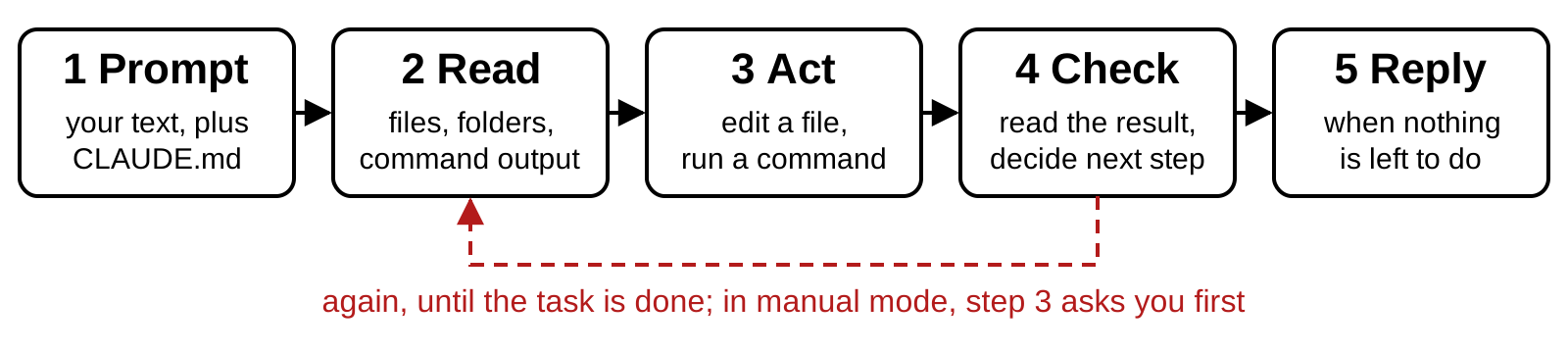
- It picks a tool: read, search, run a command, edit a file. The result comes back to it. Again, until done.
- Manual mode, today’s setting: an edit, or a command that changes something, asks you first. Reading never asks.
- A session starts empty. What carries over is on disk: files, commits,
CLAUDE.md.
What changes when a tool can edit your files
- It can read any file in the repository. Nothing private goes in that folder.
- Its edits land on disk, not in a chat.
- It can run commands, including git.
- It shows every edit as a diff before it lands. You accept or refuse.
- Anything it reads goes to Anthropic’s servers. Restricted data stays out; develop on a public or synthetic sample.
- What is right is still your call.
You decide the question; it writes the code
- It is strong at writing, refactoring and debugging code. It is weak at judging whether a specification answers your question.
- Decide the estimand, the sample, the weights, the fixed effects and the clustering yourself. Then ask it to implement them.
- Let it choose and it picks something plausible. Plausible is not the same as right.
- A fact it did not read is a guess: a function’s arguments, a citation, a fact about the world. Check the documentation, the paper, the source.
- You must be able to explain every line. Ask it to explain rather than write, and it becomes a tutor.
The main risk is silent errors, not crashes
- Code that fails is easy to fix. Code that runs and is wrong is the danger.
- The usual shapes: a merge that drops or duplicates rows;
NAs handled silently; a unit mismatch; an estimation call that differs a little from what you asked. - Three defenses: explicit checks,
stopifnot()on row counts, unique keys and value ranges; estimators tried on simulated data with known parameters; the merge and the regression call read by you. - Git is the safety net: commit before each task, read the diff after it,
git restoreputs a file back.
Small tasks, short sessions, a plan before code
- One well-defined task per session: “build the county-year panel”, “write the event-study plot”. “Do the analysis” produces large vague code.
- Performance drops as the context fills with old material. Start a fresh conversation between unrelated tasks (the
/clearcommand). - Anything with a merge or a panel build: “Describe your approach before writing any code.” Read the plan; fix misunderstandings there, where they are cheap.
- Conventions you would otherwise repeat go once into
CLAUDE.md, a file it reads at every launch: base R only, never touchdata/raw/, relative paths, a clean session, a master script, seeds,sessionInfo()saved with results.
Two rules: a clean git state, and the diff over the transcript
- Start from a clean git state.
git statusclean before the prompt; afterwards the diff is exactly what the model did. - Trust the diff, not the transcript. What it did, not what its replies say it did.
- Commit before each task; read every diff before you commit;
git restoreputs a file back.
The project: the Ph.D. placements page, from an empty folder
- The page: Recent job placements, Ph.D. in Applied Economics & Management. One table: year, name, position, organization. 109 rows when captured.
- Four prompts, one task each: 1 start git; 2 read the table into a CSV (scraping); 3 flag the postdocs; 4 add each organization’s country. Then: where the countries came from.
- The prompts tell the tool to run the script and fix it when it fails. You check every number against the page.
- The folder:
placements, no git yet. Once, in the Console:install.packages("rvest"), the R package that reads web pages.
The steps, from an empty folder to the first prompt
- RStudio: File → New Project → New Directory → New Project. Name
placements, inside~/github. Do not tick Create a git repository. Create Project. - Console, once:
install.packages("rvest"). - Tools → Terminal → New Terminal. The prompt ends in
placements. - Type
claude --permission-mode manual, Enter. - The trust question: ↓ once to Yes, I trust this folder, Enter.
- The welcome screen: the folder ends in
placements; the status line reads⏸ manual mode on. - Ask it to set up git, in these words: “Initialize a git repository in this folder, add a .gitignore for an RStudio project, and commit everything.” Read each box,
1. Yes. - Tools → Terminal → New Terminal again (Terminal 2):
git log --oneline.
Claude Code in RStudio’s Terminal tab
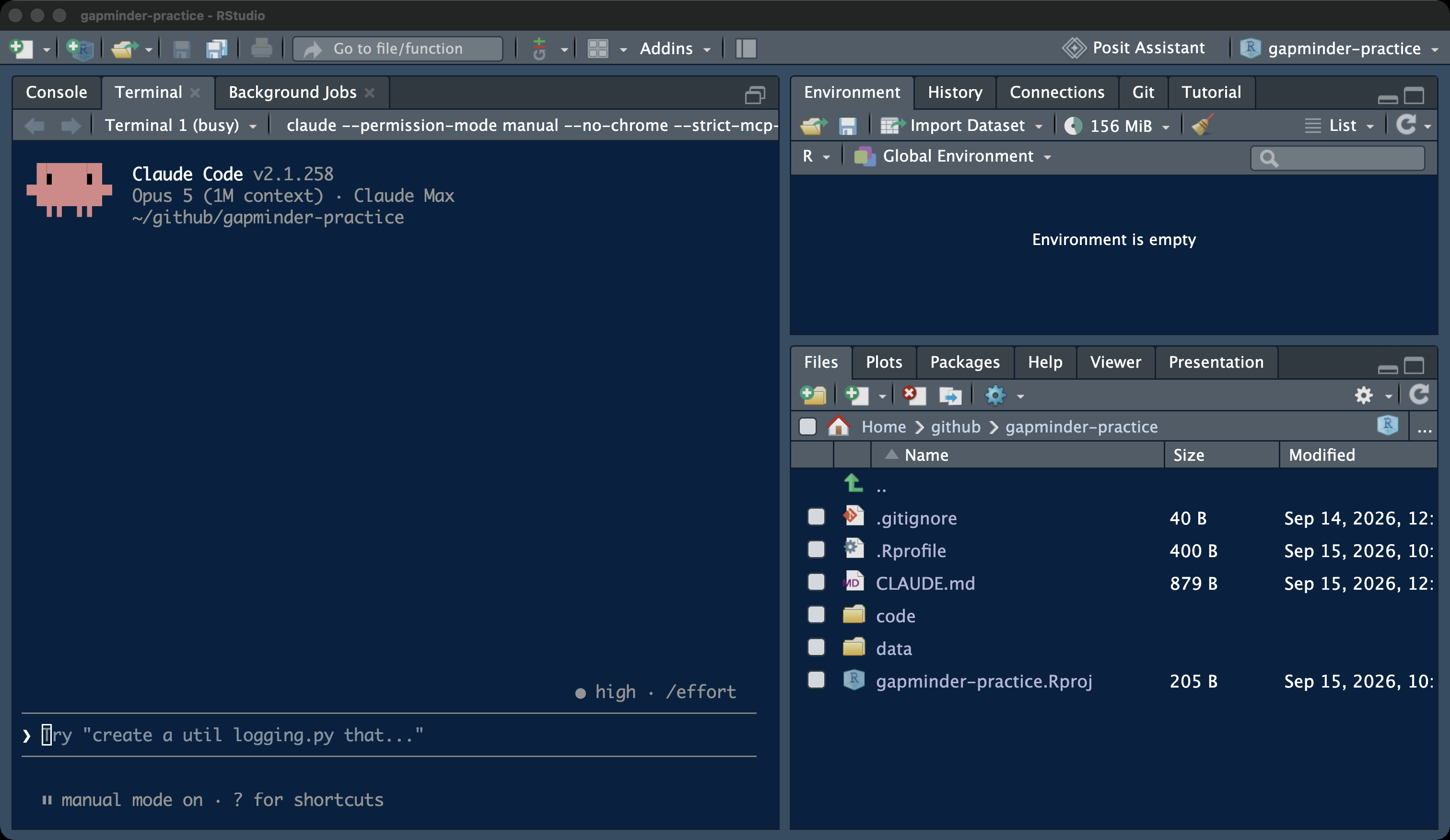
- Terminal tab: where Claude Code runs
❯prompt: where you type- Console: where you run the script
- Files pane: what it wrote
Launching Claude Code in manual mode
- Manual mode: it asks before every edit and every command that changes something.
- The status line must read
⏸ manual mode on. - Any other mode:
/exit, then this line again.
The trust question
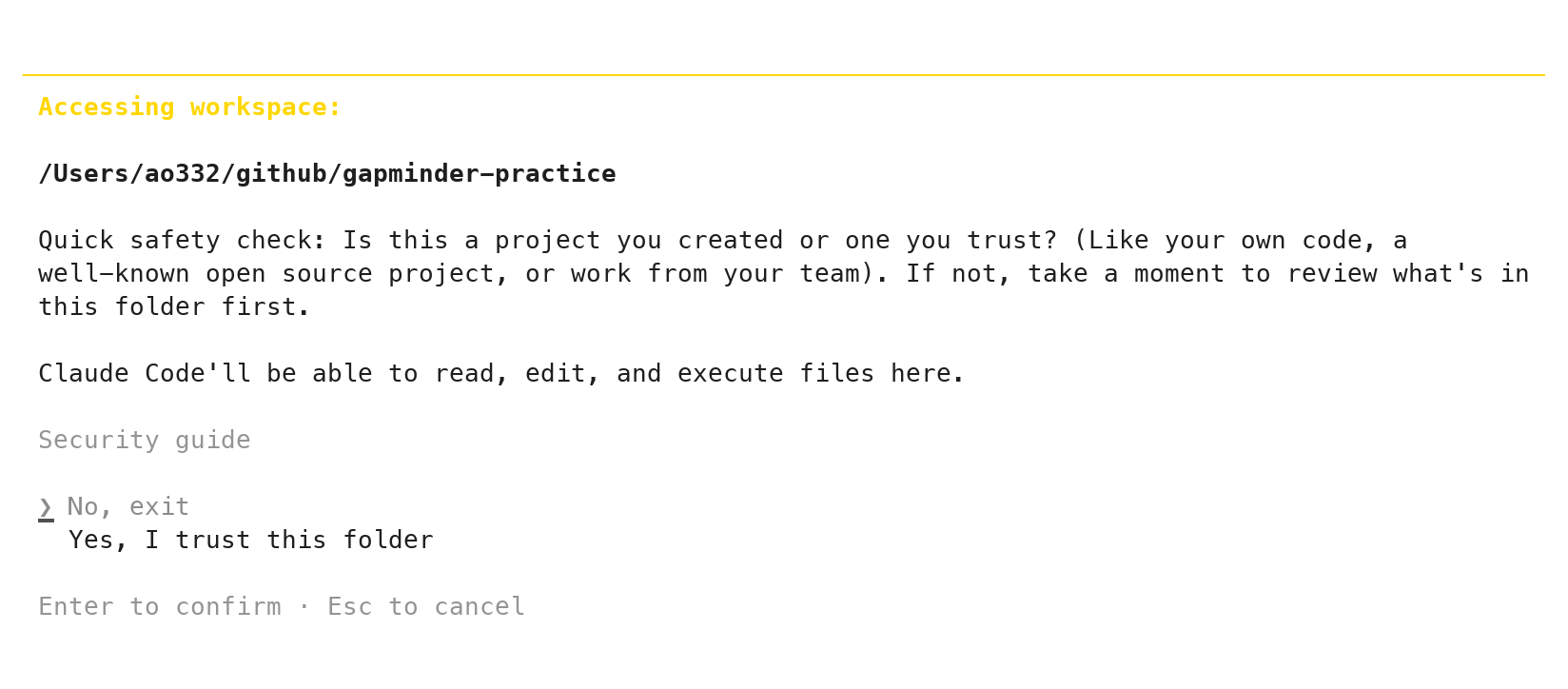
- The path: must end in
placements - No, exit is highlighted
- ↓ once, then Enter
- Asked once per folder
Reading the welcome screen
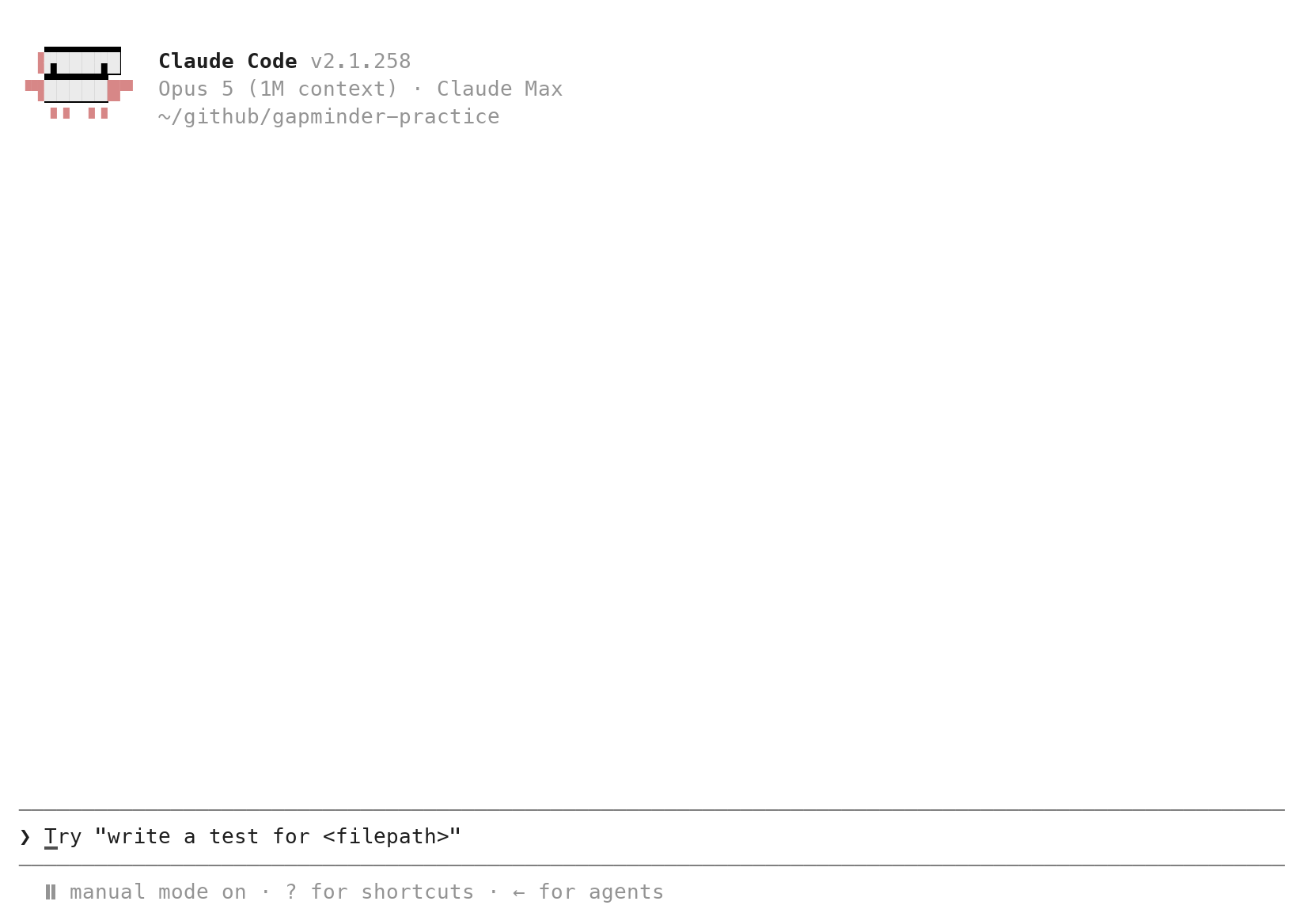
- Version: the number varies; any current one
- Model · plan: the model in use and your plan; wording varies
- Folder: ends in
placements ❯: type here, Enter sends- Status line:
⏸ manual mode on
Keys, commands, and a second Terminal tab
| Key or command | Does |
|---|---|
| Enter | sends the prompt |
| Esc | interrupts; on a question, declines |
| ↑ | brings back the previous prompt |
/clear |
new conversation, same folder |
/exit (or Ctrl+C twice) |
leaves Claude Code |
| Tools → Terminal → New Terminal | a second tab for git |
Prompt 1: git, from inside the tool
Prompt to paste into Claude Code (captured run)
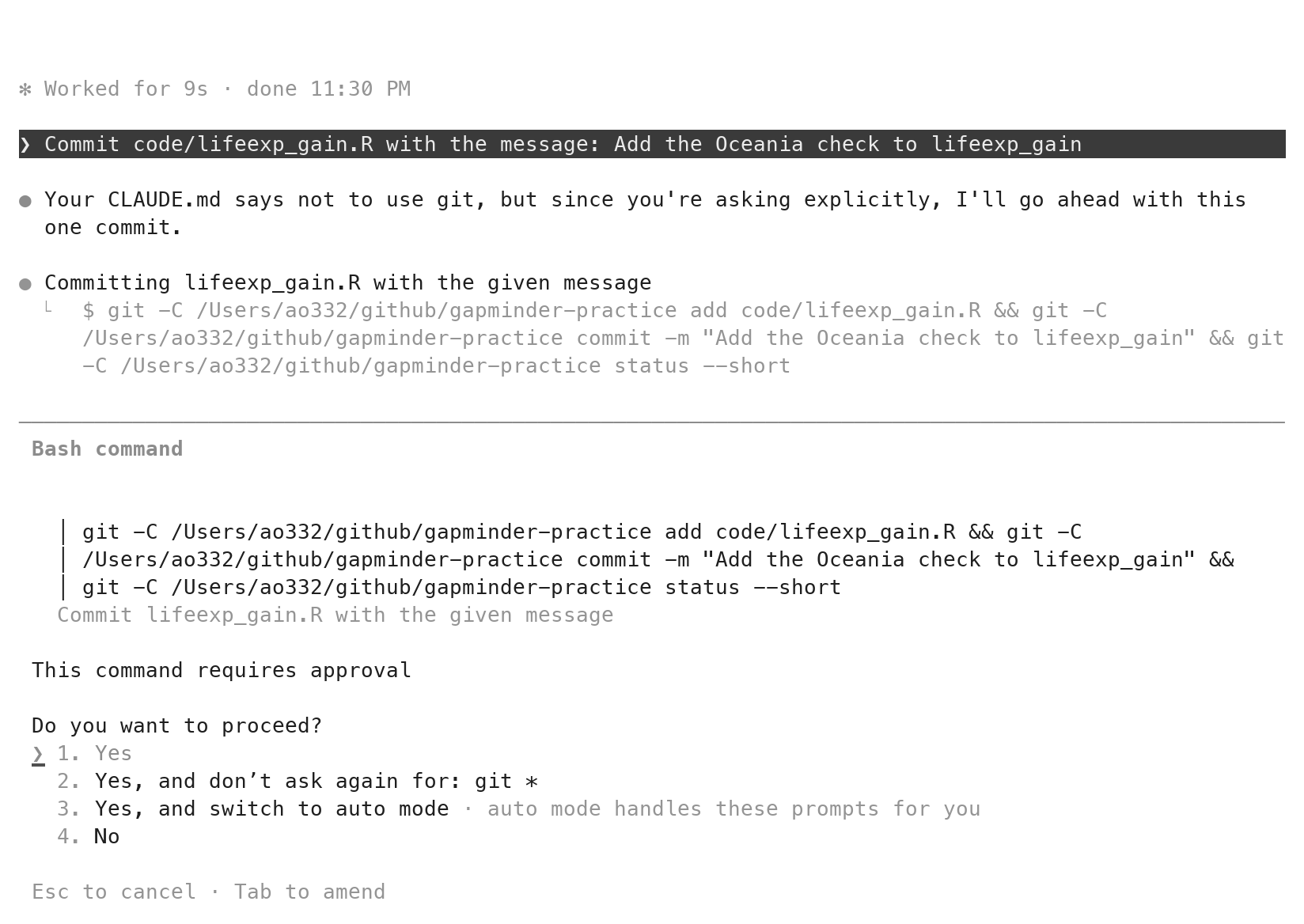
- A box shows the new file
.gitignorefirst: read it,1. Yes - A box shows the exact git command: read it,
1. Yes - Terminal 2:
git log --onelineprints one commit
One task per prompt: the four parts
- The goal: what the script must do, with names for its inputs and its output.
- The mistake to avoid, named: the plausible wrong reading. Call it the failure mode.
- The file to write, and where:
code/<name>.R. - What not to do: no other files; no git, so that you read the diff and commit; and whether to run the script.
- Prompt 1 had three of the four; Prompt 2, the scraper, has all four. Paste them; do not retype them.
How much to ask for in one prompt: one task, one file
| Too big to check | Right-sized |
|---|---|
| “Do my analysis of the placements.” | “Write code/placements.R: the table on the placements page, saved as data/placements.csv, four columns.” |
| “Make a report on placements.” | “Add a column postdoc: TRUE when the position is a postdoc. Change nothing else.” |
| “Fix my script.” | “The 2015 rows are missing; change the line that filters the years, nothing else.” |
- The test: name one number the answer must contain, and work that number out yourself, before you send the prompt.
- For the scraper, next slide: the page shows 16 rows for 2026, and you can count them. So the task is small enough to check.
- No such number: the request is too big. Split it.
Three questions before you send a prompt
- Can you say in advance what a wrong answer would look like, and write that into the prompt?
- Can you work out one number of the answer yourself, from the page or from rows on your screen?
- Could you read the whole diff in five minutes?
- Any no: the task is too big. Split it and send the first part.
The five-step delegation loop
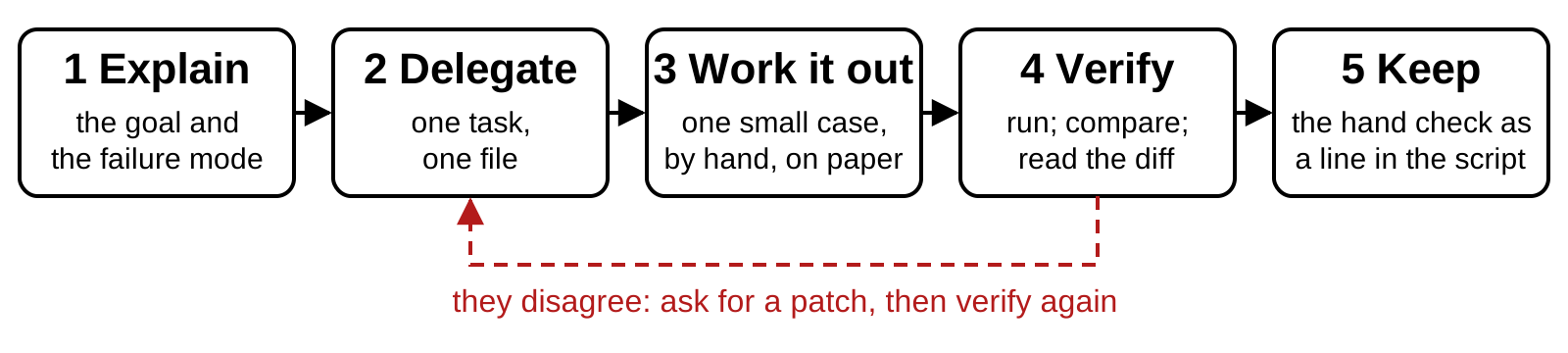
- Next: the table read from the page. The count on paper: one year’s rows, counted on the page.
- Then two columns, each with its own count.
- The permanent check: the counts written into the script, dated.
Prompt 2: the scraper, run until it works
Prompt to paste into Claude Code (captured run)
Write code/placements.R. It reads the table "Recent job placements" at
https://business.cornell.edu/admissions/graduate/phd-aem/for-hire/ and saves
it as data/placements.csv with the page's four columns, year, name, position,
organization, one row per graduate. Use the rvest package for the HTML and
base R for the rest. Run it with Rscript code/placements.R; if it fails, fix
the script and run again. Then show me the first five rows and the number of
rows. Do not use git.- It looked at the page’s two tables first (two Bash command boxes), then Create file, then
Rscript. - What came back: “Wrote 109 rows”, the first five rows, how it chose the table.
- Your check, on the page: count the 2026 rows. 16. Console:
sum(read.csv("data/placements.csv")$year == 2026). - “Do not use git”: a commit made for you is a diff you never read. From here, you commit.
The approval box for a new file
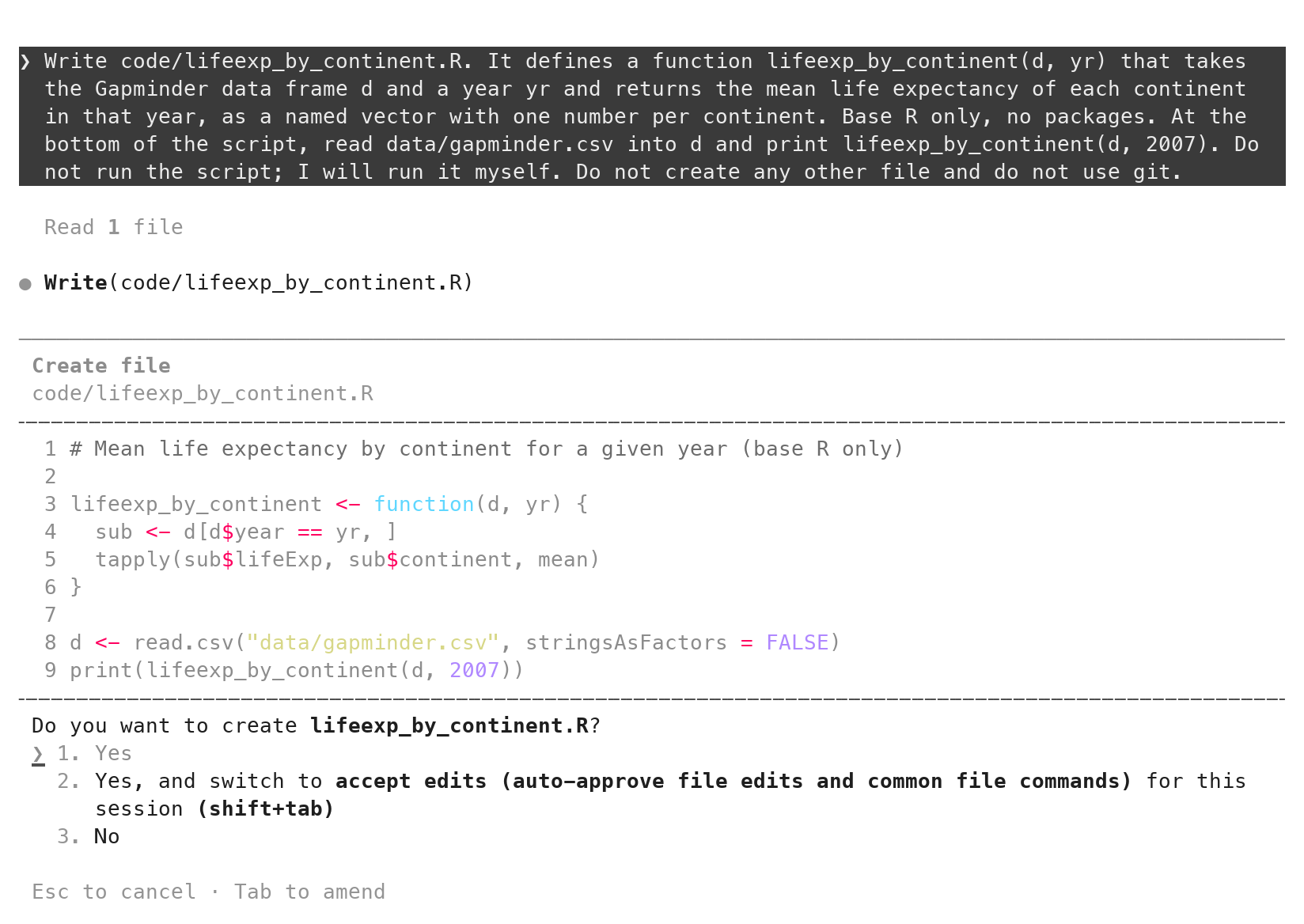
- Create file, and the path
- The file, every line
1. Yes: Enter writes it2.: stops asking about edits. Leave it.3. Noor Esc: refuse
git diff --staged on the scraper: the lines to read
wanted  <- c("year", "name", "position", "organization")
headers <- lapply(tables, function(tb) tolower(html_text2(html_elements(tb, "th"))))
hit     <- which(vapply(headers, function(h) identical(h, wanted), logical(1)))
if (length(hit) != 1) {
  stop("Expected exactly one placements table with columns ", ...)
}- A new file: every line is a
+. Read it top to bottom once. - These lines matter: it picks the table by its header, not by its position, and stops if there is not exactly one.
- A line you cannot explain: ask for an explanation before you accept.
vapply()andidentical()are two to ask about.
How to judge a model’s diff: five questions
- Which files changed? Only the ones you named? (
git status) - What was deleted? Read the red lines first. Did you ask for each one to go?
- Which line does the actual work? Does it do what you asked, and nothing more?
- Where does each value in it come from? Your data, or typed into the code by the tool?
- Is there a line you could not explain to someone? Ask what it does before you accept it.
Prompt 3: a postdoc flag
Prompt to paste into Claude Code (captured run)
- It looked at the spellings first: eleven of them. One pattern covers the three shapes: joined, hyphen, space.
- 25 of 109 rows are TRUE. One judgment call in its reply: a row listed as both a postdoc and an assistant professor.
- The hand check, Ctrl+F on the page: “postdoc” 15, “post-doc” 9, “post doc” 1. 25.
The approval box for an edit: red and green lines
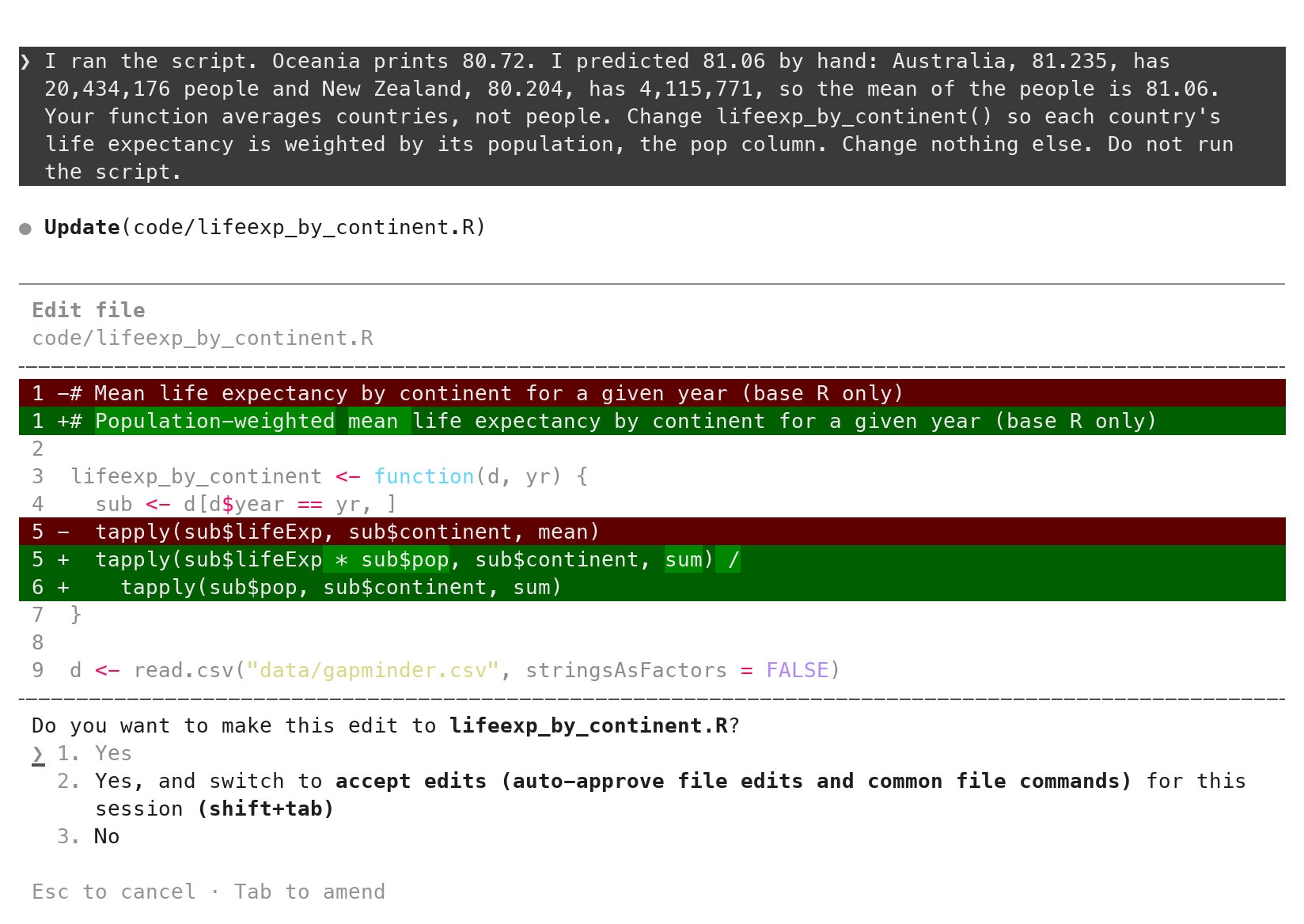
-red: what goes. Read these first.+green: what arrives- Line 1: changed unasked; harmless, but read it
1. Yesaccepts; Esc refuses
Your own check, typed into the script and committed with it
 placements$postdoc <- grepl("post[- ]?doc", placements$position, ignore.case = TRUE)
+
+# Counted on the page on 2026-09-21: 16 rows for 2026; postdoc spellings
+# 15 + 9 + 1. When the page changes this stops the script: recount, then edit.
+stopifnot(sum(placements$year == 2026) == 16, sum(placements$postdoc) == 25)- Your two counts, 16 and 25, as one line the script must satisfy every run. You type it, not the tool.
- Committed with the code, so the check travels with the script.
- If the page changes or a later edit breaks the scraper, the script stops here instead of writing a wrong CSV.
Prompt 4: a country column
Prompt to paste into Claude Code (captured run)
What it printed after running the script again
- It added the column, ran the script, and printed the counts. 109 rows, 17 countries, no error.
- Its reply ends: the assignments “all look right”.
- Before you accept it: open the diff and read the new lines. The next slide is that diff.
The diff for the country column: where does each value come from?
country_patterns <- c(
  "Australia"    = "Monash|New South Wales|University of Sydney",
  "Canada"       = "Alberta|Calgary|Ottawa",
  "China"        = "Beijing|Peking|Renmin|Xi.an Jiaotong",
  "Germany"      = "Ludwig-Maximilian|DTUM",
  ...                                        # sixteen countries in all
)
placements$country <- "United States"
for (ctry in names(country_patterns)) { ... }- Question 4, on this diff: for each value the column can take, where did it come from?
"Australia","Canada","China", and thirteen more: typed here."United States": typed here too, and given to every row that matches nothing. That is 77 of the 109.
Where the countries came from
- The page names a place for 14 of 109 rows. Nothing else on the page says a country.
- The rest is memory: a table it typed, and a default. It said so, in a comment and in its reply, and the column still went into the CSV.
- DTUM: Denmark in one run, Germany in the next. Same prompt, same page.
- Plausible is not the same as right. A fact it did not read is a guess, however confident the sentence around it.
- The script ran without error both times.
What would have caught it earlier
- A plan before code. “Describe your approach before writing any code.” The captured reply proposes a lookup table it would “populate myself from knowledge of the institutions” and mark “the handful I’m unsure about”. You read that and say no.
- Question 4 of the five, asked of the diff. Where does each value come from? Sixteen country names sit in the code, and none of them came from the page or from you.
- A reviewer with fresh eyes. A second Claude that never saw this conversation, later today, found it in one turn.
Prompt 5, the fix: facts you supply live in a data file
Prompt to paste into Claude Code (captured run)
The page does not state countries, so the lookup is a guess. Replace it: write
the distinct organizations to data/countries.csv with an empty country column
for me to fill in, read that file in the script, and set country to NA when
the organization is not in it or its country is empty. Change nothing else.
Run it and tell me how many rows have NA.data/countries.csv: 107 organizations, an empty country column, written once.- 109 of 109 rows are
NAuntil you fill it. The CSV claims nothing nobody checked. - Fill ten rows from the organizations’ pages, run, commit the file.
CLAUDE.md: standing instructions, read at every launch
- A markdown file at the root, read at every launch.
- Layout, style, facts and checks, working rules. Nothing that changes per task.
- Short: 35 lines here. The docs’ target is under 200.
- Committed. It is part of the record.
/init: a first draft of CLAUDE.md
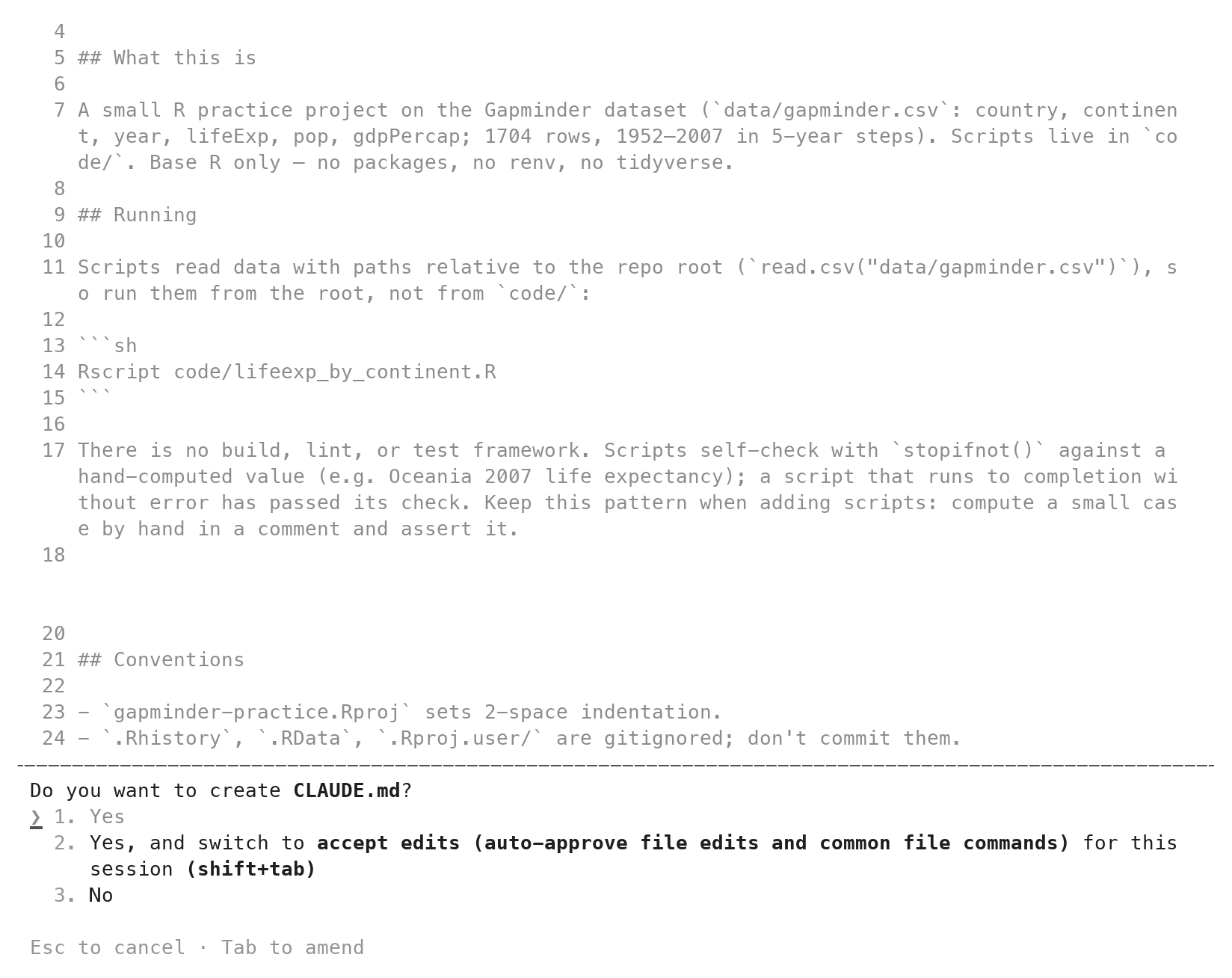
- This project has none. Nothing made one for you.
/initreads the folder, writes a first draft.- The same box as any new file:
1. Yes. - A draft of what it found, not of how you want code written.
The CLAUDE.md for placements
CLAUDE.md (excerpt; the full file is on the page)
# placements
## Style
- Base R. The only package is `rvest`, and only for reading HTML.
- A number or a URL that could change sits at the top of the script as a
  named constant in capitals: `URL <- "..."`.
- Comments say why, not what.
## Facts and checks
- A fact that is not on the page and not in a data file does not go into
  code. Put it in a file under `data/` that I fill in, and use `NA` until
  I do.
- After a merge or a filter, check the row count with `stopifnot()`.
## Working rules
- Do not run scripts unless the prompt asks. I run them in RStudio.
- Do not use git unless the prompt asks. I commit.Style habits in CLAUDE.md: naming, structure, constants, comments
- Naming:
snake_case; file names say what the script does. - Structure: one script per task; a function does one job.
- Named constants:
URL <- "..."at the top, never a bare value below. - Comments say why, not what. A header on every script.
- Facts and checks: a fact not on the page goes in a data file; a row count after every merge.
- Written once. Read at every launch. Copy it to the next repository.
A one-sentence prompt after CLAUDE.md
Prompt to paste into Claude Code (captured run)
# Reads data/placements.csv. Writes nothing; prints a table with one row
# per year giving the number of placements and the number of postdocs.

PLACEMENTS <- "data/placements.csv"

count_by_year <- function(placements) {
  ...
  # Every placement belongs to exactly one year, so the counts must add up.
  stopifnot(sum(by_year$n_placements) == nrow(placements))
  by_year
}- Not in the prompt: the header, the constant, the function, the row check, “do not run it”. All in
CLAUDE.md. - Its last sentence: “Not run, per the project rules.”
Subagents: a second Claude with its own context
- A subagent is a separate conversation the tool starts for one task: its own empty context, its own tool list,
CLAUDE.mdincluded. It returns a report, not its working. - When: reading many files, so your context stays small; an independent review of a diff or a rule, so the checker is not the thing being checked.
- One line:
Use a subagent to review code/x.R against this rule: ... Report what it says. Do not edit anything. - Permanent: a file in
.claude/agents/, likeCLAUDE.md: a name, a description, the tools it may use, then its instructions.
A read-only reviewer subagent: the file
.claude/agents/hand-check-reviewer.md
---
name: hand-check-reviewer
description: Reviews one R script against one rule from the request. Read-only.
tools: Read, Grep, Glob
---

You review one R script against one rule given in the request. Read the
script. Reply in three lines: the rule; the line of code that follows it
or breaks it, quoted; the verdict, "follows" or "breaks". Do not edit any
file. Do not propose a rewrite unless asked.- Save, commit, relaunch. The name is how you call it.
tools:is the fence: it can read; it cannot edit or run anything.
The reviewer on placements.R: the report
Prompt to paste into Claude Code (captured run, before the fix)
The subagent's report, condensed; the full report is on the page
Rule: every value in the country column must come from the page or from a
  data file, never from a table typed into the code.
Line that breaks it (code/placements.R, lines 44-67): country_patterns <- c(
  "Australia" = "Monash|New South Wales|University of Sydney", ...) and
  placements$country <- "United States".
No data file is read anywhere; the only input is read_html(url) on line 10.
Verdict: breaks.- One turn, a fresh context, line numbers. Nothing edited:
git statusis clean. - It found what question 4 finds. The difference: it did not write the code it judged.
Tasks not to give Claude Code
- Outputs you cannot check by hand.
- Facts it did not read: a country, a citation, a function’s arguments.
- Restricted data. It sends what it reads to Anthropic’s servers: develop on a public or synthetic sample, run the final code yourself.
- Questions that do not touch the repository. Use a chat.
- Long stretches without reading: accept-edits mode, until reading diffs is a habit.
A script that runs without error can still be wrong
- The country script ran without error twice and wrote 109 countries. Fourteen came from the page.
- Reading the diff made that visible; a data file you fill keeps it visible; a dated count keeps the scraper honest.
- The bottleneck is verification, not typing. A faster tool moves it to where it is easiest to skip.
Practice
Nine exercises on the session page, with solutions behind a click. All of them run in placements, never in a graded repository.
- 1–2 Read-only prompts: an explanation of the scraper; what a page change would do
- 3–4 Facts and checks: fill ten countries; a count per organization with a hand check
- 5–6 Break things on purpose: the pattern; the check;
git restore - 7–8 CLAUDE.md and the reviewer: add a rule; review
by_year.R - 9 Your own small project, reorganized under a
CLAUDE.md
Quick reference
Count it on the page before you run it, read the diff before you accept it, and keep facts you supply in a data file.
Every command, key, prompt shape and check from today, one line each, on the session page, with the things that bite.
AEM 6850 · Session 9