AEM 6850

Empirical Methods for Applied Economists

Prof. Ariel Ortiz-Bobea

12 · Publication graphics

Tuesday, October 6, 2026

Cornell University

Plan for today

  1. What journals require of your figures
    Technical specifications and readability · Nature · the AER · when they ask · presentation and referees · matching them in R · colours
  2. Asking an agent to match a target figure
    The default code · the target picture · Claude Code edits the code (live) · what it changed · where it misses · what it costs
  3. Using agents to write spec files and switch journals
    Why write the requirements in a file · YAML · a script that checks a PDF against the spec · Claude Code writes Nature’s spec file (live) · the AER’s spec file · Claude Code rewrites the script to read the specs (live) · switching journals

Figure 1, ready for Nature

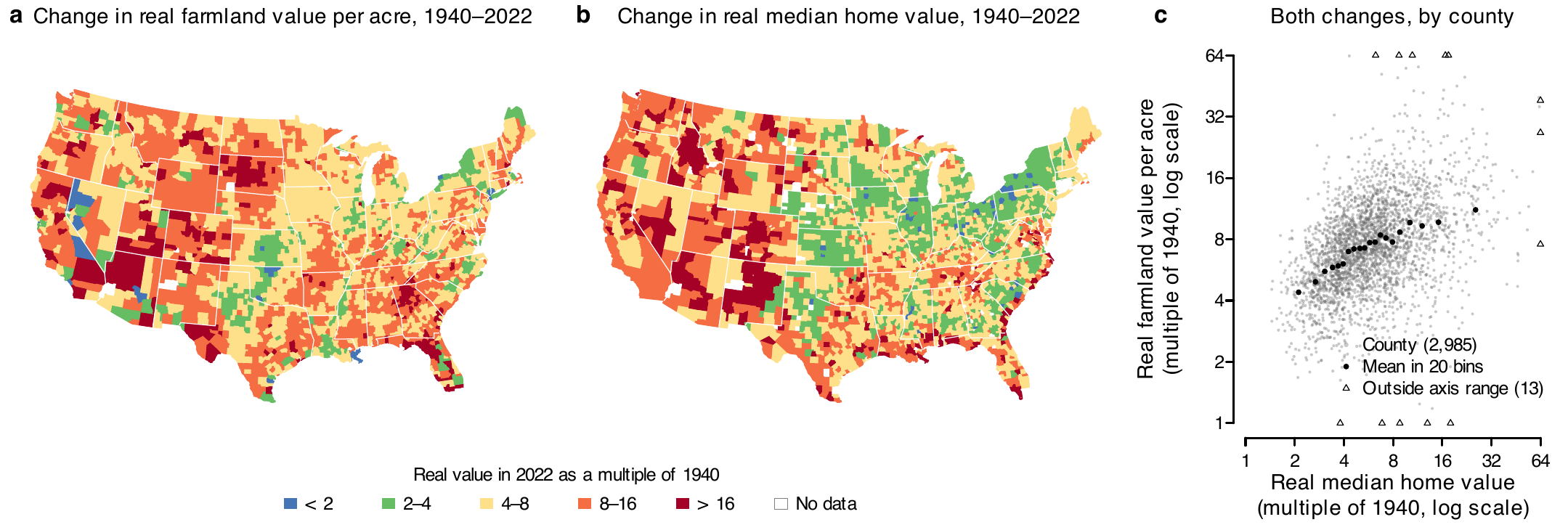
Three panels in one row. a and b are county maps of the lower 48 states shaded in five colours from blue to red by how many times the 2022 value is the 1940 value: a for farmland value per acre, b for the median home value. c is a scatter of 2,985 counties, farmland multiple against home multiple on log axes, with 20 binned means rising from about 4 to about 11.
  • Question: did farmland values rise more in counties where home values rose more?
  • a Farmland value per acre (Census of Agriculture) and b median value of an owner-occupied home (1940 census; 2018–2022 American Community Survey), each as its 2022 value divided by its 1940 value. c One against the other, 2,985 counties.
  • Real terms: each year’s dollars divided by the consumer price index. 183 mm wide, Nature’s two-column width.

Figure 1 with R’s default settings
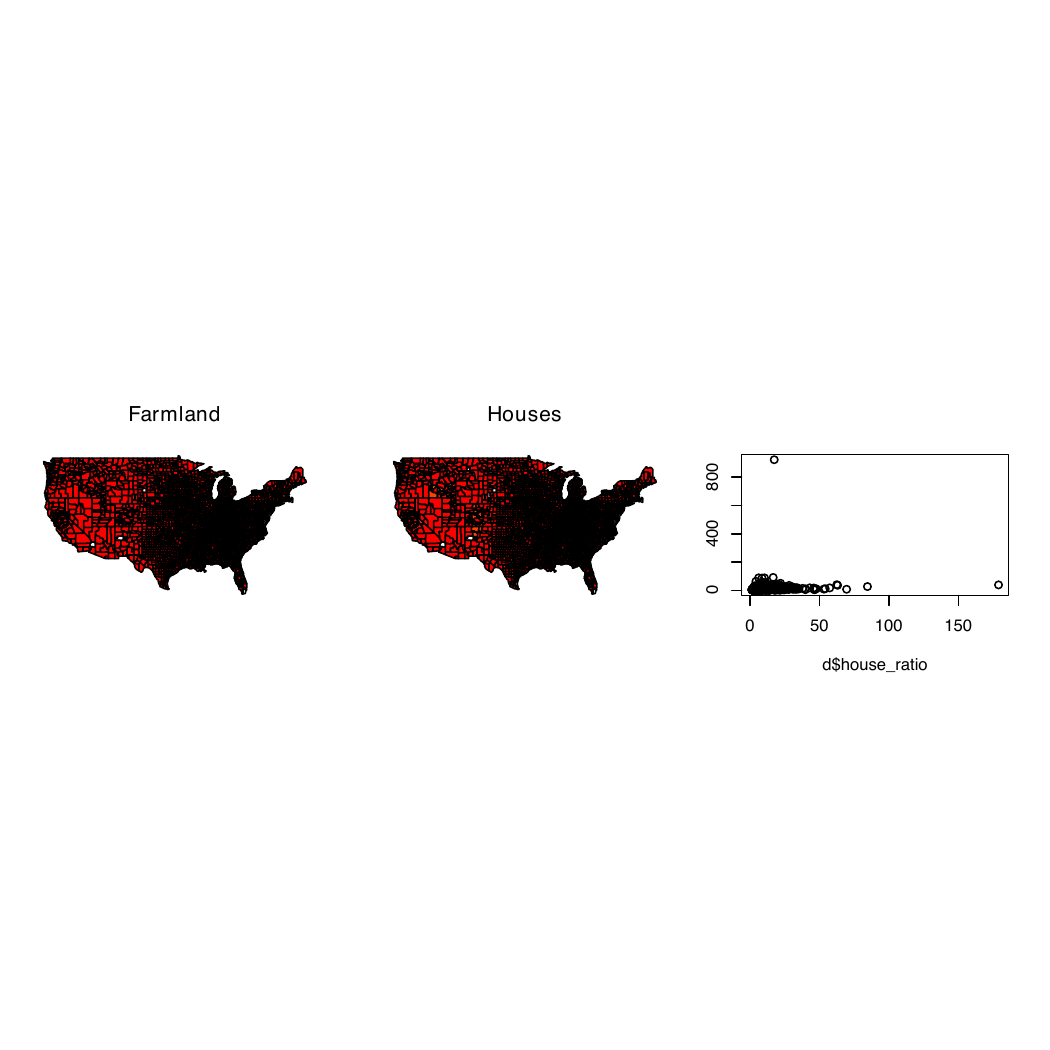
A square page, mostly blank, with three small panels in a row across the middle: two red county maps whose eastern halves are solid black, and a scatter with every point crowded into the lower left corner.

The same data, with pdf(), par(mfrow = c(1, 3)), map(fill = TRUE), cut(x, 6) and plot(), with nothing else set. The code is at the start of Part 2.

  1. A 7 × 7 in page; no journal prints that size, and two thirds of it is blank
  2. Fonts not embedded: the file holds no copy of the typeface
  3. Six classes of equal width: one outlier stretches them, and 3,052 of 3,053 counties get the same red
  4. No key, and black county borders that turn the East solid
  5. The x label is a variable name, d$house_ratio; the y label does not show

1 · What journals require of your figures

  • Two kinds of requirements
  • Nature and AER requirements
  • When journals ask for the final figure files
  • What studies show about presentation and referees
  • Matching Nature’s requirements in R
  • Categorical, sequential and diverging colour scales

Two kinds of requirements

  • Technical specifications, set by the journal and measured in the file:
    • Width and height of the file
    • Text size and line weight, in points (1 pt = 1/72 inch)
    • Fonts embedded: a copy of each typeface inside the file
    • A vector file (PDF or EPS, sharp at any zoom), no pictures inside
  • Readability, judged by looking at the figure:
    • Can a reader see the main comparison?
    • Is any text cut off, overlapping, or on top of data?
    • Do titles and labels say what is shown, with units?
    • Can every class be told apart, in gray and by a colour-blind reader?
    • Do the class breaks spread the data across the classes?

Nature and AER requirements for size, fonts and text

Requirement Nature’s words The AER’s words
Width “Nature’s standard figure sizes are 89 mm wide (single column) and 183 mm wide (double column).” Not stated
Font “Lettering should be in a sans-serif typeface, preferably Helvetica or Arial, the same font throughout all figures in the paper.” Not stated
Text size “Maximum text size for all other text should be 7 pt; minimum text size should be 5 pt.” Not stated
Panel labels “Separate panels in multi-part figures should each be labelled with 8 pt bold, upright (not italic) a, b, c.” For file names: “use letters for indicating individual panels (e.g., Figure1a.ppt, Figure1b.ppt, Figure1c.ppt, etc.)”
Line weight “Line weights and strokes should be set between 0.25 and 1 pt at the final size” Not stated

Pages: Nature, final submission and preparing figures; AER style guide. Not stated: the rule is yours to set, once for the whole paper.

Nature and AER requirements for files, colour and labels

Requirement Nature’s words The AER’s words
File format “Vector EPS or PDF format for figures containing line drawings and graphs”; “Embed fonts (True Type 2 or 42)” “Figures must be supplied as vector-based graphics in one of the following formats—vector PDF, EPS, AI, WMF, or PPT.”
Photographs and images “All photographic images must be supplied at a minimum of 300 dpi at the maximum size they can be used.” “Photographs and other images (maps, screenshots, etc.) should be provided at 300 dpi”
Colour “Colour artwork can be provided in RGB (recommended) or CMYK format.”; “An accessible colour palette to be used” Not stated
Labels “All axes to be labelled with units in parentheses, e.g. Data (unit)” “If there are variables (italics) or matrices and vectors (boldface) in figures, they should be designated as such.”

Pages: Nature, final submission and preparing figures; AER style guide. The AER also asks that the files “correspond to the figures in your accompanying PDF”.

When journals ask for the final figure files

  • Nature: “The Nature journals are flexible with regard to the format of initial submissions.” “If revisions are requested, the editor will provide detailed formatting instructions at that time.”
  • AER: “Adherence to the journal’s Style Guide is required for accepted articles but is optional at the time of submission.”
  • PNAS: each figure as a separate high-quality PDF or EPS file, with the revised manuscript.
  • Journals ask for the final files at revision (Nature, PNAS) or at acceptance (AER). With the journal’s rules in a file and a figure script that reads them (Part 3), the final files are one run of the script.

Pages: Nature, initial submission; AER, submissions; PNAS, how to submit a manuscript.

What studies show about presentation and referees

  • An experiment on writing: Feld, Lines and Ross (JEBO, 2024)
    • Professional editors improved the English of 30 economics papers, with the layout unchanged.
    • Economists rated the edited versions 0.2 SD higher and were 8.4 percentage points more likely to accept them for a conference.
  • Referees’ reasons for rejecting: Bordage (Acad Med, 2001)
    • On 123 conference submissions that at least one reviewer wanted to reject, text difficult to follow and defective tables or figures were among the ten most common reasons.
  • A format rule and authors: Card and DellaVigna (JEP, 2014)
    • After the AER capped submissions at 40 pages in 2008, 21% came in at 39 or 40 pages, up from 6%.
  • The look of the page: Huang (arXiv, 2018)
    • A model that saw only page images of computer-vision papers flagged half of the workshop papers (a stand-in for rejected ones) and 0.4% of the conference papers. Referees were not part of the test.

Takeaway: clear writing and readable figures help a paper with referees. No study has sent the same paper to referees in the journal’s format and in a plain one.

Matching Nature’s requirements in R

Draw the file at the size it will print. Then every size you set is the size the reader sees.

Nature requires Setting in R
89 mm wide, one column (183 mm for two) cairo_pdf(width = 89 / 25.4): R takes inches
Helvetica or Arial, embedded in the file family = "Helvetica"; cairo_pdf() embeds the font
Text from 5 to 7 pt pointsize = 7 for 7-pt text; cex.axis = 6 / 7 for 6-pt tick labels (printed size = pointsize × cex)
Panel letters, 8 pt bold mtext("a", font = 2, cex = 8 / 7)
Lines from 0.25 to 1 pt lwd = 0.5 / 0.75 for a 0.5-pt line (lwd = 1 is 0.75 pt)
A vector file cairo_pdf() writes one

Point (pt): a length, 1/72 inch or about 0.35 mm; a font’s size in points is the height from the top of an h to the bottom of a p. With layout() or mfrow and three or more rows or columns, R multiplies every text size by 0.66 (0.83 for two by two): add par(cex = 1) after it.

One Nature column, drawn in the R Console

R Console: writes cars-nature.pdf
# cars comes with R: speed (mph) and
# stopping distance (ft) of 50 cars
cairo_pdf("cars-nature.pdf",
          width = 89 / 25.4, height = 70 / 25.4,
          pointsize = 7, family = "Helvetica")
par(mar = c(3, 3.2, 1.6, 0.6), mgp = c(1.8, 0.5, 0),
    cex.axis = 6 / 7,  # 6-pt tick labels
    lwd = 0.5 / 0.75,  # 0.5-pt box; axes 0.75 pt
    las = 1)
plot(cars$speed, cars$dist, pch = 16, cex = 0.5,
     xlab = "Speed (mph)",
     ylab = "Stopping distance (ft)")
mtext("a", side = 3, line = 0.4, adj = 0,
      font = 2, cex = 8 / 7)   # 8-pt bold letter
dev.off()
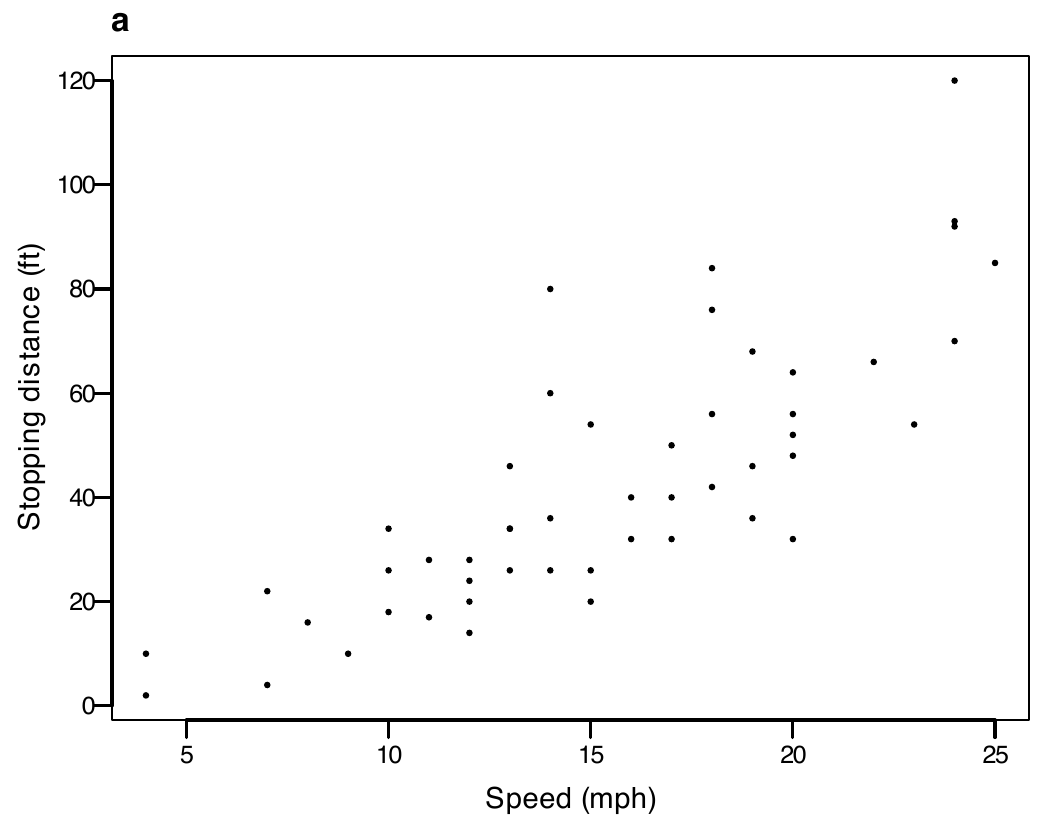
A scatter of R's cars data, speed against stopping distance, drawn 89 mm wide with 7-point axis titles, 6-point tick labels and a bold letter a at the top left.

The PDF, 89 × 70 mm.

  • The width, font, text sizes and line weight come from the table on the previous slide.

Categorical, sequential and diverging colour scales
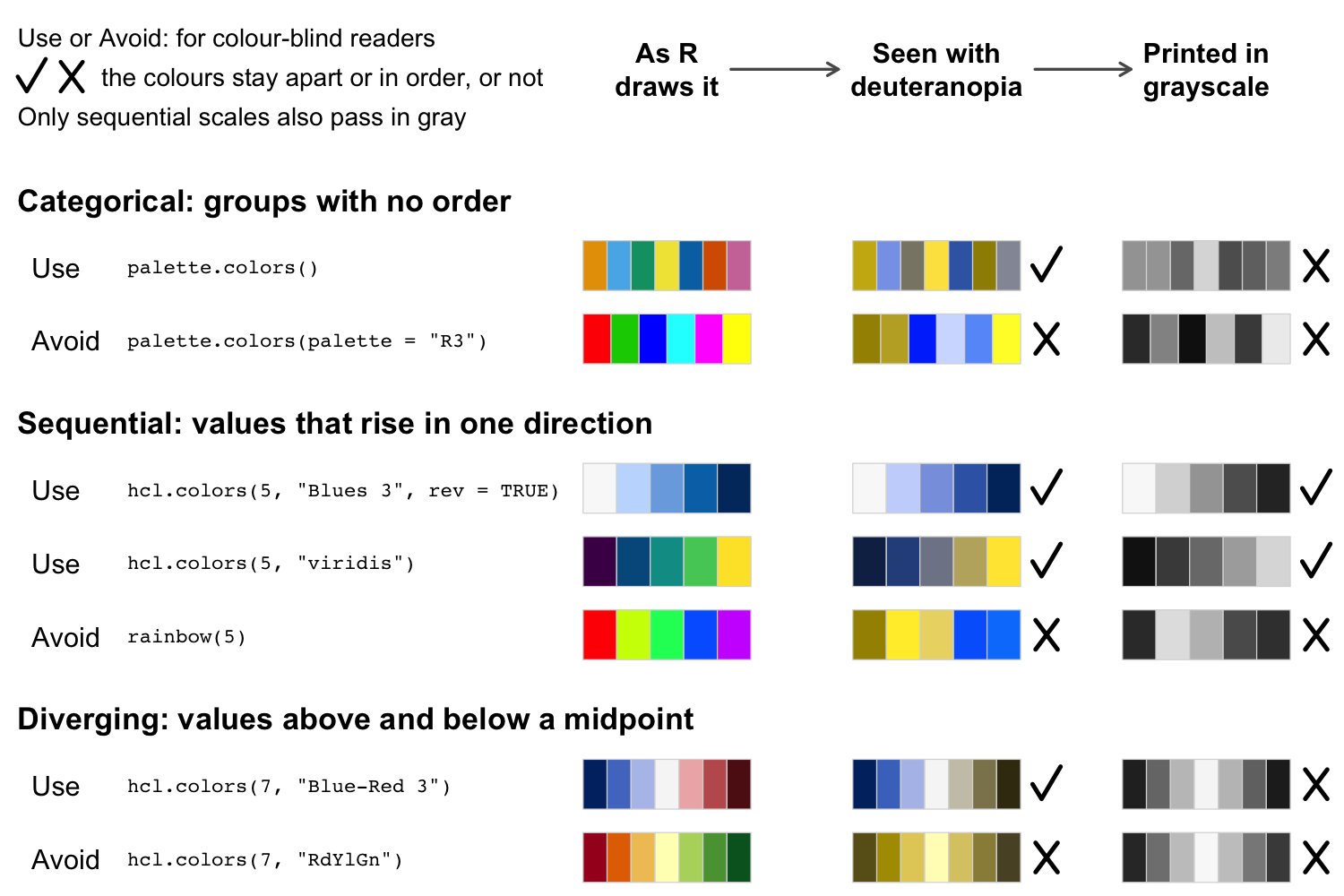
Seven palettes in three groups, categorical, sequential and diverging, each marked use or avoid with the R call that makes it, in three columns: as R draws them, as a person with deuteranopia sees them, and printed in grayscale. A tick or a cross after the last two columns says whether the colours stay apart or in order there. All palettes marked use pass for deuteranopia; only the two sequential ones also pass in grayscale.
  • Deuteranopia: red–green colour blindness. The eye lacks the cones that sense green, so reds and greens look alike.

“About 1 in 12 men have color vision deficiency”, most often red and green (National Eye Institute). Okabe-Ito colours: Wong (Nature Methods, 2011), the paper Nature’s guide cites. Simulation: Machado, Oliveira and Fernandes (IEEE TVCG, 2009), full severity.

Exercise 1

# Exercise 1 (3 minutes). Pen and paper, or the Console.
#
# Nature's double column is 183 mm wide. You want text at
# 7 pt, tick labels at 6 pt and lines at 1 pt.
# There are 25.4 mm in an inch.
#
# 1. Write the cairo_pdf() call that opens figure1.pdf,
#    183 mm wide and 100 mm tall, with 7-point text in
#    Helvetica.
# 2. Which cex.axis gives 6-point tick labels, and which
#    lwd gives a 1-point line?
#
# Two answers to compare with the room: the width in
# inches, and the lwd.
cairo_pdf("figure1.pdf", width = 183 / 25.4, height = 100 / 25.4,
          pointsize = 7, family = "Helvetica")   # 7.20 by 3.94 in
6 / 7         # cex.axis = 0.86 gives 6-pt tick labels
1 / 0.75      # lwd = 1.33 gives a 1-pt line

A width of 7.20 in (183 / 25.4), and lwd = 1.33 (1 / 0.75).

2 · Asking an agent to match a target figure

  • The default code for Figure 1
  • The target: a picture of Figure 1 for Nature
  • Claude Code edits the code to match the picture (live)
  • What it drew, and what it changed
  • Where it misses Nature’s rules
  • Exercise 2
  • What matching a picture costs

The default code for Figure 1

code/figure1_default.R (part); needs data_clean/ from code/2_clean_data.R
library(maps)
d <- readRDS("data_clean/counties.rds")
poly <- map("county", plot = FALSE, namesonly = TRUE)
fips <- sprintf("%05d",
  county.fips$fips[match(poly, county.fips$polyname)])
pdf("figures/default/figure1.pdf")
par(mfrow = c(1, 3))
map("county", fill = TRUE,
    col = heat.colors(6)[cut(d$land_ratio[match(fips, d$fips)], 6)])
title("Farmland")
map("county", fill = TRUE,
    col = heat.colors(6)[cut(d$house_ratio[match(fips, d$fips)], 6)])
title("Houses")
plot(d$house_ratio, d$land_ratio)
dev.off()

The default version of Figure 1: a square page, mostly blank, with three small panels in a row.

  • d has one row per county. land_ratio and house_ratio are the 2022 value divided by the 1940 value.
  • Download the project (a zip file), then its data (Cornell NetID login): replace the project’s data folder with the one in the data zip.

The target: a picture of Figure 1 for Nature

The target: Figure 1 for Nature, three panels in one row, the two county maps and the scatter.
  • target/figure1.png: the figure from “Figure 1, ready for Nature” as a picture at 300 dpi (pixels per inch): 2,159 × 730 pixels, 183 mm wide in print.
  • It stands in for a published figure whose look you want to copy. We drew it before class with the project’s finished script (Part 3).
  • The project’s match/ folder holds three things: this picture, a copy of the default code, and the data.
  • Claude Code starts in match/, with no list of Nature’s rules and none of the code that drew the target.
  • The prompt says “Use only the files in this folder”, and Claude Code asks before it reads anything outside it.

Live demo: Claude Code edits the code to match the picture

Prompt to paste into Claude Code
code/figure1_default.R draws figures/default/figure1.pdf. target/figure1.png
is a 300-dpi picture of the figure I want, at its printed size. Edit
code/figure1_default.R so that the PDF it draws matches the target as
closely as you can: size, layout, colours, class breaks, keys, titles, axis
labels, text sizes and line weights. Run the script, turn the PDF into a
PNG with pdftoppm, compare it with the target, and repeat until you cannot
get closer. Use only the files in this folder. When you finish, list the
changes you made.
  • Claude Code runs live, in match/. It takes about six minutes.
  • match/.claude/settings.json, which comes in the project, lets it edit files and run Rscript and pdftoppm (PDF to picture) without asking. Other commands still ask.

What Claude Code drew

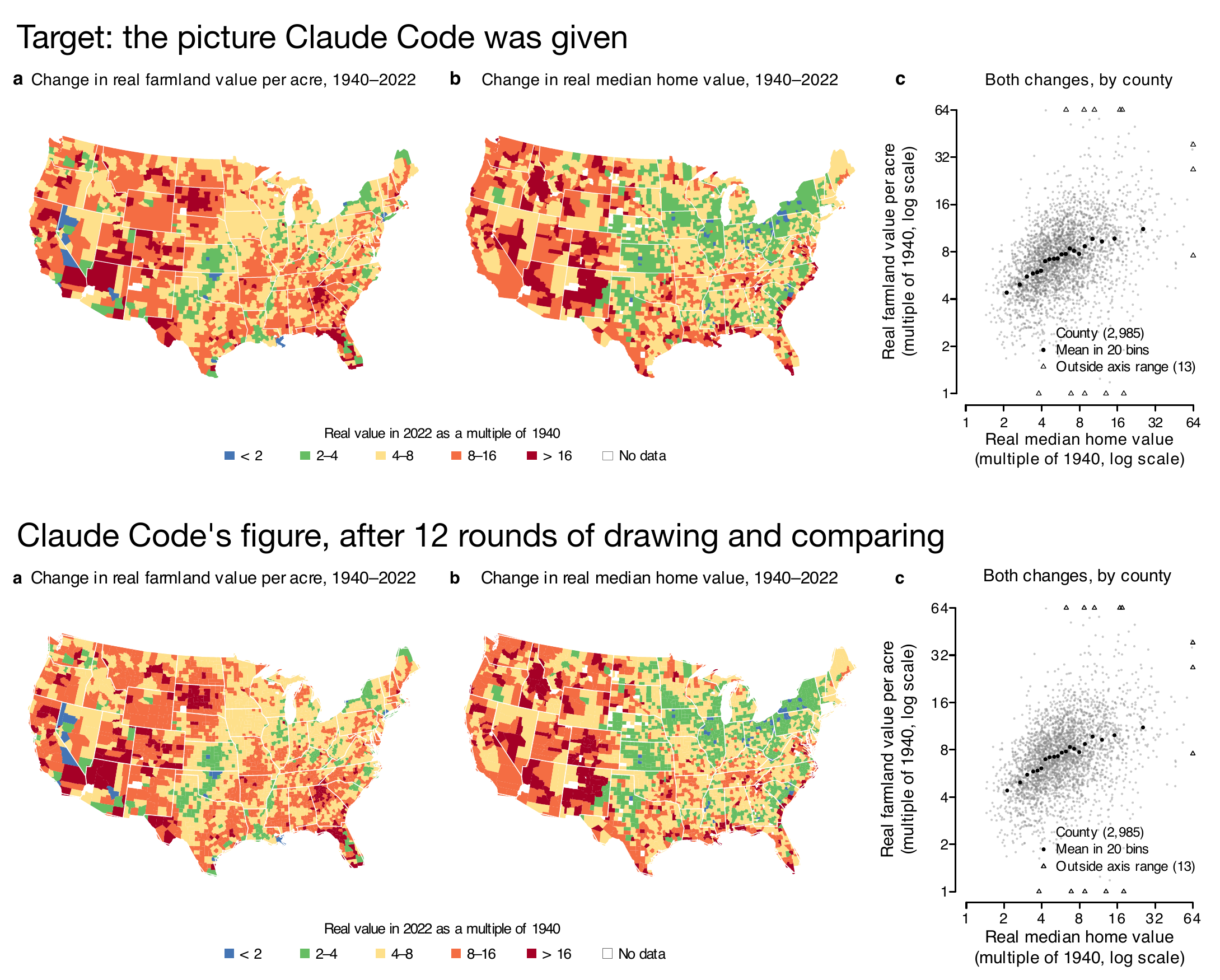
Two versions of Figure 1, one above the other: the target picture, and the figure Claude Code drew after 12 rounds. They are hard to tell apart; the panel letters in Claude Code's version are slightly smaller.
  • A test run before class: 335 seconds, 12 rounds of drawing and comparing.
  • Its own pixel-by-pixel comparison found the two almost the same.

What Claude Code changed in the code

code/figure1_default.R after the test run (part)
W <- 7.2; H <- 2.433
cairo_pdf("figures/default/figure1.pdf", width = W, height = H,
          family = "Helvetica", pointsize = 7)
breaks <- c(0, 2, 4, 8, 16, Inf)
pal    <- c("#4575B4", "#66BD63", "#FEE08B", "#F46D43", "#A50026")
page_text(x0, 0.97, letter, adj = c(0, 0.5), font = 2, cex = 1.05)
kx <- (362 + 125.2 * (0:5)) / 2000
  • The script grew from 20 lines to 100.
  • It swapped pdf() for cairo_pdf() and set the page to 7.2 × 2.43 in, with 7-pt Helvetica.
  • It read the five colours off the picture’s pixels. They are the target’s colours exactly.
  • It placed the titles and the key where it measured them on the picture: page_text(), a function it wrote, puts text at a fraction of the page, and kx holds those fractions.

Claude Code’s figure misses two of Nature’s rules

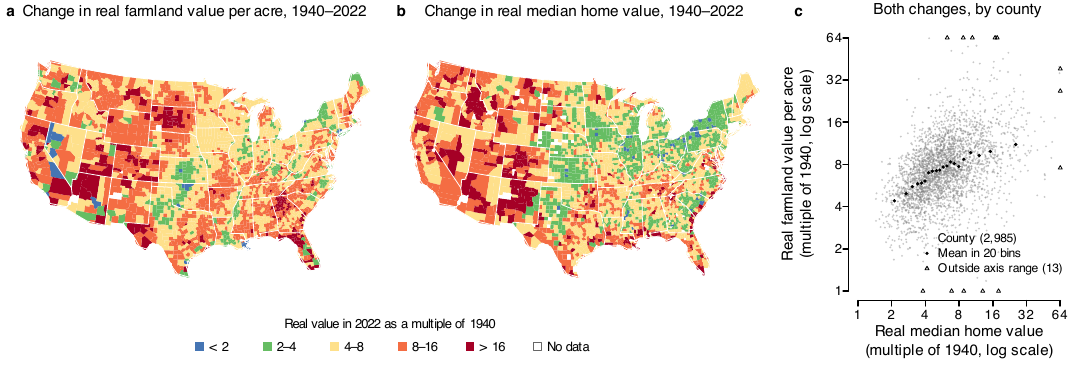
Claude Code's figure and the target side by side. They look the same.
Text Nature’s rule (Part 1) Claude Code’s code (test run) Size in print
Panel and axis titles at most 7 pt cex = 1.05 and 1.04 at pointsize = 7 7.35 and 7.28 pt
Panel letters 8-pt bold font = 2, cex = 1.05 7 × 1.05 = 7.35 pt
  • A picture shows how a figure looks, without the numbers behind it. Claude Code set the sizes to match the widths of words in pixels: at 300 dpi, half a point is about two pixels.
  • Matching a picture gets close, and will rarely be exact.
  • Meeting a journal’s rules exactly takes the rules themselves, which Part 3 gives the agent.

Exercise 2

Five minutes, in Claude; a chat is enough.

  1. Save the picture: the figure from “One Nature column, drawn in the R Console”, at 300 dpi.
  2. Attach it in Claude with this prompt:
Prompt to paste into Claude, with the picture attached
The attached picture is a 300-dpi picture of a figure, at its printed
size. My R code draws the same data but looks nothing like it:

pdf("cars.pdf")
plot(cars$speed, cars$dist)
dev.off()

Change my code so that the PDF it draws matches the picture as closely as
you can: size, font, text sizes, line weights, labels, point style and the
letter. Give me the full code.
  1. Compare its numbers with the code that drew the picture: cairo_pdf(), 89 × 70 mm, pointsize = 7, cex.axis = 6 / 7, lwd = 0.5 / 0.75 for the box (axes stay 0.75 pt), letter cex = 8 / 7.

Two answers to compare with the room: which numbers it matched, and which it guessed.

Three runs of the prompt before class, in a chat, with no code run:

Setting Code on “One Nature column” Run 1 Run 2 Run 3
Size 89 × 70 mm 89 × 70 mm 89 × 70 mm 89 × 69 mm
Tick labels 6 pt 5.5 pt 5 pt 6 pt
Axis lines 0.75 pt 1.1 pt 1.1 pt 1.2 pt
Panel letter 8 pt 8 pt 8 pt 7 pt
PDF function cairo_pdf() pdf() pdf() pdf()
  • All three got the size and the 7-pt Helvetica.
  • The runs disagree on the tick labels, the axis lines and the letter.
  • In the picture the axes (0.75 pt) look heavier than the box (0.5 pt). All three runs saw that and overshot, past Nature’s 1-pt maximum.
  • All three used pdf(), so the fonts are not embedded.

What matching a picture costs

  • Every number is typed into the script: the page size, the text sizes, the colours, and positions measured in the picture’s pixels.
  • Some numbers are guesses: the titles came out up to 0.35 pt over Nature’s limit, the panel letters 0.65 pt short.
  • The same prompt gives different numbers on each run.
  • The next figure in the paper needs the same work again.
  • A second journal needs a new target picture and another run.
  • Nothing in the script says where a number came from.

3 · Using agents to write spec files and switch journals

  • Why write the requirements in a file, and what YAML is
  • The spec file for Nature, and a script that checks a PDF against it
  • Claude Code writes the spec file for Nature (live), and how to check it
  • The spec file for the AER
  • Claude Code rewrites the script to read the spec files (live)
  • open_fig(), panel labels, and switching journals

Why write the requirements in a file

  • In Part 2 the agent had only a picture, so it guessed the sizes. With the rules in a file, it reads them.
  • The file is specs/nature.yml, a short text file of Nature’s requirements: widths, fonts, text sizes, panel labels, line weights.
  • Each requirement carries the journal’s own words and the page they come from. We call the file the spec, short for specification.
  • Three programs read it:
    • R, to set the size and fonts when it draws
    • The checking script, tools/check_fig.R, to measure the PDF
    • Claude Code, when it writes or edits figure code
  • Edit a value in the file, and every figure drawn after that uses the new value.

What a YAML file is

  • What it is: a plain-text file of settings, one name: value per line, ending in .yml or .yaml.
    • Indenting by two spaces puts a value inside the name above it.
    • {min: 5, max: 7} is the one-line form of min: 5 and max: 7 indented under the name.
    • A # after a space starts a comment.
    • Text with a colon followed by a space goes in quotes.
  • What uses it: settings that a person writes and a program reads.
    • The header at the top of a Quarto document, and _quarto.yml
    • GitHub’s automated jobs (.github/workflows/)
  • What reads it: Quarto and GitHub, for their own settings · R, with the yaml package · Python, with PyYAML · an agent, as text
R Console; needs the yaml package (install.packages("yaml"))
library(yaml)
s <- read_yaml(text = "
text_pt:
  value: {min: 5, max: 7}
")
s$text_pt$value$max      # a list inside a list
#> [1] 7

The spec file for Nature

specs/nature.yml (part)
text_pt:
  value: {min: 5, max: 7}
  quote: "Maximum text size for all other text should be 7 pt; minimum text size should be 5 pt."
  source: final

panel_label:
  value: {pt: 8, bold: true, case: lower, placement: inside}
  quote: "Separate panels in multi-part figures should each be labelled with 8 pt bold, upright (not italic) a, b, c."
  source: final (size, bold, lower case); house (letter at top left)

line_pt:
  value: {min: 0.25, max: 1}
  quote: "Line weights and strokes should be set between 0.25 and 1 pt at the
    final size (lines thinner than 0.25 pt may vanish in print)."
  source: final
  • Each rule has three parts:
    • value: what R and the checking script use
    • quote: Nature’s sentence, word for word
    • source: the page, listed under pages: at the top of the file, or house for our own choice where the pages say nothing
  • This file comes with the project, with each quote checked against Nature’s pages.
  • Later in this part, live, Claude Code writes it again from Nature’s pages.

A script that checks a PDF against the spec file

  • With Nature’s rules in a file, a script can measure any PDF against them.
  • tools/check_fig.R reads specs/<journal>.yml, measures the PDF, and prints one line per rule: PASS or FAIL, and what it measured.
  • It works on any PDF figure, drawn in R, Python or anything else, for any journal with a spec file.
  • It checks the rules the spec sets as numbers:
    • Width and height, fonts and whether they are embedded
    • Text sizes and panel letters
    • Line weights, and pictures pasted inside the PDF
  • Readability is left to a person, or to an agent that looks at the figure.
  • It comes in the project zip, in tools/, written with Claude Code before class: 137 lines of R.
  • It needs poppler, a free set of command-line tools that read PDFs (on a Mac, brew install poppler), and the R packages yaml and magick.

Asking Claude Code for a checking script

Prompt to paste into Claude Code, in a folder with specs/ and some PDFs (a test run, before class)
specs/nature.yml and specs/aer.yml hold two journals' rules for figures,
each with the journal's words. Write tools/check_fig.R, an R script run as
  Rscript tools/check_fig.R <pdf> <journal>
that measures the PDF against specs/<journal>.yml and prints one line per
rule, PASS or FAIL, with what it measured: the page width and height
(pdfinfo), the fonts and whether each is embedded (pdffonts), the size of
every word of text (pdftotext -bbox), the panel letters, and the line
weights (pdftocairo -svg). Read every number from the spec file; type none
into the script. Test it on the PDFs in pdfs/. pdfs/cars-nature.pdf was
drawn 89 x 70 mm with 7-pt text, 6-pt tick labels, an 8-pt bold letter a
and 0.5-pt lines, with embedded fonts, so it should pass every Nature rule.
  • A test run before class took about 8 minutes and wrote a 461-line script, a different file from the project’s 137-line checker.
  • On Claude Code’s Part 2 figure it found the same two failures as the project’s script. It passed the target.
  • On the default figure, which has no panel letters, it printed PASS for the letters (“single panel?”). The project’s script prints FAIL.
  • Takeaway: test a checker an agent wrote on PDFs whose right answers you know.

How the checking script measures the width

Terminal, in the project folder: the tool the script runs for the width
pdfinfo figures/default/figure1.pdf
Output (one line of it)
Page size:       504 x 504 pts
  • 504 pt × 25.4 / 72 = 177.8 mm. The spec allows 89, 120 or 183 mm (one column, a column and a half, two columns), so the width fails.
  • The other checks follow the same steps, with other tools that read the PDF:
    • pdffonts: each font, and whether it is embedded
    • pdftotext -bbox: a box around every word; its height is the text size
    • pdftocairo -svg: every line, with its width in points
  • The script runs these tools and compares each result with Nature’s number.

Text sizes are exact for embedded fonts and read about half a point low for fonts that are not embedded.

The checking script on three versions of Figure 1

Figure Width Fonts embedded Text size Panel letters Other five checks
The default figure: a square page with three small panels.
Default code
FAIL, 177.8 mm FAIL, 0 of 2 FAIL, up to 9.2 pt FAIL, none PASS
Claude Code's figure from Part 2.
Claude Code (Part 2)
PASS PASS FAIL, up to 7.3 pt FAIL, 7.3 pt PASS
The target: Figure 1 for Nature.
Target
PASS PASS PASS, 6 to 7 pt PASS, 8 pt PASS

Other five checks: height, font, text on page, line weight, vector only.

Terminal, in the project folder: one run per PDF
Rscript tools/check_fig.R figures/default/figure1.pdf nature

Live demo: Claude Code writes the spec file for Nature

Prompt to paste into Claude Code
Read Nature's instructions for figures on these two pages:
https://www.nature.com/nature/for-authors/final-submission
https://research-figure-guide.nature.com/figures/preparing-figures-our-specifications/
Write specs/nature.yml in the same format as specs/aer.yml, with the same
rule names and the same shape of value, so that R/fig_style.R and
tools/check_fig.R can read it. Add height_mm_max. For each rule give the
value, the exact words it comes from, and which page. Where the pages say
nothing, write "not stated".
  • Claude Code runs live, in the project folder, with the shipped specs/nature.yml moved aside. It takes about two minutes.
  • The prompt names specs/aer.yml as the format to copy, since that file is still there.
  • You do not need to run it: the project you download already has the file shown on “The spec file for Nature”.

Checking the spec file Claude Code wrote

  1. The values: read each value against its quote, and find each quote on Nature’s pages.
  2. The rule names: in a terminal in the project folder, run Rscript tools/check_fig.R cars-nature.pdf nature, with the PDF from Part 1’s cars code copied into that folder. It meets every rule, so all nine checks should print PASS.
Check Run 1 Run 2
height not run PASS
font FAIL PASS
panel letters not run PASS
width, fonts embedded, text on page, text size, line weight, vector only PASS PASS
  • Two runs before class: run 2 used the prompt on the previous slide, run 1 was told only “the same format as specs/aer.yml”.
  • Run 1’s quotes matched Nature’s pages. It wrote height_mm for height_mm_max, size_pt for pt, and the font as a list.
  • When the height or panel-letter rule is missing, the script skips that check without a message.

The spec file for the AER

specs/aer.yml (part)
panel_label:
  value: {placement: title}
  quote: "Be sure to label your figure files clearly, taking special care to use
    letters for indicating individual panels (e.g., Figure1a.ppt, Figure1b.ppt,
    Figure1c.ppt, etc.)."
  source: style (letters in file names); house ("Panel A." in the title)

width_mm:
  value: {panel: 115}
  quote: not stated
  source: house

text_pt:
  value: {min: 7, max: 9}
  quote: not stated
  source: house

House rule: one the journal does not set, chosen once for the whole paper and marked source: house. The AER’s style guide sets the file format, letters in the names of panel files, and where source notes go. Our house rules: one file per panel, “Panel A.” in the title, panels 115 mm wide, text 7 to 9 pt, lines 0.5 to 1.5 pt, colours that stay distinct in gray.

Live demo: Claude Code rewrites the script to read the spec files

Prompt to paste into Claude Code, in match/, after copying the project's specs/ into it
code/figure1_default.R draws Figure 1 for Nature, with every width, font,
text size and line weight typed into the script. specs/nature.yml and
specs/aer.yml hold each journal's rules, with the journal's words.
1. Write R/fig_style.R with three functions: read_spec(journal), which
   reads specs/<journal>.yml; open_fig(), which opens a PDF at the
   journal's width with its font, text size and line weight; and a
   function that draws a panel's label the way the journal asks.
2. Copy the script to code/figure1.R and change it so that
   journal <- "nature" at the top picks the spec, and the script itself
   types no width, font, text size or line weight. For the AER, write one
   file per panel, as specs/aer.yml says.
3. Run it for both journals and check the PDFs with pdfinfo and pdffonts.
Do not print the data; you do not need to look at it. When you finish,
list what you changed.
  • The goal: take the typed numbers out of Claude Code’s Part 2 script, so that one word at the top picks the journal.
  • Claude Code runs live, in match/, after cp -R ../specs . copies in the spec files. It takes about four minutes.

What the rewrite produced

  • R/fig_style.R, 92 lines: read_spec(), open_fig(), a panel-label function, and one it added unasked, to undo the text shrink of R’s layout().
  • code/figure1.R, 128 lines, with no width, font, text size or line weight typed in.
  • It fixed the two broken rules on its own: titles and letters at 7.35 pt became 7 pt and 8 pt.
  • Measured: the Nature file passes all nine checks, and the three AER files pass theirs.
  • Where a spec gives a range, it chose the size and wrote its rule at the top of R/fig_style.R.
  • The project ships its own versions, written before class: R/fig_style.R and code/3_figure1.R. The next slides use them.

open_fig() opens the PDF with the spec’s settings

R/fig_style.R (part); runs in R from the project folder; needs the yaml package
read_spec <- function(journal) {
  r <- read_yaml(file.path("specs", paste0(journal, ".yml")))
  list(journal  = journal,
       width_mm = r$width_mm$value,
       font     = r$font$value,
       text_pt  = r$text_pt$value,
       label    = r$panel_label$value,
       line_pt  = r$line_pt$value,
       panels   = r$file$value$panels)
}

open_fig <- function(path, spec, width, height_mm) {
  cairo_pdf(path, width = spec$width_mm[[width]] / 25.4,
            height = height_mm / 25.4,
            pointsize = spec$text_pt$max, family = spec$font)
  par(las = 1, mgp = c(1.5, 0.4, 0), tcl = -0.3, lwd = line_lwd(spec))
}
  • open_fig() is a wrapper: a short function that calls other functions with some arguments filled in.
  • It passes the spec’s width, font, text size and line weight to cairo_pdf() and par(). Figure scripts never type them.
  • Try it in R from the project folder, no data needed: source("R/fig_style.R"), open_fig("cars.pdf", read_spec("nature"), "single", 70) ("single" is a width named in the spec), plot(cars), dev.off().

Panel labels for each journal

R/fig_style.R (part); in R, from the project folder, after source("R/fig_style.R")
draw_panel_title <- function(letter, title, spec, at = par("usr")[1]) {
  if (spec$label$placement == "inside") {
    mtext(title, side = 3, line = 0.4)
    mtext(letter, side = 3, line = 0.4, adj = 0, at = at, font = 2,
          cex = spec$label$pt / spec$text_pt$max)
  } else {
    mtext(paste0("Panel ", toupper(letter), ". ", title), side = 3,
          line = 0.4)
  }
}
  • Nature: an 8-pt bold lowercase letter on each panel, as Nature asks.
    • Its pages do not say where the letter goes. We put it at the top left.
    • The three panels share one file, laid out as we want them printed.
  • AER: “Panel A.” before each panel’s title, our house rule.
    • The style guide’s one sentence on panels is about file names: “use letters for indicating individual panels (e.g., Figure1a.ppt, Figure1b.ppt, Figure1c.ppt, etc.)”.
    • It does not require one file per panel. We follow its example and write Figure1a.pdf to Figure1c.pdf.

Switching between Nature and the AER

code/3_figure1.R (part); runs once data/ holds the two licensed files
journal <- "nature"                    # "nature" or "aer"
spec <- read_spec(journal)

if (spec$panels == "one file") {
  open_fig(sprintf("figures/%s/figure1.pdf", journal), spec, "double", 62)
  layout(matrix(c(1, 2, 3, 4, 4, 3), nrow = 2, byrow = TRUE),
         widths = c(1.3, 1.3, 1), heights = c(1, 0.16))
  par(cex = 1)            # layout() with 3 columns sets cex to 0.66
  ...                     # map a, map b, scatter c, the key
} else {
  for (letter in c("a", "b")) {
    open_fig(sprintf("figures/%s/Figure1%s.pdf", journal, letter), spec,
             "panel", 85)
    ...                   # one map and its key
  }
  ...                     # Figure1c.pdf: the scatter
}
  • Changing one word, "nature" to "aer", writes the AER’s three files.

The Nature and AER versions

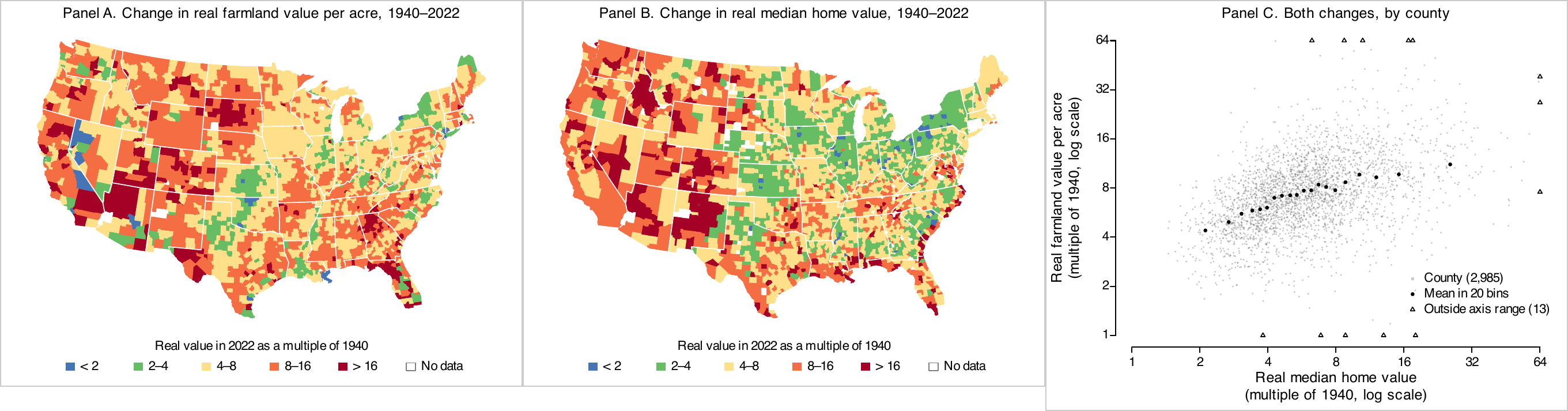
The AER version: three separate panel files side by side, titled Panel A, Panel B and Panel C, with larger text than the Nature version.
  • AER: three files, Figure1a.pdf to Figure1c.pdf, each 115 mm wide, text 8 and 9 pt, “Panel A.” in each title.
  • All of these are our house rules. One file per panel follows the file names in the style guide’s example.
  • Nature: one file, 183 × 62 mm, text 6 and 7 pt, letters a, b, c in 8-pt bold (the slide “Figure 1, ready for Nature”).

Decisions you make as the author

  • The question. Did farmland values rise more where home values rose more, from 1940 (before the Interstate highways) to 2022?
  • What the reader compares. Two maps with one key, and the scatter beside them.
  • The class breaks. Classes that each double, because “twice as much” is easy to read.
  • The colours. Five hues from blue to red make each class easy to find on the map. The cost: green and orange look alike for deuteranopia and in gray.
  • Which changes to keep, after reading each one against the measurement and the spec.

What to take away

  1. Open the PDF at the printed width, width = mm / 25.4, and set text and lines in points: pointsize, cex, lwd = pt / 0.75.
  2. Check the technical requirements with a script that measures the PDF, and readability by looking at the figure.
  3. An agent can match a picture of a figure closely and still miss a rule by a fraction of a point, which a measurement of the PDF finds.
  4. Matching a picture types every number into the script, and each run types different ones.
  5. Write each journal’s rules in a spec file, with the journal’s words. R, the checking script and an agent all read it.
  6. Check a spec file an agent wrote: its values against the quotes, its rule names with the checking script.
  7. Keep one script per figure, with the journal named once at the top.

Practice

Eleven exercises on the session page, with solutions behind a click. All of them use the project; the six marked “data” need the licensed files described in its README.

  • 1–2 Sizes: Figure 1 in one Nature column; the column-and-a-half width in the checking script
  • 3–4 Spec files: AJAE’s rules; Science’s rules, behind a bot check
  • 5–6 Colours and checks: another palette, checked in gray and for deuteranopia; a units check in check_fig.R
  • 7–10 Agents: the figure-critic and figure-builder agents (see the page); your own house rules for the AER
  • 11 Matching a figure: a Nature figure’s style, on Figure 1’s data