AEM 6850
Empirical Methods for Applied Economists
Prof. Ariel Ortiz-Bobea
Tuesday, September 15, 2026
By the end of this session you can:
git add it, git commit it with a message, and git push it to GitHub.git pull.git status and tell whether a change is only on disk, staged for the next commit, or already committed.analysis_v1.R
analysis_v2.R
analysis_FINAL.R
analysis_FINAL_v2.R
analysis_REALLY_FINAL.R
analysis_FINAL_USE_THIS.R
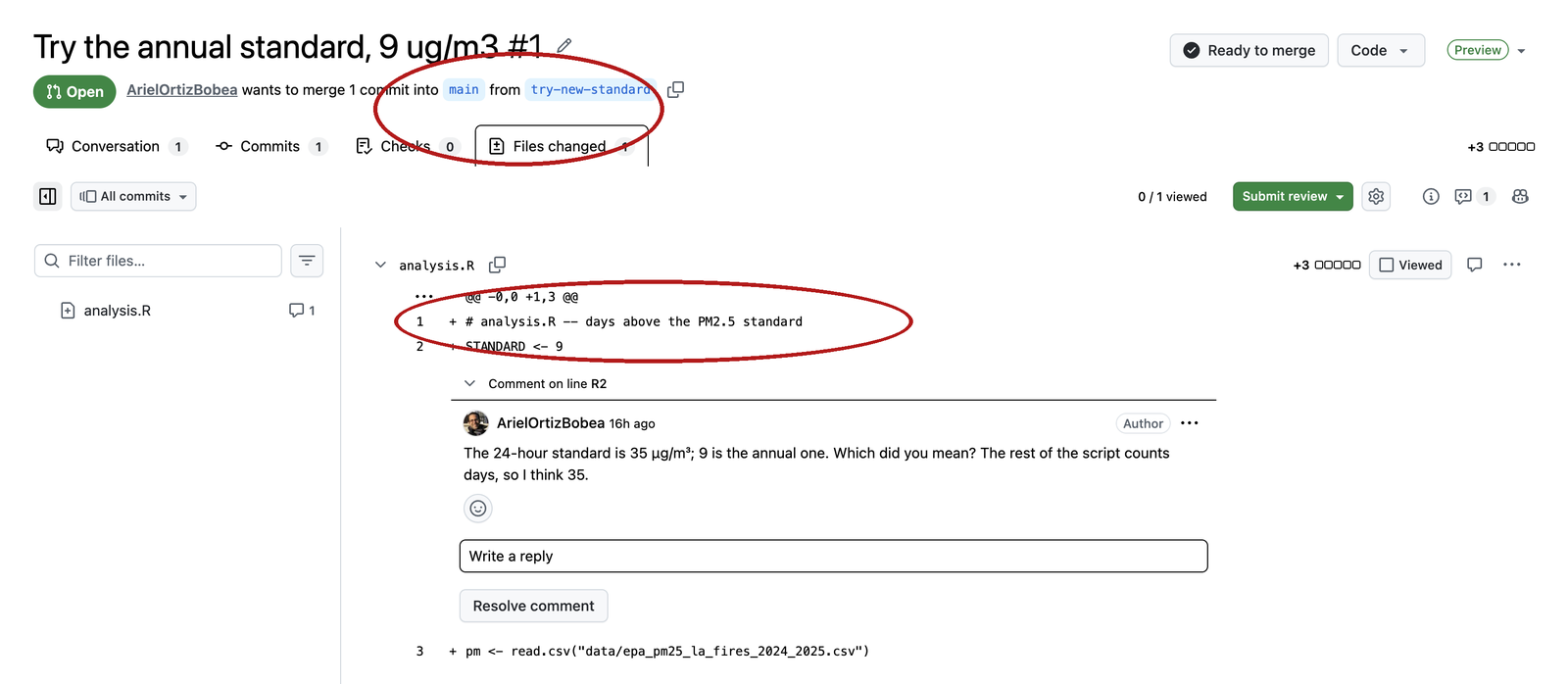
FINAL and FINAL_v2?paper_v3_jane_edits.R.A coding assistant (Copilot, ChatGPT, Claude) was asked to add one check to a three-line script. This is what it did.
-/+ pair in the middle: 35 became 9.| git | GitHub | |
|---|---|---|
| What | a program on your laptop | a website |
| Does | takes and keeps snapshots of a folder | keeps a copy of the snapshots and shows them in a browser |
| Needs the internet | no | yes |
| You have used it | not yet | once: add my intro, before class |
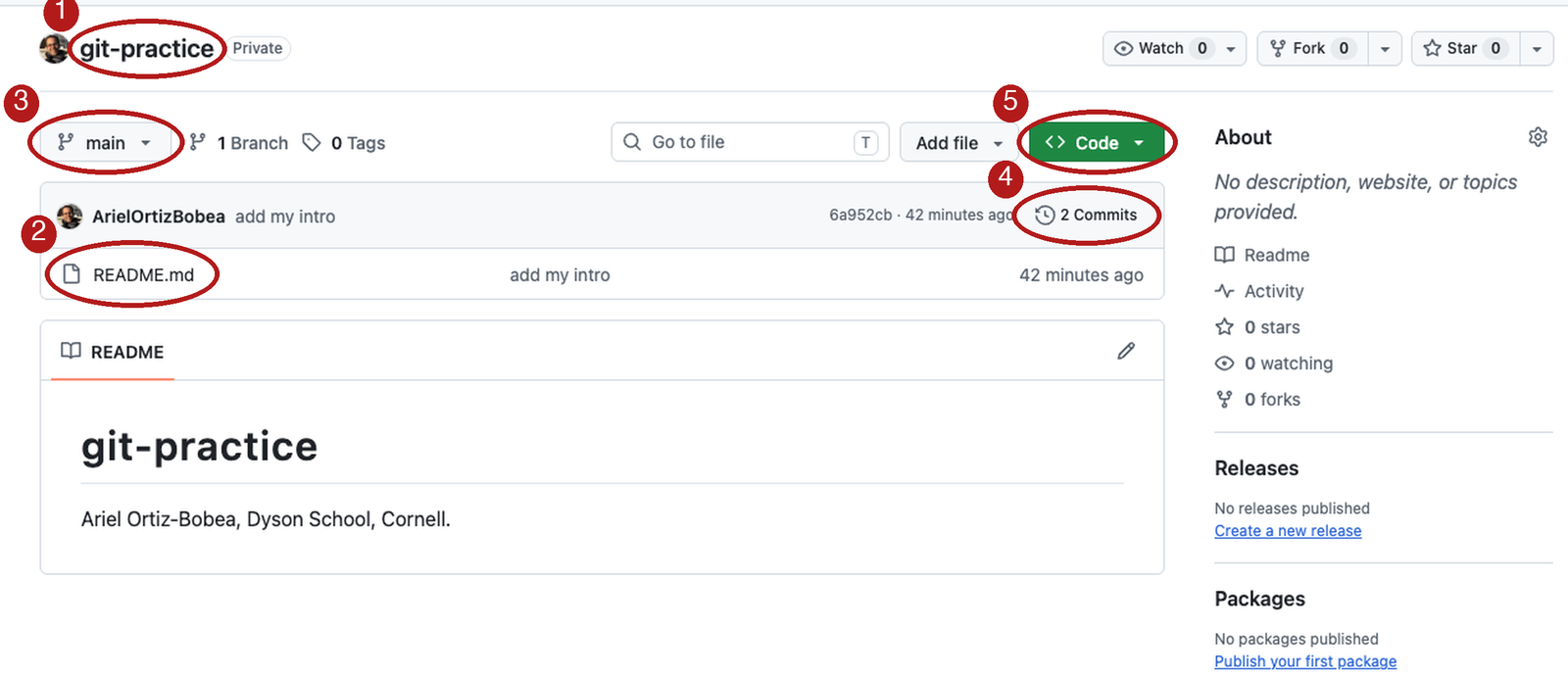
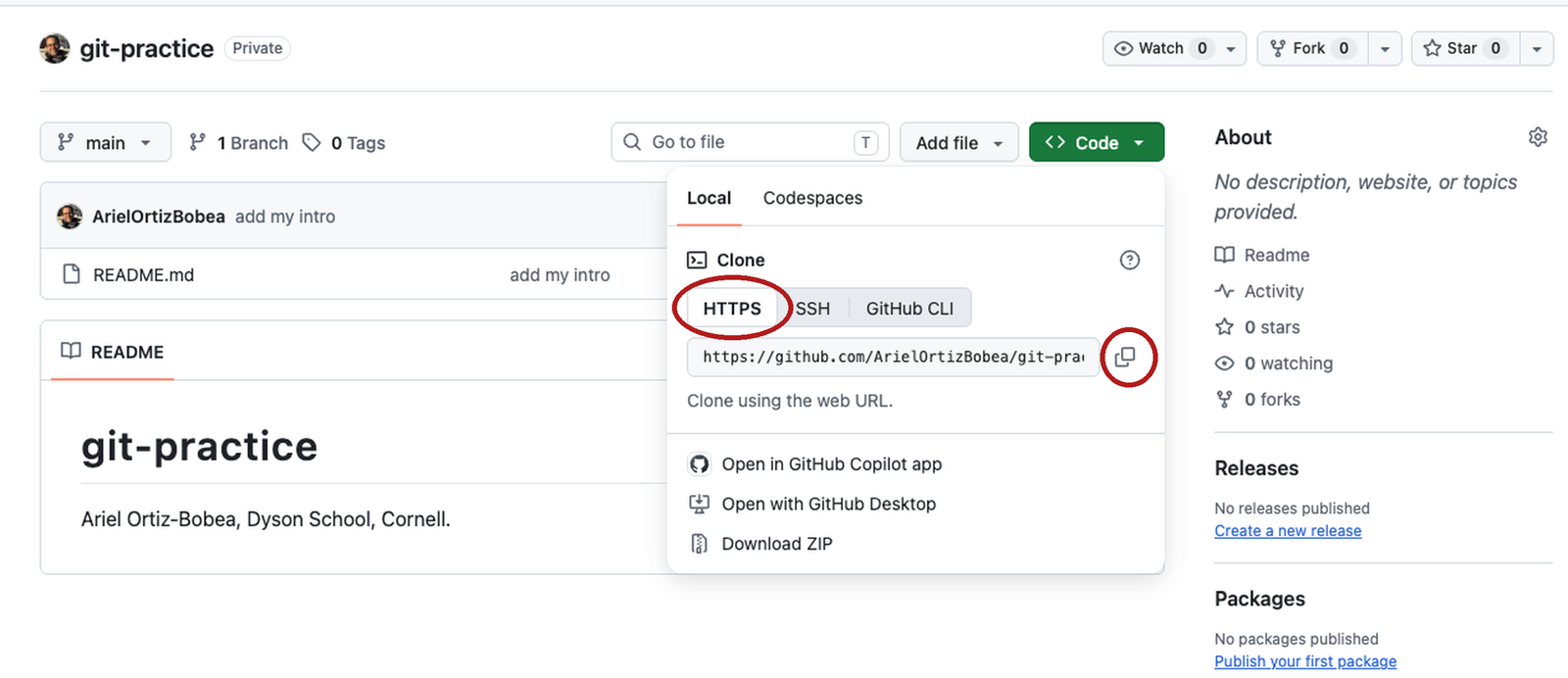
git-practice. Private. Tick Add a README file. Create repository.Initial commit. A repository is born with a timeline of length one.README.md → one line → Commit changes… → message add my intro. Two snapshots. You did exactly this before class.
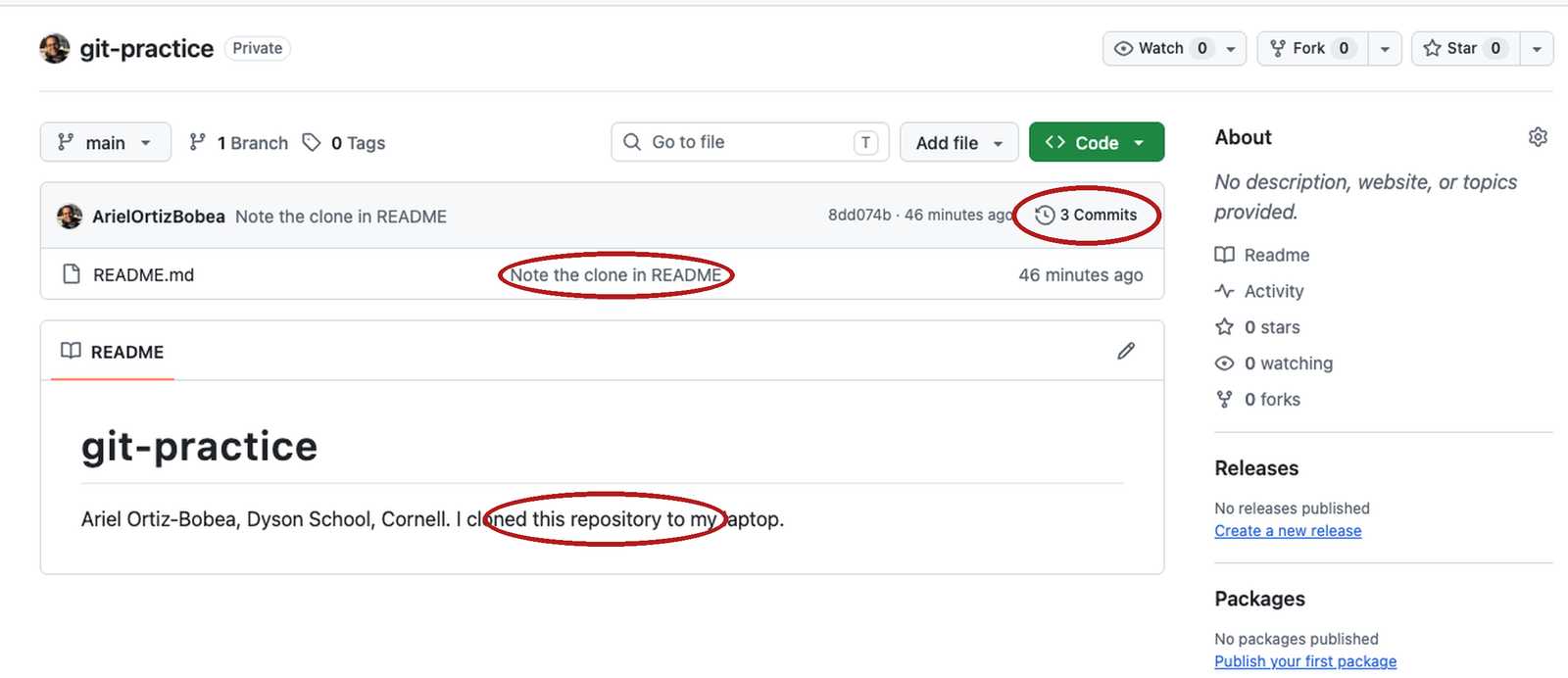
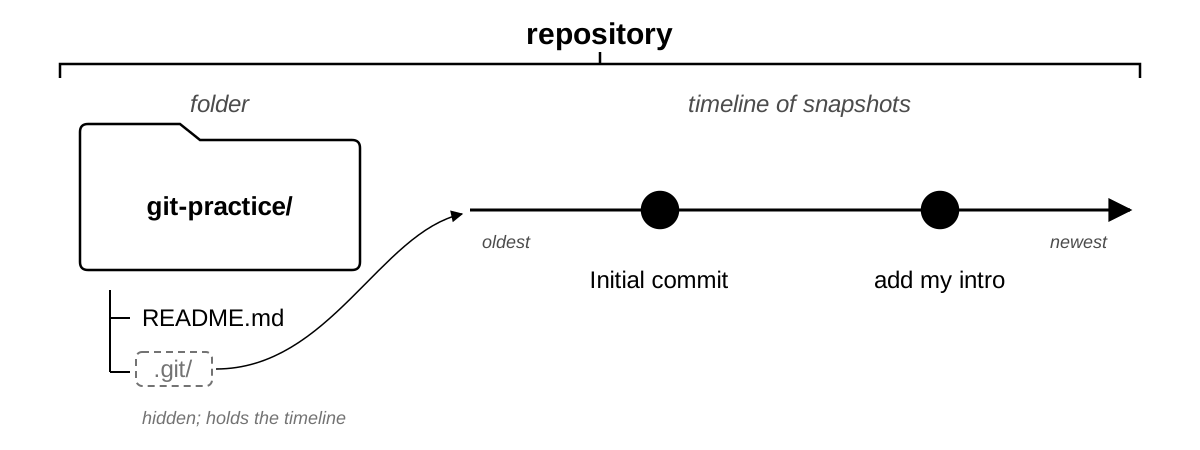
README.md, the only filemain — the timeline’s name2 Commits — two snapshots
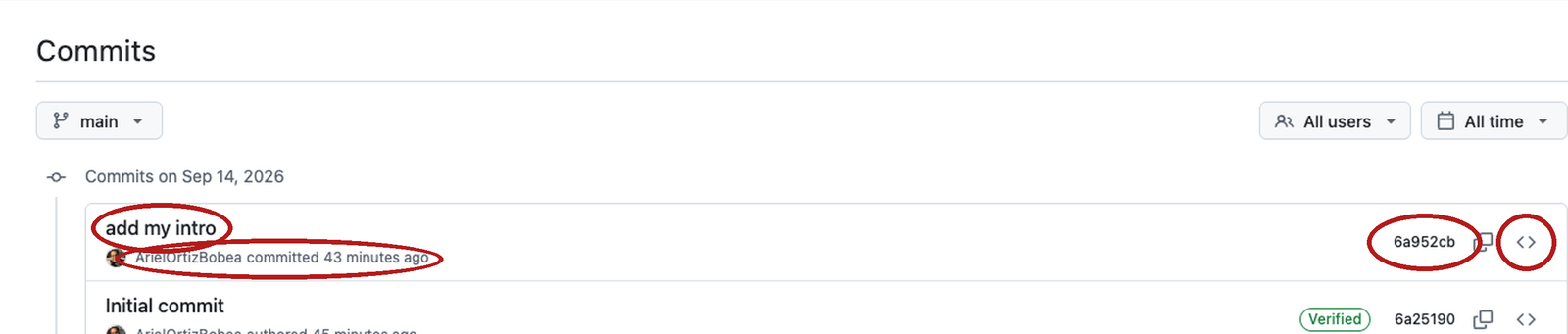
add my intro. The only part a human wrote.<>: the whole folder as it was then.
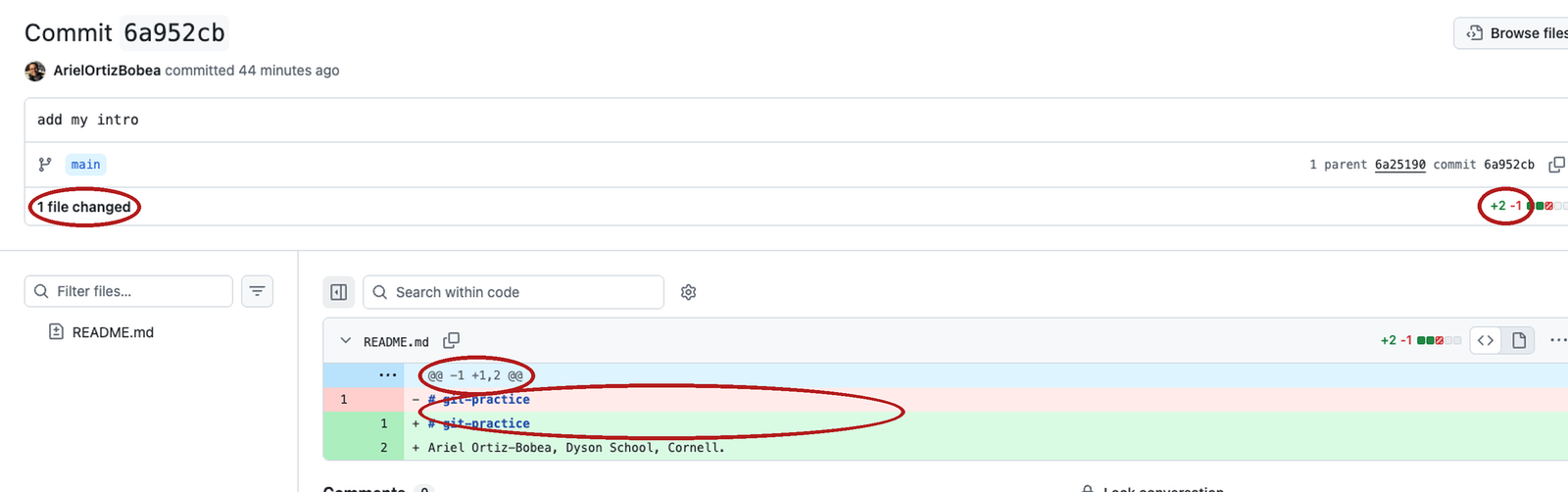
+2 −1 — two lines added, one removed- / green + — the line as it was, as it is@@ — where in the file--- a/analysis.R
+++ b/analysis.R
@@ -1,3 +1,4 @@
--- a/ is the old version, +++ b/ the new.@@ ... @@ says where in the file. You rarely need the numbers.- and one +. Read them as a pair. A pure addition is + alone.- first. A removal you did not ask for is the dangerous one.origin.push or pull, and git status never looks at GitHub.
.git. That is part of the address, not the hidden folder.
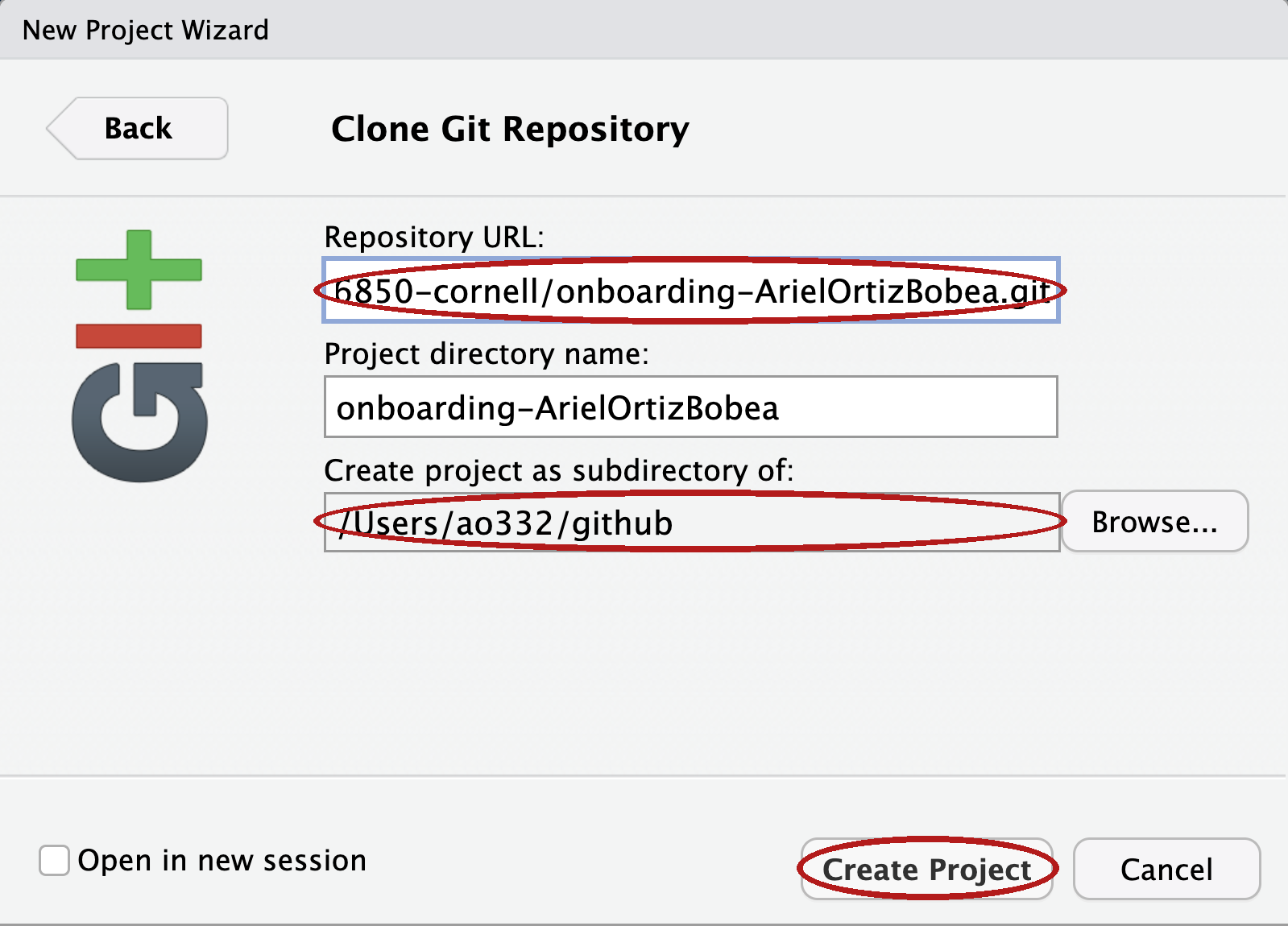
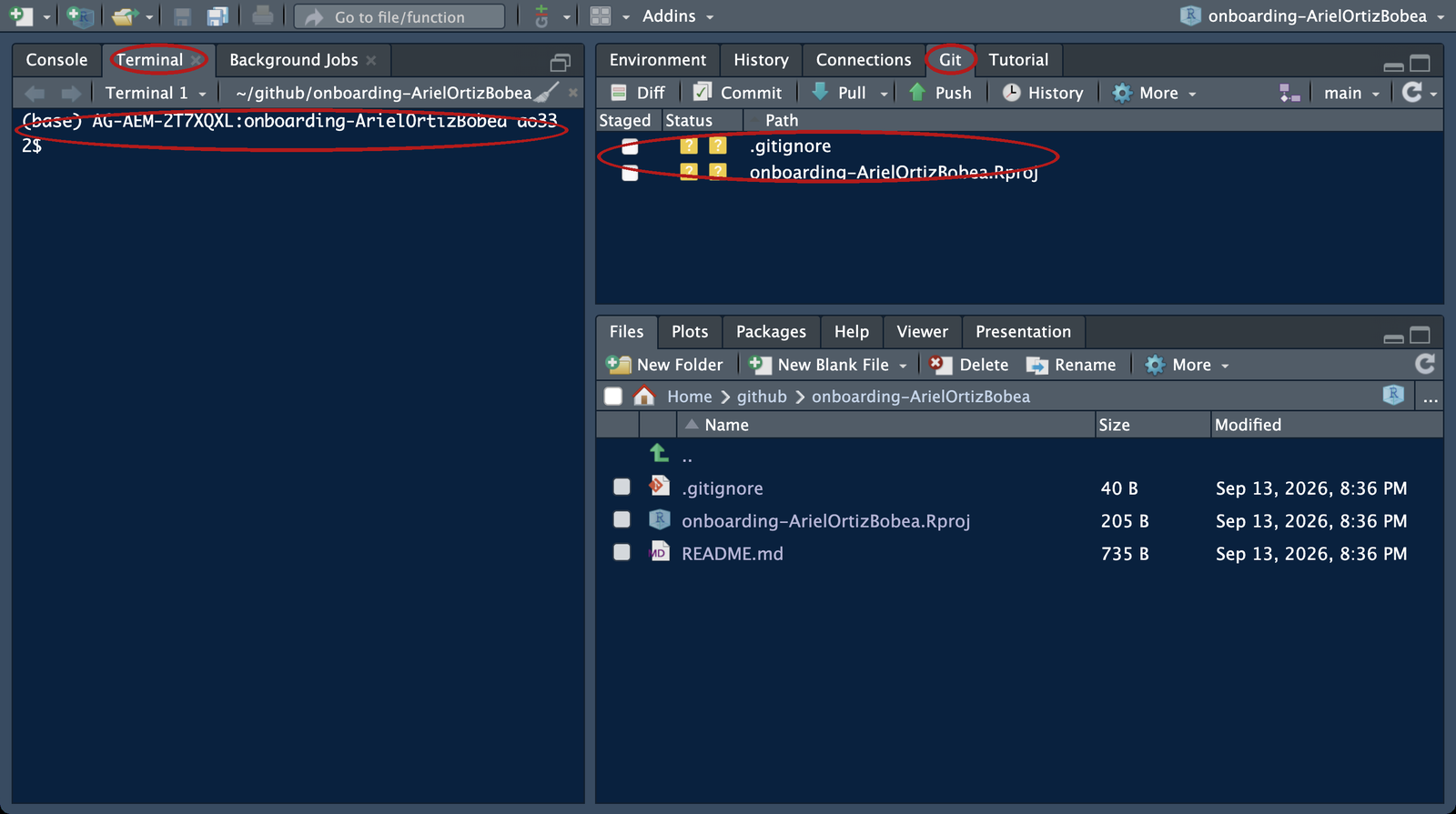
github.git clone. The clone lands in github/git-practice..Rproj marks the top folder; R reads paths from there.
% or $. Type after it, press Enter.Lines without #> you type. Lines with #> are what git prints.
origin)..gitignore lists files git should never track (last slide).HEAD -> main: where you are. origin/main: where GitHub’s copy is. Same place, for now. origin/HEAD: the branch GitHub opens by default. Ignore it.q.# Exercise 1 (7 minutes). Your git-practice repository, on your laptop.
#
# 1. Save any open scripts first: switching projects restarts R
# and empties the Environment. Then open the project you cloned
# before class: File > Recent Projects > git-practice.
# Not cloned before class? Use the browser path under this box now;
# clone tonight with Before class step 5, and bring the laptop to
# office hours if it still fails.
#
# 2. Tools > Terminal > New Terminal, then: git log --oneline
# How many commits? Which one did you make in the browser?
#
# 3. git status
# Under which heading are the two files RStudio made?
#
# Two answers to compare with the room: the number of commits, and the
# heading the two RStudio files sit under.git log --oneline
#> 6a952cb (HEAD -> main, origin/main, origin/HEAD) add my intro # your hashes differ
#> 6a25190 Initial commit
git status
#> On branch main
#> Your branch is up to date with 'origin/main'.
#>
#> Untracked files:
#> (use "git add <file>..." to include in what will be committed)
#> .gitignore
#> git-practice.Rproj
#>
#> nothing added to commit but untracked files present (use "git add" to track)Two commits; both RStudio files under Untracked files.
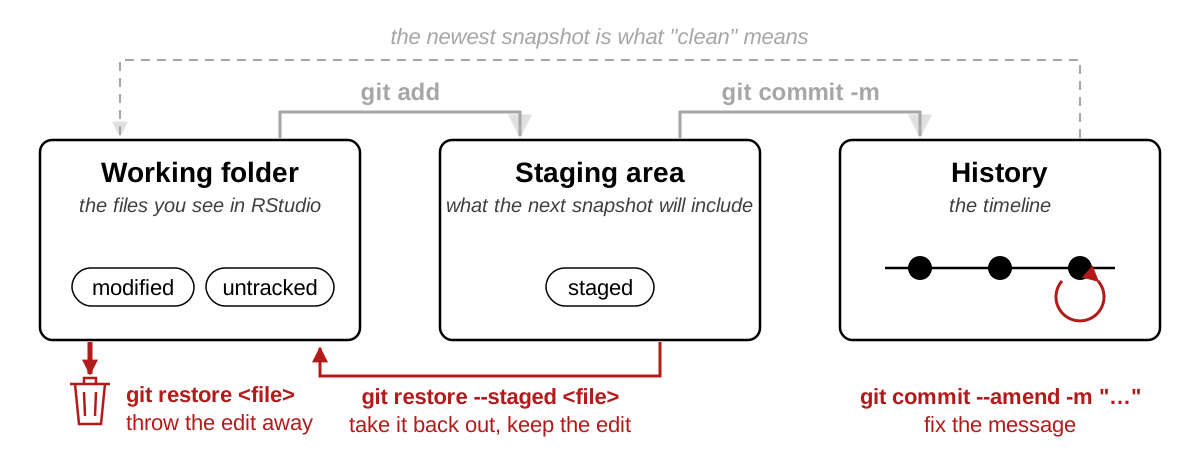
modified: a file the timeline knows, changed on disk. On the desk and nowhere else. (...: lines seen on an earlier slide.)---; the two lines above are bookkeeping. Two lines of context, then one + and no -.- red and + green; the slide cannot, so read the first character of each line.add prints nothing. Silence is success.Changes to be committed: the staging area. README.md is in the frame; the two untracked files are not, because you did not name them.README.md is ticked.-m is the caption. Every commit has one. It says why.-m? A screen asks for the caption: Esc, :q!, Enter backs out (Windows: close Notepad); then -m.push hands GitHub every photo it does not have. The last line reads from this hash to that hash.git log shows.
Three commits, and the README ends with your line: what git log shows, in the browser.
# Exercise 2 (9 minutes). In your git-practice project, Terminal tab,
# browser open on your repository.
#
# 1. Open README.md in RStudio. Add one line at the end:
# My first commit from the terminal.
# Save.
#
# 2. git status. Under which heading is README.md?
# (The two RStudio files stay untracked; Practice 1 commits them.)
#
# 3. git diff. How many added lines (a single + at the left edge,
# green)? (If the prompt disappears, press q.)
#
# 4. git add README.md
# git commit -m "First commit from my laptop"
# Read the second line of the reply.
#
# 5. git push
# Then reload your repository's page on GitHub. How many commits?
#
# Two answers to compare with the room: the second line of git commit's
# reply in step 4, and the commit count after step 5.git status
#> ...
#> Changes not staged for commit:
#> modified: README.md
#>
#> Untracked files:
#> .gitignore
#> git-practice.Rproj
git diff
#> diff --git a/README.md b/README.md
#> ...
#> +++ b/README.md
#> ...
#> +My first commit from the terminal.
git add README.md
git commit -m "First commit from my laptop"
#> [main <new>] First commit from my laptop # your hash differs
#> 1 file changed, 1 insertion(+)
git push
#> ...
#> <old>..<new> main -> main # your two hashes1 file changed, 1 insertion(+); 3 Commits on the front page.
git add analysis.R
git diff --staged
#> diff --git a/analysis.R b/analysis.R
#> new file mode 100644
#> index 0000000..a3eb8fb
#> --- /dev/null
#> +++ b/analysis.R
#> @@ -0,0 +1,3 @@
#> +# analysis.R -- days above the PM2.5 standard
#> +STANDARD <- 35
#> +pm <- read.csv("data/epa_pm25_la_fires_2024_2025.csv")status lists it; add frames it.diff --staged: the frame against the last photo, the next commit exactly. /dev/null is the old version of a file that did not exist.--staged before every commit: what the shutter will see.git commit -m "Add analysis.R with the standard"
#> [main 4977c8d] Add analysis.R with the standard
#> 1 file changed, 3 insertions(+)
git add .gitignore git-practice.Rproj
git diff --staged
#> ...
#> +.Rproj.user
#> +.Rhistory
#> +.RData
#> +.Ruserdata
#> ... # the .Rproj: fourteen lines of settings.gitignore is four patterns: files git should never track (last slide).git commit -m "Add the files RStudio made for the project"
#> [main 7c91799] Add the files RStudio made for the project
#> 2 files changed, 18 insertions(+)
git log --oneline
#> 7c91799 (HEAD -> main) Add the files RStudio made for the project
#> 4977c8d Add analysis.R with the standard
#> 8dd074b (origin/main, origin/HEAD) Note the clone in README
#> 6a952cb add my intro
#> 6a25190 Initial commit
git push
#> ...
#> 8dd074b..7c91799 main -> mainHEAD -> main is where you are; origin/main sat two below it until the push.git status
#> modified: analysis.R
git diff
#> diff --git a/analysis.R b/analysis.R
#> index a3eb8fb..816aaff 100644
#> --- a/analysis.R
#> +++ b/analysis.R
#> @@ -1,3 +1,4 @@
#> # analysis.R -- days above the PM2.5 standard
#> -STANDARD <- 35
#> +STANDARD <- 9
#> pm <- read.csv("data/epa_pm25_la_fires_2024_2025.csv")
#> +stopifnot(nrow(pm) > 0)stopifnot. Got: that, and a different standard.- line is the tell. Read removals first.restore puts the file back to what is staged; nothing is staged, so that is the newest snapshot. No output, then clean. Look at the editor: RStudio reloads the file, the edit is gone.git diff first, every time, so you know what you are deleting.| The change is in | To undo | Command |
|---|---|---|
| the working folder | put the desk back to the last photo; the edit is gone | git restore <file> |
| the staging area | take it out of the frame; it stays on the desk | git restore --staged <file> |
| the last commit, not pushed | rewrite the caption, before it reaches the shared album | git commit --amend -m "…" |
<file> is the file’s name, no brackets: git restore analysis.R.

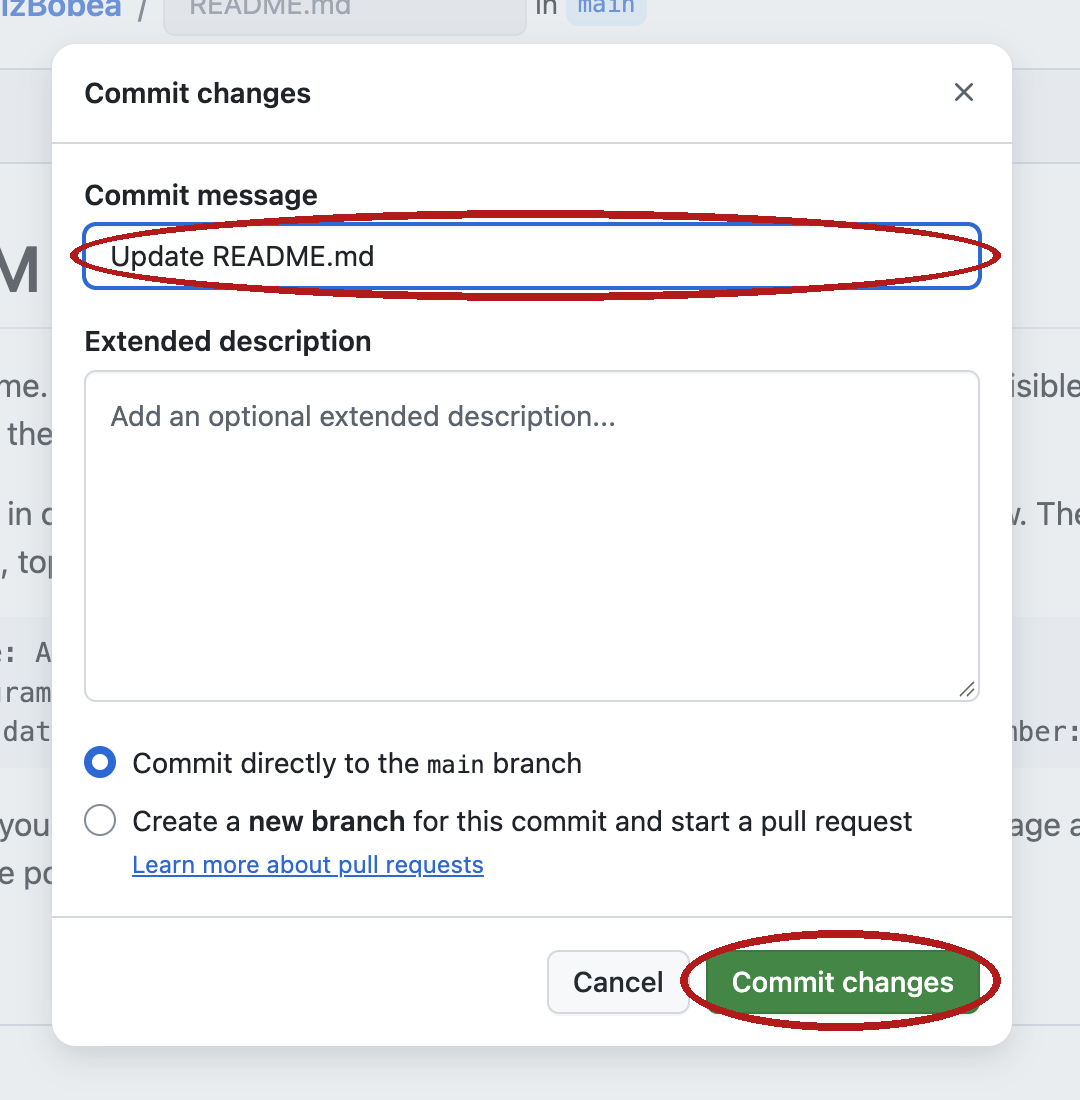
Update README.md. A message nobody chose, again.git status said up to date and was wrong. status never asks GitHub.pull downloads what GitHub has that you do not, and applies it. Fast-forward: GitHub’s album was yours plus one photo, so git added it to the end of yours.README.md in RStudio: the line is there. Pull when you sit down, push when you stand up.git push
#> To https://github.com/ArielOrtizBobea/git-practice.git
#> ! [rejected] main -> main (fetch first)
#> error: failed to push some refs to 'https://github.com/ArielOrtizBobea/git-practice.git'
#> hint: Updates were rejected because the remote contains work that you do not
#> hint: have locally. This is usually caused by another repository pushing to
#> hint: the same ref. If you want to integrate the remote changes, use
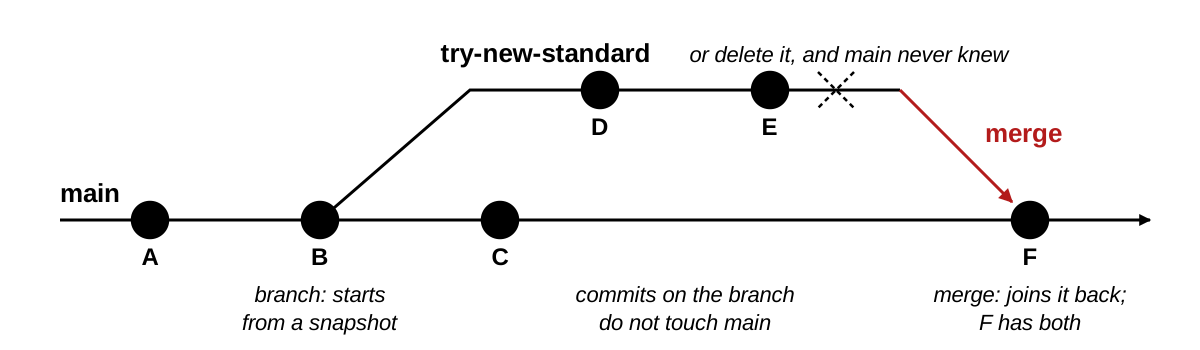
#> hint: 'git pull' before pushing again.pull says CONFLICT: stop and ask. Rare in a solo project, and not a disaster.main keeps working while you experiment.main never knew.analysis_v2.R, done right: the experiment lives beside the working version. Solo, rarely: an experiment, a rewrite, anything a coauthor should read first.
main.git pull. git pull downloads the issue after it is out. A pull request proposes, and waits for a person.# Data is downloaded by your script; never upload it.
data/
# R session artifacts
.Rhistory
.RData
.Rproj.user/
/ is a folder and everything in it. An ignored file never appears in git status..gitignore is itself committed, so every clone gets the same rules. RStudio wrote the four-line one I committed; yours sits in the Git pane with a yellow ? until Practice 1.Ten exercises on the session page, with solutions behind a click. All of them run in your git-practice clone or a sandbox repository you make — never in a homework repository.
.gitignore; an assistant’s diff, printed| Term | One line |
|---|---|
| repository | a folder plus its timeline of snapshots; the timeline lives in the hidden .git |
| commit, snapshot | one photo of the whole folder, with a caption, an author and a hash |
| commit message | the caption: one sentence that says why |
| hash | the photo’s serial number; seven characters are enough to name it |
| diff | two snapshots side by side, spot the difference: - as it was, + as it is |
branch, main |
git’s word for a timeline; every repository starts with one, called main |
HEAD |
where you are on the timeline |
local, remote, origin |
your copy; a copy elsewhere; git’s name for the GitHub copy it was cloned from |
| clone | download the whole album and remember where it came from |
| push, pull | hand your new photos to the shared album; bring down the ones you lack |
| fast-forward | a pull that only had to add GitHub’s new photos to the end of yours |
| rejected push | GitHub has a photo you do not; pull, then push |
| Term | One line |
|---|---|
| working folder | the desk: the files as you see them in RStudio; git says working tree |
| staging area | the frame: what the next snapshot will include, each file as it was when you typed add |
| untracked | a file git sees that the timeline has never had |
| modified | a tracked file that differs on disk from the newest snapshot |
| staged | in the frame; part of the next commit |
| clean | the desk matches the newest photo; nothing pending |
| discard, unstage, amend | put the desk back to the last photo; take a file out of the frame; rewrite the last caption, before pushing |
| merge | join a branch back into the one it came from |
| pull request | a merge proposed on GitHub with a review attached; not git pull |
| merge conflict | two snapshots changed the same line; git stops and asks you to choose |
.gitignore |
the do-not-photograph list; a file on it never reaches the frame, the album, or GitHub |
| token, pager | what GitHub accepts from a program instead of a password; the screen for long output, q leaves it |
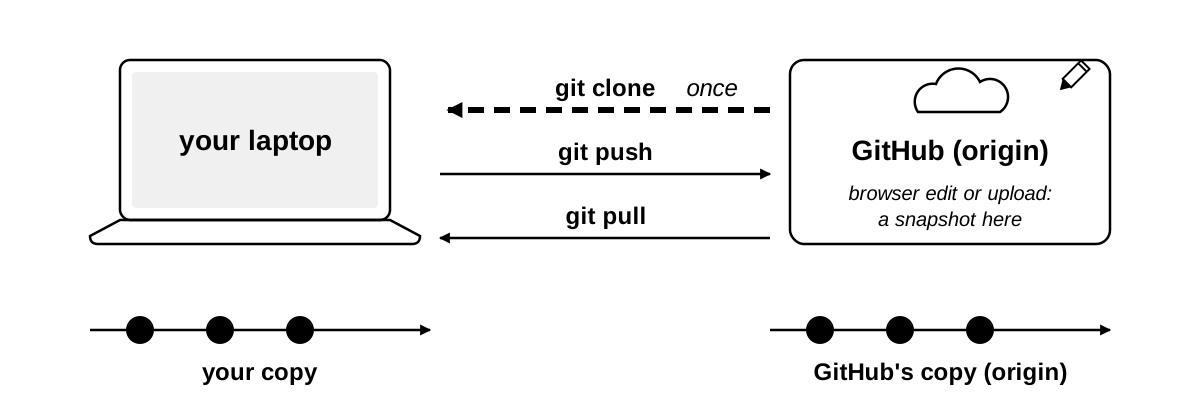
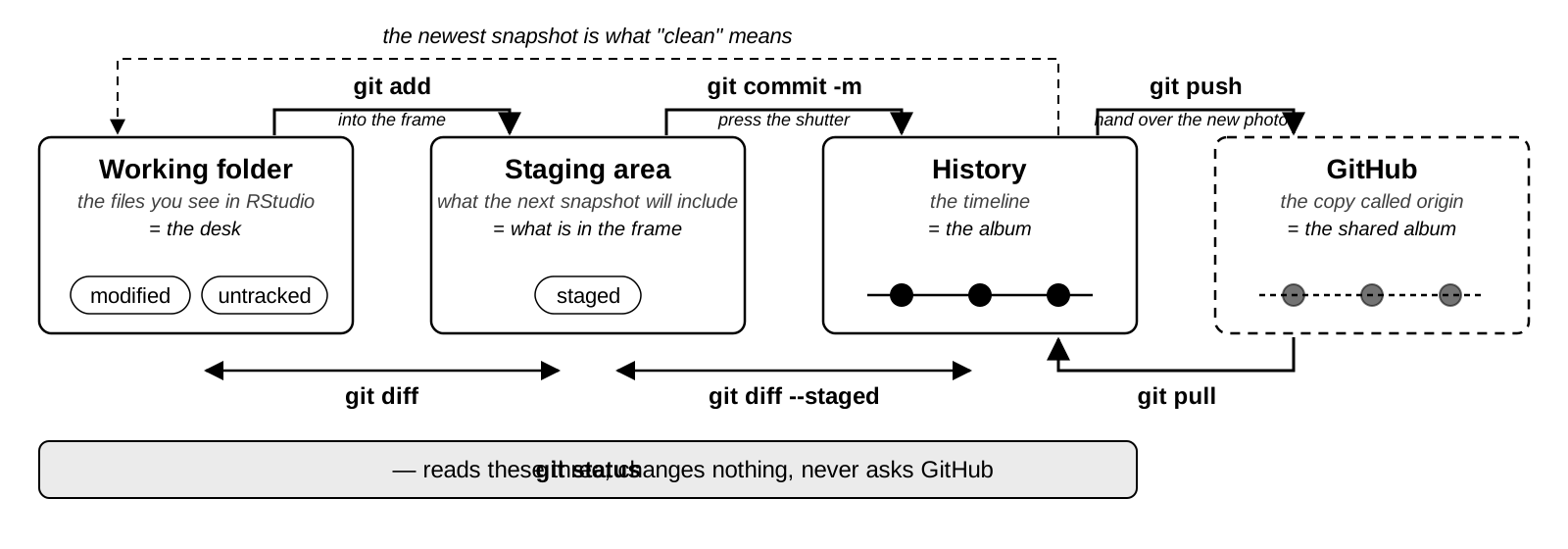
A repository is a folder plus a timeline of snapshots. Every git command either moves a change toward that timeline, or copies the timeline between your laptop and GitHub.
Every command from today, one line each, on the session page — with the four-places picture next to it, the things that bite, and every term with a link to the section that defines it.
AEM 6850 · Session 7